Close Menu
  • Articles
    • Learn Electronics
    • Product Review
    • Tech Articles
  • Electronics Circuits
    • 555 Timer Projects
    • Op-Amp Circuits
    • Power Electronics
  • Microcontrollers
    • Arduino Projects
    • STM32 Projects
    • AMB82-Mini IoT AI Camera
    • BLE Projects
  • IoT Projects
    • ESP8266 Projects
    • ESP32 Projects
    • ESP32 MicroPython
    • ESP32-CAM Projects
    • LoRa/LoRaWAN Projects
  • Raspberry Pi
    • Raspberry Pi Projects
    • Raspberry Pi Pico Projects
    • Raspberry Pi Pico W Projects
  • Electronics Calculator
Facebook X (Twitter) Instagram
  • About Us
  • Disclaimer
  • Privacy Policy
  • Contact Us
  • Advertise With Us
Facebook X (Twitter) Instagram Pinterest YouTube LinkedIn
How To Electronics
  • Articles
    • Learn Electronics
    • Product Review
    • Tech Articles
  • Electronics Circuits
    • 555 Timer Projects
    • Op-Amp Circuits
    • Power Electronics
  • Microcontrollers
    • Arduino Projects
    • STM32 Projects
    • AMB82-Mini IoT AI Camera
    • BLE Projects
  • IoT Projects
    • ESP8266 Projects
    • ESP32 Projects
    • ESP32 MicroPython
    • ESP32-CAM Projects
    • LoRa/LoRaWAN Projects
  • Raspberry Pi
    • Raspberry Pi Projects
    • Raspberry Pi Pico Projects
    • Raspberry Pi Pico W Projects
  • Electronics Calculator
How To Electronics
Home » LM35 Temperature Sensor with Raspberry Pi Pico MicroPython
Raspberry Pi Raspberry Pi Pico Projects

LM35 Temperature Sensor with Raspberry Pi Pico MicroPython

Mamtaz AlamBy Mamtaz AlamUpdated:February 2, 20253 Mins Read
Share Facebook Twitter LinkedIn Telegram Reddit WhatsApp
LM35 Temperature Sensor with Raspberry Pi Pico MicroPython
Share
Facebook Twitter LinkedIn Pinterest Email Reddit Telegram WhatsApp

Overview

In this project, we will interface an LM35 Temperature Sensor with a Raspberry Pi Pico using MicroPython to create a digital thermometer. Earlier we used temperature sensors like MLX90614, DS18B20 & DHT11 with Raspberry Pi Pico.

The LM35 Temperature Sensor is an analog sensor whose output is proportional to the temperature in Centigrade. It offers a temperature measurement range from -55°C to +150°C with an accuracy of +/- 0.75°C. This wide range and high accuracy make the LM35 an excellent choice for a variety of temperature-sensing applications.

Similar to utilizing an internal temperature sensor, MicroPython code can be written to accurately read the ADC input value provided by the LM35 Temperature Sensor. To bring this project to life, we will write a MicroPython script that runs on the Raspberry Pi Pico. This script will read the analog output from the LM35 sensor, convert this reading into a temperature, and then communicate the result.


Components Required

We need following components for this tutorial.

S.N.ComponentsQuantityPurchase Link
1Raspberry Pi Pico1Amazon | AliExpress | SunFounder
2LM35 Temperature Sensor1Amazon | AliExpress| SunFounder
3Jumper Wires10Amazon | AliExpress | SunFounder
4Breadboard1Amazon | AliExpress | SunFounder


LM35 Temperature Sensor

LM35 Temperature Sensor

The LM35 series are precise temperature sensors with an output voltage linear to the Centigrade temperature, eliminating the need to subtract a constant voltage for Centigrade scaling unlike Kelvin-calibrated sensors. It achieves typical accuracies of ±0.25°C at room temperature and ±0.75°C across a -55°C to 150°C range without external calibration.

LM35 Pinout

Its cost-effectiveness is ensured by wafer-level trimming and calibration. The LM35’s low-output impedance, linear output, and inherent calibration facilitate easy interfacing with circuitry. It operates on single or dual power supplies, drawing only 60 µA, which minimizes self-heating to under 0.1°C in still air.

Features

  1. Calibrated directly in Degree Celsius (Centigrade)
  2. Linear at 10.0 mV/°C scale factor
  3. 0.5°C accuracy guarantee-able (at a25°C)
  4. Rated for full -55°C to a 150°C range.s
  5. Suitable for remote applications
  6. Low cost due to wafer-level trimming
  7. Operates from 4 to 30 volts
  8. Less than 60 mA current drain
  9. Low self-heating, 0.08°C instill an air
  10. Non-linearity only 0.25°C typical
  11. Low impedance output, 0.1Ωfor 1 mA load


Interfacing LM35 Temperature Sensor with Raspberry Pi Pico

Let’s interface the LM35 Temperature Sensor with the Raspberry Pi Pico. The process for connecting the sensor is straightforward.

Raspberry Pi Pico LM35 Connection

  • Connect the VCC of the LM35 to the 3.3V (Vin) on the Pico.
  • Connect the GND of the LM35 to a GND pin on the Pico.
  • Finally, connect the Vout (output) of the LM35 to one of the Pico’s analog input pins (e.g., GP26)

Raspberry Pi Pico LM35 Temperature Sensor

For making the connections, a breadboard can be useful, allowing you to use jumper wires to easily connect the LM35 to the Raspberry Pi Pico board without soldering.


MicroPython Code

Lets write a MicroPython Code to interface LM35 Temperature Sensor with Raspberry Pi Pico & get the temperature readings.

The following code initializes an LM35 temperature sensor connected to an ADC pin of a Raspberry Pi Pico using MicroPython. It continuously reads analog values from the LM35, averages them over ten samples to reduce noise, and then calculates the temperature in both Celsius and Fahrenheit, adjusting for any systematic error through a calibration offset. The computed temperatures are printed out every 1 second.


1
2
3
4
5
6
7
8
9
10
11
12
13
14
15
16
17
18
19
20
21
22
23
24
25
26
27
28
29
30
31
32
33
34
35
36
37
38
39
40
41
42
43
44
45
46
47
48
49
50
# Import required libraries
import machine  # For interfacing with hardware components like ADC
import utime    # For time-related functions, such as sleep
 
# Initialize the ADC (Analog to Digital Converter) on pin 26 for reading LM35 temperature sensor
LM35 = machine.ADC(26)
 
# Define a calibration offset value. This is determined through practical testing to correct systematic error.
Cal_Offset = -1650
 
# Function to compute temperature from the averaged analog readings
def Compute_Temp(Avg_A):
    # Add calibration adjustment to the average ADC value
    LM35_A = Avg_A + Cal_Offset
    # Convert the adjusted analog reading to voltage (assuming each ADC unit represents .00005 Volts)
    LM35_V = LM35_A * .00005
    # Convert the voltage to temperature in Celsius (since LM35 has a scale factor of 10mV/°C)
    Tmp_C = round((LM35_V * 100), 1)
    # Convert temperature from Celsius to Fahrenheit
    Tmp_F = round((Tmp_C * 1.8 + 32), 1)
    # Return both Celsius and Fahrenheit temperatures
    return Tmp_C, Tmp_F
 
# Initialize variables for accumulating samples and counting the number of samples
Samples = 0
Num_Samples = 1
 
# Main loop to continuously read temperature
while True:
    # Check if fewer than 10 samples have been collected
    if Num_Samples <= 10:
        # Read the current temperature sensor value from the ADC
        LM35_A = LM35.read_u16()
        # Add the current reading to the total samples accumulator
        Samples += LM35_A
        # Increment the counter for the number of samples collected
        Num_Samples += 1
    else:
        # Calculate the average of the collected samples
        Avg_A = Samples / 10
        # Reset the samples accumulator and samples counter for the next batch of readings
        Samples = 0
        Num_Samples = 1
        # Compute the temperature in Celsius and Fahrenheit from the average ADC value
        T_c, T_f = Compute_Temp(Avg_A)
        # Print the calculated temperatures
        print("Celcius=", T_c, "  Fahrenheit=", T_f)
    
    # Wait for 0.1 seconds before the next loop iteration to limit the rate of temperature reading
    utime.sleep(.1)

Save the code to the Raspberry Pi Pico board. Then run the code.
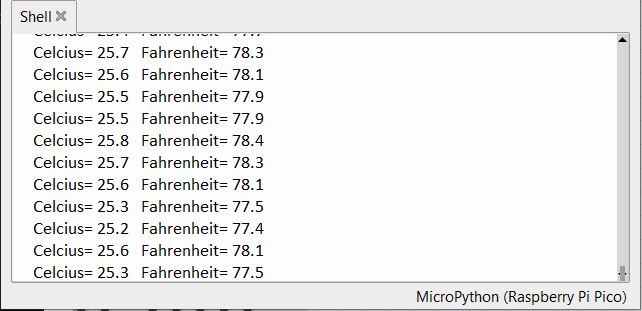
The Python Shell will display the temperature of your room. Optionally, compare the sensor’s readings with a known accurate thermometer to verify its accuracy. To observer the rise in temperature reading, heat the LM35 sensor with any heat source like soldering iron.

To build a Web Server, refer to LM35 Raspberry Pi Pico W guide, where the temperatures readings can be displayed on a Webpage dynamically.

Share. Facebook Twitter Pinterest LinkedIn Tumblr Email Reddit Telegram WhatsApp
Previous ArticleMonitor Water Tank Level with GSM & ESP8266 on Blynk
Next Article Interfacing AD8495 K-Type Thermocouple Amplifier with Arduino

Related Posts

ADXL375 Accelerometer with Raspberry Pi Pico & MicroPython

ADXL375 Accelerometer with Raspberry Pi Pico & MicroPython

Updated:July 24, 2025
Interface BMI160 with Raspberry Pi Pico & MicroPython

Interface BMI160 with Raspberry Pi Pico & MicroPython

Updated:February 2, 20253K
Shift Register 74HC595 with Raspberry Pi Pico & MicroPython

Shift Register 74HC595 with Raspberry Pi Pico & MicroPython

Updated:February 2, 202513K
Interfacing XBee Module with Raspberry Pi Pico & MicroPython

Interfacing XBee Module with Raspberry Pi Pico & MicroPython

Updated:February 2, 20253K
Modbus RTU with Raspberry Pi Pico & Micropython

Modbus RTU with Raspberry Pi Pico & MicroPython

Updated:February 2, 20258K
Fever Detector with MLX90640 & OpenCV Raspberry Pi

Thermal Fever Detector with MLX90640 & OpenCV Raspberry Pi

Updated:February 2, 20256K
Add A Comment

CommentsCancel reply

Latest Posts

ESP32 Fingerprint Attendance System with Live Web Dashboard

June 14, 2026
IoT Based PM & Air Quality Monitoring System using ESP32

IoT Based PM & Air Quality Monitoring System using ESP32

June 14, 2026
DIY ESP32 MLX90640 IR Thermal Camera with Live Web Display

DIY ESP32 MLX90640 IR Thermal Camera with Live Web Display

May 10, 2026
IoT Activity Tracker with ESP32 & Accelerometer Gyroscope

IoT Activity Tracker with ESP32 & Accelerometer/Gyroscope

May 2, 2026
A Guide to Sourcing Obsolete ICs for Vintage Projects

Beyond AliExpress: A Guide to Sourcing Obsolete ICs for Vintage Projects

April 21, 2026

ESP32 IoT Vehicle Motion Analyzer with MPU6050 & LIS3MDL

April 27, 2026
Building a Smart Sensor Node with a BLE Microcontroller

Building a Smart Sensor Node with a BLE Microcontroller

February 26, 2026
High-Accuracy Pitch, Roll, Yaw with ESP32 & BNO08x IMU

High-Accuracy Pitch, Roll, Yaw with ESP32 & BNO08x IMU

April 27, 2026
Top Posts & Pages
  • IoT Based PM & Air Quality Monitoring System using ESP32
    IoT Based PM & Air Quality Monitoring System using ESP32
  • 12V DC to 220V AC Inverter Circuit & PCB
    12V DC to 220V AC Inverter Circuit & PCB
  • Buck Converter: Basics, Working, Design & Application
    Buck Converter: Basics, Working, Design & Application
  • Designing of MPPT Solar Charge Controller using Arduino
    Designing of MPPT Solar Charge Controller using Arduino
  • How to use INA219 DC Current Sensor Module with Arduino
    How to use INA219 DC Current Sensor Module with Arduino
  • High-Accuracy Pitch, Roll, Yaw with ESP32 & BNO08x IMU
    High-Accuracy Pitch, Roll, Yaw with ESP32 & BNO08x IMU
  • L293D Dual H-Bridge Motor Driver IC Pins, Circuit, Working
    L293D Dual H-Bridge Motor Driver IC Pins, Circuit, Working
  • IoT Based Electricity Energy Meter using ESP32 & Blynk
    IoT Based Electricity Energy Meter using ESP32 & Blynk
Categories
  • Arduino Projects (197)
  • Articles (60)
    • Learn Electronics (19)
    • Product Review (15)
    • Tech Articles (28)
  • Electronics Circuits (46)
    • 555 Timer Projects (21)
    • Op-Amp Circuits (7)
    • Power Electronics (13)
  • IoT Projects (205)
    • ESP32 MicroPython (7)
    • ESP32 Projects (82)
    • ESP32-CAM Projects (15)
    • ESP8266 Projects (76)
    • LoRa/LoRaWAN Projects (22)
  • Microcontrollers (38)
    • AMB82-Mini IoT AI Camera (4)
    • BLE Projects (18)
    • STM32 Projects (19)
  • Raspberry Pi (93)
    • Raspberry Pi Pico Projects (57)
    • Raspberry Pi Pico W Projects (12)
    • Raspberry Pi Projects (24)
Follow Us
  • Facebook
  • Twitter
  • Pinterest
  • Instagram
  • YouTube
About Us

“‘How to Electronics’ is a vibrant community for electronics enthusiasts and professionals. We deliver latest insights in areas such as Embedded Systems, Power Electronics, AI, IoT, and Robotics. Our goal is to stimulate innovation and provide practical solutions for students, organizations, and industries. Join us to transform learning into a joyful journey of discovery and innovation.

Copyright © How To Electronics. All rights reserved.
  • About Us
  • Disclaimer
  • Privacy Policy
  • Contact Us
  • Advertise With Us

Type above and press Enter to search. Press Esc to cancel.

Ad Blocker Enabled!
Ad Blocker Enabled!
Looks like you're using an ad blocker. Please allow ads on our site. We rely on advertising to help fund our site.