


Overview
In this project, we will develop an IoT-based Water Tank Level Monitoring System that utilizes the GSM/GPRS network to monitor Water Level. By incorporating the SIM800L GSM Module with ESP8266 Microcontroller, this system is designed to transmit the water tank’s level data directly to the Blynk Dashboard. The user-friendly dashboard will not only display the current water level but also indicate whether the tank is full or empty. This will provide users with real-time insights into their water storage system.
Furthermore, the project enhances user convenience by offering the capability to receive updates on the tank’s status through SMS. This means that in addition to the dashboard’s visual representation of the water level, users can also get notified of the tank being full or empty via text messages. For measuring the Water Level, we will use the Ultrasonic Sensor HC-SR04.
Earlier we build, a few of those similar projects which you can go through for more understanding:
- GSM Based Water Level Monitoring System with Arduino
- IoT Based Water Level Control & Monitoring with ESP8266
- Inductive Water Level Indicator with Display
- Water Level Alert using Float Sensor & 555 Timer
Bill of Materials
Following are the list of components required to build Water Tank Level Monitoring System with GSM & ESP8266 on Blynk.
| S.N. | Components | Quantity | Purchase Links |
|---|---|---|---|
| 1 | ESP8266 Board | 1 | Amazon | AliExpress | SunFounder |
| 2 | GSM Module SIM800L | 1 | Amazon | AliExpress |
| 3 | 16x2 I2C LCD Module | 1 | Amazon | AliExpress | SunFounder |
| 4 | HC-SR04 Ultrasonic Sensor | 1 | Amazon | AliExpress | SunFounder |
| 5 | LM2596 Buck Converter | 1 | Amazon | AliExpress |
| 6 | 7805 Voltage Regulator IC | 1 | Amazon | AliExpress |
| 7 | LED 5mm Red Color | 1 | Amazon | AliExpress | SunFounder |
| 8 | Resistor 560-ohm | 2 | Amazon | AliExpress |
| 9 | Capacitor 100uF | 1 | Amazon | AliExpress | SunFounder |
| 10 | Capacitor 10uF | 1 | Amazon | AliExpress |
| 11 | 9V/12V DC Adapter | 1 | Amazon | AliExpress | SunFounder |
Circuit Diagram & Setup
Here is the circuit for Water Tank Level Monitoring System with GSM & ESP8266. All the active-passive components are connected to the digital pins of NodeMCU ESP8266 Board.
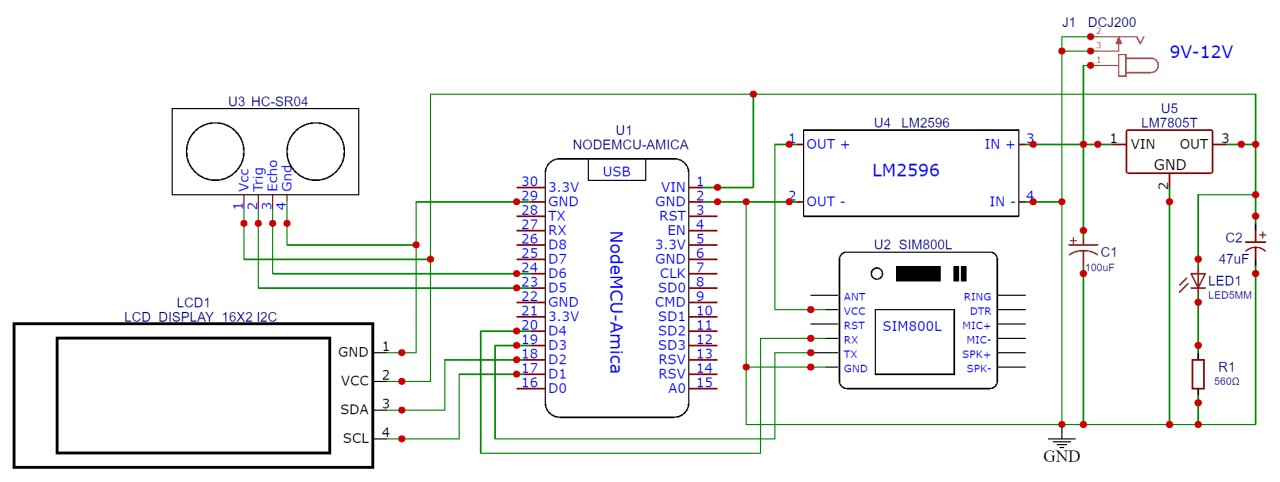
The center of the Circuit is NodeMCU Board which works on 5V power supply. The 5V input is fed to NodeMCU board via 7805 Voltage regulator IC. The Ultrasonic Sensor HC-SR04 is connected to the digital pins of NodeMCU ESP8266 Board.
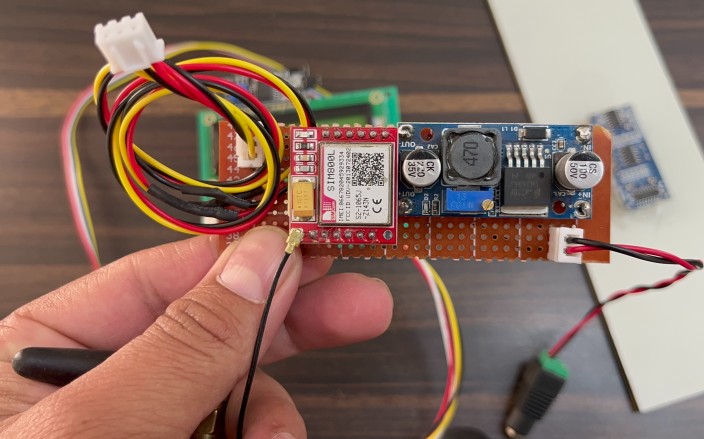
For the GSM power supply part we are using the Buck Converter Module LM2596. The LM2596 is supplied with 9V DC Supply. The LM2596 output is setup between 3.7V to 4V for GSM Module. The 16X2 I2C LCD Display is connected to I2C Pins of NodemCU ESP8266 Board.
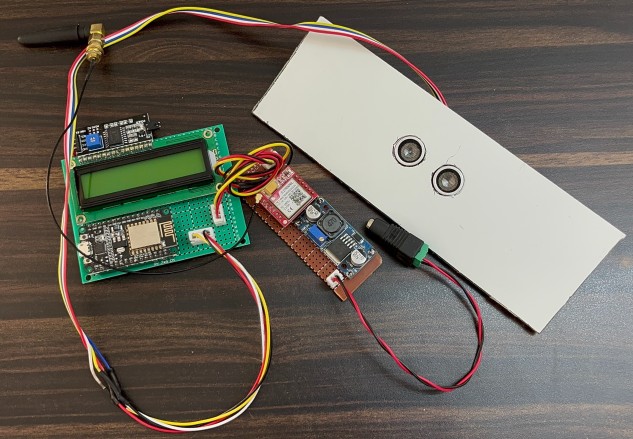
For the demo, I assembled the project on a Zero PCB Board here. You can also assemble the circuit on a breadboard or Vero board or use your own custom PCB for commercial applications.
Project PCB Gerber File & PCB Ordering Online
We have designed the PCB using the EasyEDA Software. The PCB design looks like this.
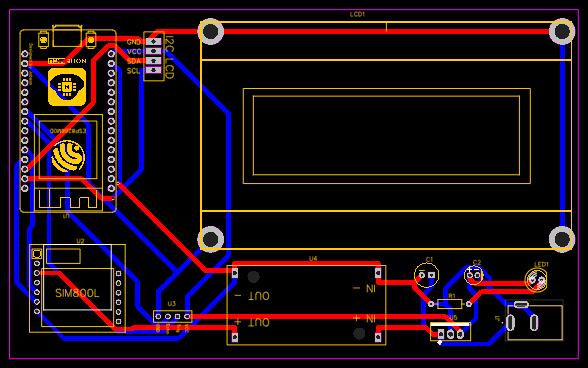
Here is the 2D View of the PCB.
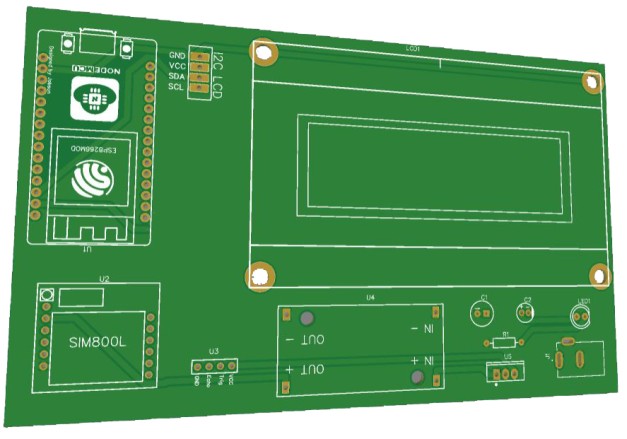
The Gerber File for the PCB is given below. You can simply download the Gerber File and order the PCB from PCBGOGO at 1$ only.
You can use this Gerber file to order high-quality PCB for this project. To do that visit the PCBGOGO official website by clicking here: https://www.pcbgogo.com/.

You can now upload the Gerber File by choosing the Quote Now option. From these options, you can choose the Material Type, Dimensions, Quantity, Thickness, Solder Mask Color and other required parameters.

After filling all details, select your country and shipping method. Finally you can place the order.
Setting up Blynk Dashboard
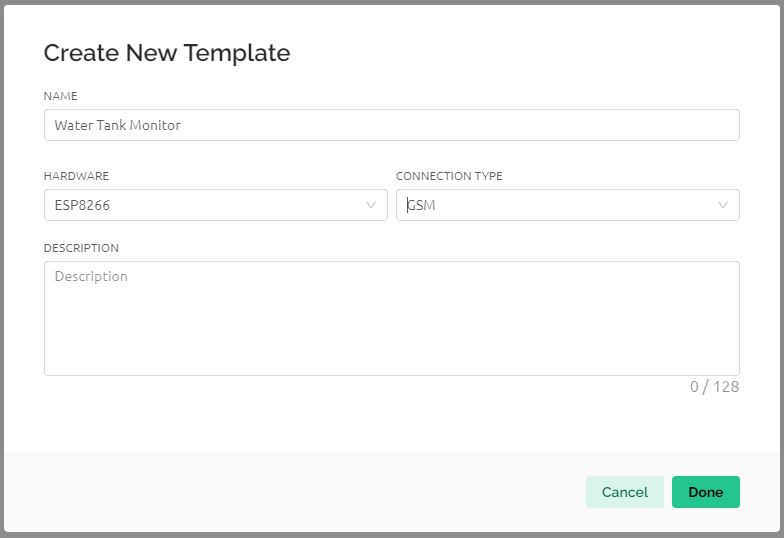
Let’s begin by setting up the Blynk App for data visualization. First, create a template and assign it any name of your choosing.
For the hardware selection, choose ESP8266, and set the connection type to GSM.
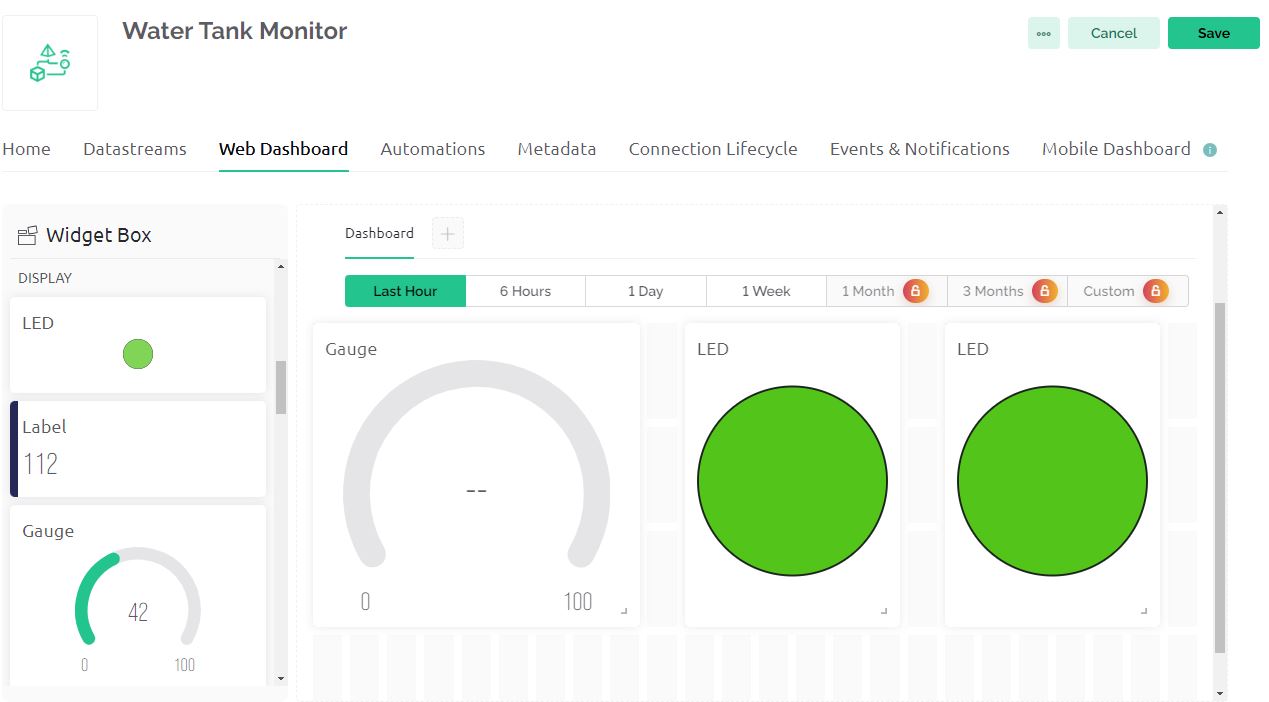
Next, navigate to the web dashboard. Here, you’ll need to drag and drop one gauge widget and two LED widgets onto the dashboard. Once added, adjust their sizes for better visibility and provide them with appropriate titles.
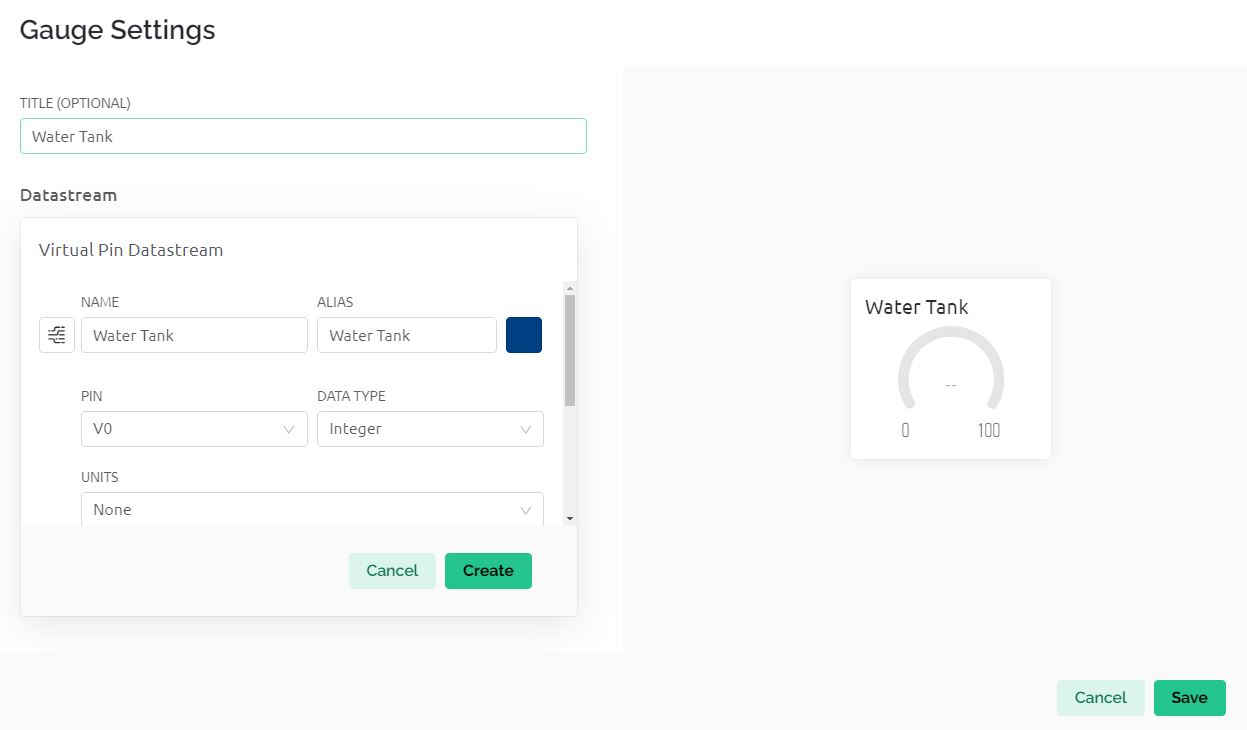
You’ll also need to create data streams that handle integer values ranging from 0 to 100% to represent your data accurately. For the LED widgets, assign values of 1 and 0 to signify ‘tank full’ and ‘tank empty’ statuses, respectively.
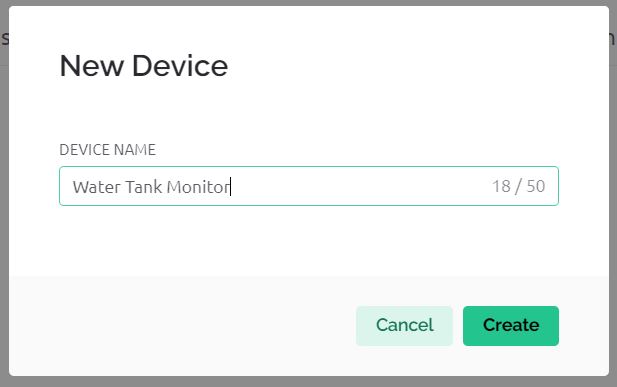
Following this, create a device, giving it any name you prefer. Upon completion, you will observe that the device has been successfully created on the platform.
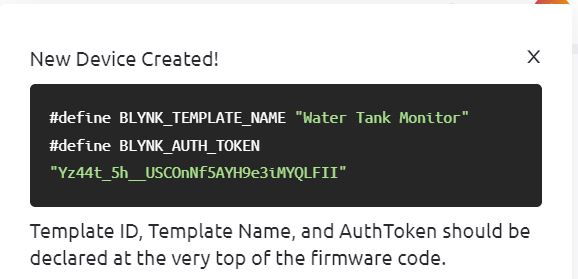
Additionally, you’ll be provided with credentials that are crucial for this project.
Source Code/Program
The code is designed for a GSM Water Tank Monitoring System using GSM module (SIM800), ESP8266 Microcontroller and an ultrasonic sensor to measure the liquid level in a tank. It connects to the Blynk IoT platform for remote monitoring and control. The system displays the liquid level on an LCD screen and sends alerts via SMS when the tank is full or empty.
It utilizes the Blynk library for communication with the Blynk app, the TinyGsmClient library for GSM functionality, and controls an ultrasonic sensor to determine the tank’s liquid level. Additionally, it includes functions to send SMS alerts for specific tank level conditions.
Add the following libraries to the Arduino folder, before uploading the code.
1. TinyGSM Client Library: Download TinyGsmClient Library
2. Blynk Library: Download Blynk Library
3. I2C LCD Library: Download I2C_LCD Library
From this line, change the Blynk Authentication token and replace it with your Blynk token.
|
1 |
#define BLYNK_AUTH_TOKEN "*************************" |
You need to replace the apn in this line with the APN Service provider of your Cellular network.
|
1 |
char apn[] = "internet"; |
In the SendMessage2 & SendMessage1 function, replace the number where you want to send the SMS for water alert.
|
1 |
SerialAT.println("AT+CMGS=\"+91xxxxxxxx\"\r"); |
Here is the full code for this project.
|
1 2 3 4 5 6 7 8 9 10 11 12 13 14 15 16 17 18 19 20 21 22 23 24 25 26 27 28 29 30 31 32 33 34 35 36 37 38 39 40 41 42 43 44 45 46 47 48 49 50 51 52 53 54 55 56 57 58 59 60 61 62 63 64 65 66 67 68 69 70 71 72 73 74 75 76 77 78 79 80 81 82 83 84 85 86 87 88 89 90 91 92 93 94 95 96 97 98 99 100 101 102 103 104 105 106 107 108 109 110 111 112 113 114 115 116 117 118 119 120 121 122 123 124 125 126 127 128 129 130 131 132 133 134 135 136 137 138 139 140 141 142 143 144 145 146 147 148 149 150 |
#define BLYNK_TEMPLATE_ID "TMPL30BL34-7r" #define BLYNK_TEMPLATE_NAME "IoT" #define BLYNK_AUTH_TOKEN "*************************" #define BLYNK_PRINT Serial #define TINY_GSM_MODEM_SIM800 char apn[] = "internet"; char user[] = ""; char pass[] = ""; #include <TinyGsmClient.h> #include <BlynkSimpleTinyGSM.h> #include <LiquidCrystal_I2C.h> #include <SoftwareSerial.h> #include <Wire.h> LiquidCrystal_I2C lcd(0x27, 16, 2); SoftwareSerial SerialAT(D3, D4); //gsm TinyGsm modem(SerialAT); char auth[] = BLYNK_AUTH_TOKEN; BlynkTimer timer; const int trigPin1 = D5; const int echoPin1 = D6; unsigned long startMillis; unsigned long currentMillis; const unsigned long period = 10000; long duration1; int distance1; int firstmessageSent = 0; int secondmessageSent = 0; void setup() { Serial.begin(9600); delay(10); SerialAT.begin(9600); delay(3000); Serial.println("Initializing modem..."); modem.restart(); Blynk.begin(auth, modem, apn, user, pass); Wire.begin(D2, D1); lcd.init(); lcd.backlight(); lcd.setCursor(0, 0); lcd.print(" WELCOME TO"); lcd.setCursor(0, 1); lcd.print(" OUR PROJECTS"); delay(2000); lcd.clear(); lcd.setCursor(0, 0); lcd.print(" SMART"); lcd.setCursor(0, 1); lcd.print("TANK MONITORING"); delay(3000); lcd.clear(); pinMode(trigPin1, OUTPUT); pinMode(echoPin1, INPUT); } void loop() { ultersonic(); lcd.clear(); lcd.setCursor(0, 0); lcd.print("Liquid Level-"); lcd.print(distance1); Blynk.virtualWrite(V0, distance1); if (distance1 < 20) { digitalWrite(D0, HIGH); digitalWrite(D8, LOW); lcd.setCursor(0, 1); lcd.print(" Tank Full."); WidgetLED LED(V2); LED.on(); WidgetLED LED1(V1); LED1.off(); if (secondmessageSent == 0) { SendMessage1(); secondmessageSent = 1; firstmessageSent = 0; } delay(100); } if (distance1 > 60) { digitalWrite(D0, HIGH); digitalWrite(D8, LOW); lcd.setCursor(0, 1); lcd.print(" Tank Empty"); if (firstmessageSent == 0) { SendMessage2(); secondmessageSent = 0; firstmessageSent = 1; } delay(100); } else { digitalWrite(D0, HIGH); digitalWrite(D8, LOW); WidgetLED LED(V2); LED.off(); WidgetLED LED1(V1); LED1.on(); } currentMillis = millis(); if (currentMillis - startMillis >= period) { startMillis = currentMillis; } } void SendMessage2() { SerialAT.println(" Tank Empty "); SerialAT.println("AT+CMGF=1"); delay(1000); SerialAT.println("AT+CMGS=\"+91xxxxxxxx\"\r"); delay(1000); SerialAT.println(" Tank Empty"); delay(100); SerialAT.println((char)26); delay(1000); } void SendMessage1() { SerialAT.println(" Tank Full "); SerialAT.println("AT+CMGF=1"); delay(1000); SerialAT.println("AT+CMGS=\"+91xxxxxxxxxx\"\r"); delay(1000); SerialAT.println(" Tank Full "); delay(100); SerialAT.println((char)26); delay(1000); } void ultersonic() { digitalWrite(trigPin1, LOW); delayMicroseconds(2); digitalWrite(trigPin1, HIGH); delayMicroseconds(10); digitalWrite(trigPin1, LOW); duration1 = pulseIn(echoPin1, HIGH); distance1 = duration1 * 0.207 / 2; Serial.println(distance1); delay(100); } |
Working of Water Tank Level Monitor with GSM & ESP8266 on Blynk
After uploading the code, the device is ready for testing. Initially, the GSM module establishes a connection with the Blynk Server, indicating the system is ready for testing.
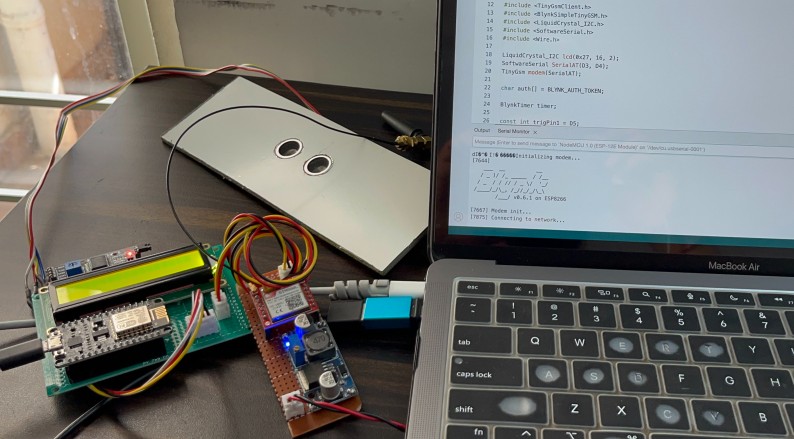
To initiate testing, the water pump is activated to start filling the tank.
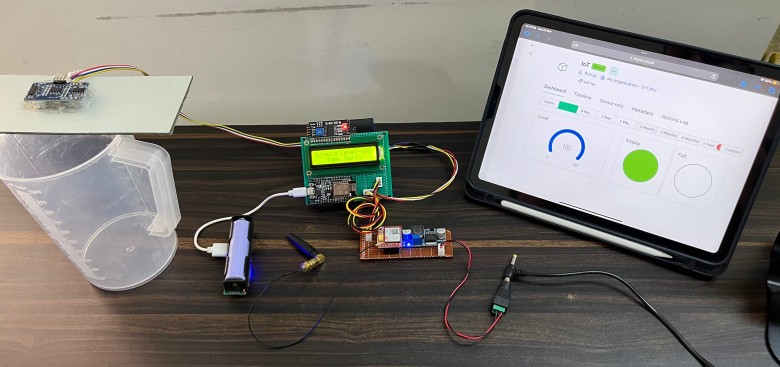
During this process, the Blynk Dashboard’s gauge visually represents the decreasing level of emptiness, indicating the tank is gradually being filled with water. This change is gradual, mirroring the actual filling process of the tank.

Once the tank reaches full capacity, the dashboard indicator changes to red, signifying that the tank is completely full.
Additionally, the LCD display connected to the system provides real-time updates on the water level.
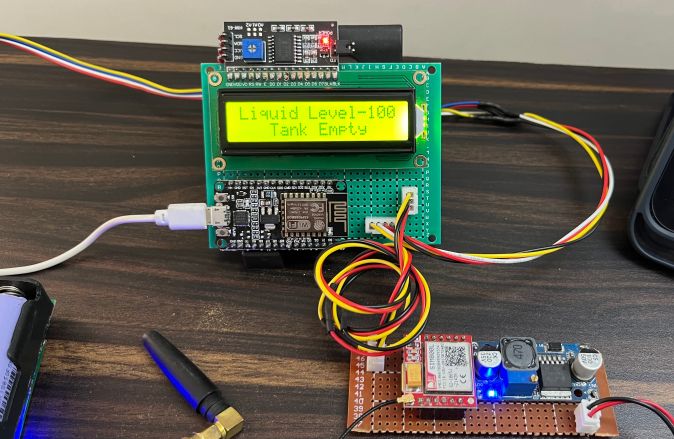
Initially, it shows the liquid level at 100 and indicates that the tank is empty. Correspondingly, a notification is sent as an SMS to the phone, confirming that the tank is empty.
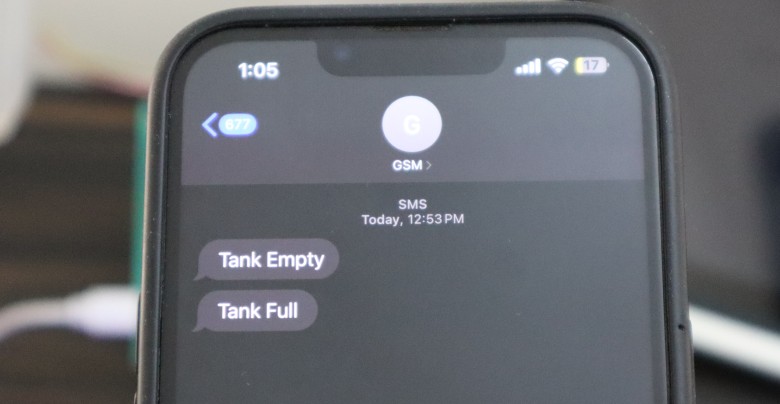
The final phase of the test involves filling the tank to observe the system’s response to a full tank scenario. As the tank becomes full, the LCD display updates to indicate that the tank is full, and a matching SMS notification is sent to the phone, confirming the tank’s full status.
Video Tutorial & Demo






