


Overview
In this tutorial, we will explore the process of interfacing the ADS1115 16-Bit ADC Module with ESP32. The ADS1115 breakout board is a high-resolution analog-to-digital converter (ADC) that can be used with various microcontrollers, including Arduino, STM32, and ESP8266/32. In particular, the ESP32 is a powerful microcontroller with built-in Wi-Fi and Bluetooth capabilities, making it an ideal choice for IoT applications.
The ESP32 has a built-in 12-bit ADC, which provides higher resolution than the 10-bit ADC found on Arduino boards. However, the ADS1115 boasts an even higher resolution of 16 bits, offering superior performance in terms of voltage measurement. The smallest voltage the ESP32 can measure is 3.3V / 4096 = 0.0008V (or 0.8mV), while the ADS1115 can measure as low as 5V / 65536 = 0.000076V (76uV). This makes the ADS1115 an excellent choice when precise voltage measurements are required. If you want more precison up to 0.3uV, you may check ADS1220 24-Bit ADC Module.
In the following sections of this tutorial, we will provide step-by-step instructions for connecting the ADS1115 to the ESP32, configuring the I2C communication, and writing code to read and process analog signals using the Arduino IDE. By the end of this guide, you will have a solid understanding of how to interface the ADS1115 16-Bit ADC Module with the ESP32 and harness its full potential for your projects.
Bill of Materials
To thoroughly understand the ADS1115 ADC Module when used with ESP32, we require the subsequent elements:
| S.N. | Components | Quantity | Purchase Link |
|---|---|---|---|
| 1 | ESP32 Board | 1 | Amazon | AliExpress |
| 2 | ADS1115 ADC Module | 1 | Amazon | AliExpress |
| 3 | 16x2 I2C LCD Display | 1 | Amazon | AliExpress |
| 4 | 10K Potentiometer | 2 | Amazon | AliExpress |
| 5 | Breadboard | 1 | Amazon | AliExpress |
| 6 | Connecting Wires | 1 | Amazon | AliExpress |
ESP32 ADC Pins and Accuracy
The ESP32 is a powerful microcontroller with integrated Wi-Fi and Bluetooth capabilities. It has several analog-to-digital converters (ADC) pins, which can be used to measure analog signals and convert them into digital values. The ESP32 has two ADCs, ADC1 and ADC2, with a total of 18 available ADC channels.

- ADC1 has 8 channels (GPIO32 to GPIO39)
- ADC2 has 10 channels (GPIO0, GPIO2, GPIO4, GPIO12 to GPIO15, and GPIO25 to GPIO27)
Accuracy: The ESP32’s ADCs have a resolution of 12 bits, meaning they can represent an analog signal using 4096 discrete levels. However, due to internal noise and non-linear characteristics, the effective resolution is typically around 10-11 bits.
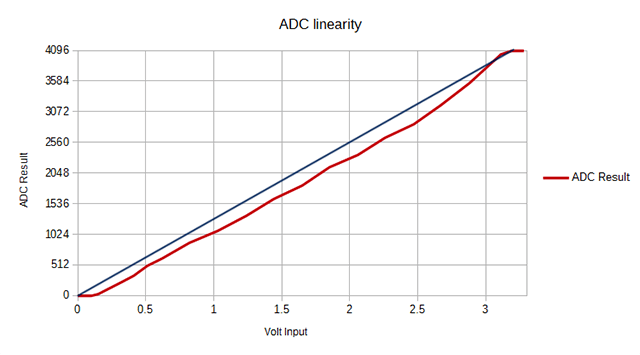
To improve the accuracy of the ADC readings on the ESP32, you can:
- Use the built-in hall sensor for calibration.
- Implement oversampling and averaging to reduce noise.
- Use an external voltage reference for better stability.
- Consider using an external ADC module, like the ADS1115, if higher accuracy is required.
Keep in mind that ADC2 channels are shared with Wi-Fi functionalities, so if you are using Wi-Fi, it’s better to use ADC1 channels to avoid potential conflicts or interference with ADC readings.
ADS1115 Chip
The ADS1115 is a precision, low-power, 16-bit, I2Ccompatible, analog-to-digital converter IC.

Features of ADS1115
- 16-bit Resolution
- Four (4) Channel Single-Ended or Two (2) Channel Differential Inputs
- I2C Protocol Interface
- Programmable Comparator
- Wide Supply Range
- Low Current Consumption
- Continuous-Conversion Mode
- Programmable Data Rate
- Programmable Comparator
- Single-Cycle Settling
- Internal Low-Drift Voltage Reference
- Internal Oscillator
- Wide Operating Temperature Range
- Available in Ultra-Small X2QFN Package
ADS1115 Pin Configuration
The below image shows the pin configuration of the ADS1115 chip.

- Pin 1 is the ADDR pin that selects the I2C address for the chip.
- Pin 2 is the Alert/Ready pin which serves as a data ready and alert signal.
- Pin 3 is the GND terminal.
- Pins 4, 5, 6 & 7 are the four (4) ADC input pins. We can use these pins as either four (4) single-ended inputs or two (2) differential inputs.
- Pin 8 is the positive power supply pin which accepts 2.0 V to 5.5 V
- Pins 9 and 10 are the terminals for the I2C interface, SDA and SCL respectively.
ADS1115 Functional Block Diagram
The following presents the functional diagram for the ADS1115 Chip:

First, a multiplexer chooses the input signal. This selected signal then enters a Programmable Gain Amplifier (PGA), which can be programmed to amplify smaller signals before the conversion takes place.
Next, a 16-bit Delta Sigma converter processes the input. This converter employs its own integrated voltage reference and oscillator for input signal measurement. Once the conversion is completed, the resulting data is sent to the I2C interface. Additionally, a comparator generates a signal for the external interface, indicating that the converted result is available for retrieval.
Typical Connections of the ADS1115
The primary I2C connections for the ADS1115 can be seen in the following image.

The ADS1115 is compatible with standard mode, fast mode, and high-speed mode I2C controllers, allowing it to interface directly with them. The ADS1115 functions with any microcontroller I2C peripheral, encompassing master-only and single-master I2C peripherals.
For more information refer to ADS1115 Datasheet
ADS1115 Module or Breakout Board
The ADS1115 is available in X2QFN and VSSOP packages, which are not suitable for prototyping. As a result, an ADS1115 Module or Breakout Board is necessary for use with ESP32 or any other microcontroller.

These modules can be found by various manufacturers at affordable prices. Their breadboard-friendly design makes them ideal for prototyping and testing applications, allowing for easy integration.
ADS1115 Module Pinout
The ADS1115 Module has a total number of 10 Pins.
| Pin. No. | Pin Name | Pin Description |
| 1 | VDD | Power supply: 2.0V to 5.5V |
| 2 | GND | Ground |
| 3 | SCL | Serial clock input: Clocks data on SDA (used for I2C communication) |
| 4 | SDA | Serial data: Transmits and receives data (used for I2C communication) |
| 5 | ADDR | I2C address select (slave) |
| 6 | ALERT/RDY | Digital comparator output or conversion ready |
| 7 | AIN0 | Differential channel 1: Single-ended channel 1 input or Negative input |
| 8 | AIN1 | Differential channel 1: Single-ended channel 2 input or Negative input |
| 9 | AIN2 | Differential channel 2: Single-ended channel 3 input or Positive input |
| 10 | AIN3 | Differential channel 2: Single-ended channel 4 input or Negative input |
ADS1115 Module Schematic
The illustration displayed earlier represents Adafruit’s adaptation of the ADS1115 module.

This design adheres to the standard connection protocol for the ADS1115 chip. It features 10K ohm pull-up resistors on both the I2C and Alert pins, as well as a 1uF capacitor situated between the VDD and GND pins, functioning as a decoupling capacitor.
Interfacing ADS1115 Module with ESP32
The ESP32 wiring diagram for interfacing the ADS1115 ADC Module is straightforward.

Firstly, connect the VDD and GND Pin of the module to the 3.3V and GND Pin of the ESP32, respectively. Next, connect the ADS1115 I2C pins (SDA and SCL) to the I2C pins (SDA=GPIO21 and SCL=GPIO22) of the ESP32. The ADDR pin of the chip should be connected to either VDD, SDA, or SCL, depending on which of the addresses 0x49, 0x4A, or 0x4B you wish to use. Note that the ADDR pin is pulled down to the ground by a 10K resistor by default.
If you want to use the ALERT/READY pin of the ADS1115 module, you must connect it to an ESP32 digital pin. This pin has two uses. Firstly, you can use it for interrupt-driven conversion where it serves as a data READY signal. Secondly, you can use it with the programmable output comparator for detecting conversion thresholds. In this case, it serves as an ALERT signal.
The ADS1115 has four ADC outputs, A0, A1, A2, and A3, which means that you can connect up to four analog sensors to this module. For instance, to test the module reading, you can use a potentiometer, which you should connect according to the circuit diagram provided above.
ADS1115 Library Installation
There are multiple libraries available for the ADS1115 Module. While browsing through the Library Manager you will get the library from a different developer.

Out of all the available libraries, we can try using one of the stable libraries for our application. The library is from Adafruit. You can download the library from the following link as well.
Basic Source Code/Program
Using the basic example code from the Adafruit ADS1115 example folder, we can test the working of the sensor.
Copy the following code and upload it to the ESP32 Board.
|
1 2 3 4 5 6 7 8 9 10 11 12 13 14 15 16 17 18 19 20 21 22 23 24 25 26 27 28 29 30 31 32 33 34 35 36 37 38 39 40 41 42 43 44 45 46 47 48 49 50 51 |
#include <Adafruit_ADS1X15.h> Adafruit_ADS1115 ads; /* Use this for the 16-bit version */ //Adafruit_ADS1015 ads; /* Use this for the 12-bit version */ void setup(void) { Serial.begin(115200); Serial.println("Getting single-ended readings from AIN0..3"); Serial.println("ADC Range: +/- 6.144V (1 bit = 3mV/ADS1015, 0.1875mV/ADS1115)"); // The ADC input range (or gain) can be changed via the following // functions, but be careful never to exceed VDD +0.3V max, or to // exceed the upper and lower limits if you adjust the input range! // Setting these values incorrectly may destroy your ADC! // ADS1015 ADS1115 // ------- ------- // ads.setGain(GAIN_TWOTHIRDS); // 2/3x gain +/- 6.144V 1 bit = 3mV 0.1875mV (default) // ads.setGain(GAIN_ONE); // 1x gain +/- 4.096V 1 bit = 2mV 0.125mV //ads.setGain(GAIN_TWO); // 2x gain +/- 2.048V 1 bit = 1mV 0.0625mV // ads.setGain(GAIN_FOUR); // 4x gain +/- 1.024V 1 bit = 0.5mV 0.03125mV // ads.setGain(GAIN_EIGHT); // 8x gain +/- 0.512V 1 bit = 0.25mV 0.015625mV // ads.setGain(GAIN_SIXTEEN); // 16x gain +/- 0.256V 1 bit = 0.125mV 0.0078125mV if (!ads.begin()) { Serial.println("Failed to initialize ADS."); while (1); } } void loop(void) { int16_t adc0, adc1, adc2, adc3; float volts0, volts1, volts2, volts3; adc0 = ads.readADC_SingleEnded(0); adc1 = ads.readADC_SingleEnded(1); adc2 = ads.readADC_SingleEnded(2); adc3 = ads.readADC_SingleEnded(3); volts0 = ads.computeVolts(adc0); volts1 = ads.computeVolts(adc1); volts2 = ads.computeVolts(adc2); volts3 = ads.computeVolts(adc3); Serial.println("-----------------------------------------------------------"); Serial.print("AIN0: "); Serial.print(adc0); Serial.print(" "); Serial.print(volts0); Serial.println("V"); Serial.print("AIN1: "); Serial.print(adc1); Serial.print(" "); Serial.print(volts1); Serial.println("V"); Serial.print("AIN2: "); Serial.print(adc2); Serial.print(" "); Serial.print(volts2); Serial.println("V"); Serial.print("AIN3: "); Serial.print(adc3); Serial.print(" "); Serial.print(volts3); Serial.println("V"); } |
After uploading the code, open the Serial Monitor. The Serial Monitor will show the ADC value for all 4 outputs AIN0, AIN1, AIN2, AIN3 along with the output voltage.

Since we have only used two potentiometers for AIN0 and AIN1, we will get these values changing while rotating the potentiometer.
Testing ADS1115 Module Accuracy
Now, we will assess the precision of the ADS1115 ADC Module. In order to evaluate its accuracy, we can employ an LCD Display to exhibit the ADC value and the measured voltages. Subsequently, we can utilize a multimeter to gauge the detected voltage and compare it to the voltage displayed on the Serial Monitor.
ADS1115, ESP32 & LCD Connection Diagram
Connect the LCD to the previous circuit as per the circuit diagram.

Connect the LCD SDA & SCL Pin to GPIO21 & GPIO22 of ESP32. Provide 5V VCC & GND connection to LCD Display using Vin & GND pins of ESP32.

Source Code/Program
The code requires I2C LCD Library for compilation. Then you can copy the following code and upload it to the ESP32 Board.
|
1 2 3 4 5 6 7 8 9 10 11 12 13 14 15 16 17 18 19 20 21 22 23 24 25 26 27 28 29 30 31 32 33 34 35 36 37 38 39 40 41 42 43 44 45 46 47 48 49 50 51 52 53 54 55 56 57 58 59 60 61 62 63 64 65 66 67 68 69 70 71 72 |
#include <Adafruit_ADS1X15.h> #include <LiquidCrystal_I2C.h> LiquidCrystal_I2C lcd(0x27, 16, 2); Adafruit_ADS1115 ads; /* Use this for the 16-bit version */ //Adafruit_ADS1015 ads; /* Use this for the 12-bit version */ void setup(void) { Serial.begin(115200); Serial.println("Getting single-ended readings from AIN0..3"); Serial.println("ADC Range: +/- 6.144V (1 bit = 3mV/ADS1015, 0.1875mV/ADS1115)"); // The ADC input range (or gain) can be changed via the following // functions, but be careful never to exceed VDD +0.3V max, or to // exceed the upper and lower limits if you adjust the input range! // Setting these values incorrectly may destroy your ADC! // ADS1015 ADS1115 // ------- ------- // ads.setGain(GAIN_TWOTHIRDS); // 2/3x gain +/- 6.144V 1 bit = 3mV 0.1875mV (default) // ads.setGain(GAIN_ONE); // 1x gain +/- 4.096V 1 bit = 2mV 0.125mV //ads.setGain(GAIN_TWO); // 2x gain +/- 2.048V 1 bit = 1mV 0.0625mV // ads.setGain(GAIN_FOUR); // 4x gain +/- 1.024V 1 bit = 0.5mV 0.03125mV // ads.setGain(GAIN_EIGHT); // 8x gain +/- 0.512V 1 bit = 0.25mV 0.015625mV // ads.setGain(GAIN_SIXTEEN); // 16x gain +/- 0.256V 1 bit = 0.125mV 0.0078125mV lcd.init(); lcd.backlight(); if (!ads.begin()) { Serial.println("Failed to initialize ADS."); while (1); } } void loop(void) { int16_t adc0, adc1, adc2, adc3; float volts0, volts1, volts2, volts3; adc0 = ads.readADC_SingleEnded(0); adc1 = ads.readADC_SingleEnded(1); adc2 = ads.readADC_SingleEnded(2); adc3 = ads.readADC_SingleEnded(3); volts0 = ads.computeVolts(adc0); volts1 = ads.computeVolts(adc1); volts2 = ads.computeVolts(adc2); volts3 = ads.computeVolts(adc3); Serial.println("-----------------------------------------------------------"); Serial.print("AIN0: "); Serial.print(adc0); Serial.print(" "); Serial.print(volts0); Serial.println("V"); Serial.print("AIN1: "); Serial.print(adc1); Serial.print(" "); Serial.print(volts1); Serial.println("V"); Serial.print("AIN2: "); Serial.print(adc2); Serial.print(" "); Serial.print(volts2); Serial.println("V"); Serial.print("AIN3: "); Serial.print(adc3); Serial.print(" "); Serial.print(volts3); Serial.println("V"); lcd.clear(); lcd.setCursor(0, 0); lcd.print("ADC0:"); lcd.print(adc0); lcd.print(" "); lcd.print(volts0); lcd.print("V"); lcd.setCursor(0, 1); lcd.print("ADC1:"); lcd.print(adc1); lcd.print(" "); lcd.print(volts1); lcd.print("V"); delay(1000); } |
Test Results
Upon uploading the code, the module becomes prepared for testing. A multimeter will be required for this purpose.
The LCD will display the ADC Value and measured Voltage.

We are using two potentiometers to input ADC Voltage and display both of them on LCD Display. One of the measured voltages shown by the multimeter is 3.28V which in LCD shows 3.31V.

The maximum ADC output voltage from the module is 3.3V and the minimum is 0V.
While measuring lower voltage, at 0.84V in LCD was measured as 0.827V in Multimeter. You may use a ADC Calculator to manually calculate the ADC Value.

Thus we can conclude that the ADS1115 16-Bit ADC Module has good accuracy and can be used for multipurpose applications.
According to other tests, this device has a stated typical accuracy of 0.01% but it has a maximum accuracy of 0.15%. This accuracy includes all sources of error such as voltage reference, Gain error, offset, and noise.
Video Tutorial & Guide

The same ADS1115 Module can also be used with other Microcontrollers which are as follows:





