


Overview
In this guide, we will be interfacing the HMC5883L Triple Axis Digital Magnetometer with a Raspberry Pi Pico & MicroPython Code to create our very own digital compass. The HMC5883L magnetometer serves as a feasible option for a digital compass because of its three-axis magnetometer functionality, which is often used to measure the strength and direction of magnetic fields. It can also be utilized to discern the Earth’s magnetic north.
The HMC5883L magnetometer will provide compass readings and measure the magnetic field of the X, Y, and Z axes in microteslas (µT). With these measurements, we can also calculate the heading in degrees. All these operations will be implemented using MicroPython on our Raspberry Pi Pico.
Bill of Materials
We need following components to work on this project.
| S.N. | Components | Quantity | Purchase Link |
|---|---|---|---|
| 1 | Raspberry Pi Pico | 1 | Amazon | AliExpress | SunFounder |
| 2 | HMC5883L Magnetometer | 1 | Amazon | AliExpress | SunFounder |
| 3 | Jumper Wires | 10 | Amazon | AliExpress | SunFounder |
| 4 | Breadboard | 1 | Amazon | AliExpress | SunFounder |
What is a Magnetic Compass & Magnetometer?
A magnetic compass is a tool for navigation that is employed to ascertain direction in relation to Earth’s magnetic poles. Its functionality is based on the concept of magnetism and incorporates a small, lightweight magnet which is delicately balanced on an almost friction-free pivot point, commonly known as the compass needle.

The compass needle, having the ability to swivel without restraint, synchronizes itself with the Earth’s magnetic field, with its extremities pointing towards the magnetic north and south. This basic feature enables individuals to determine their bearings in reference to the four primary directions—north, south, east, and west.
A magnetometer is a non-invasive device that records variations in Earth’s magnetic field, delivering significant data for marine exploration. This includes the inspection of cultural heritage sites like ship and aircraft debris, as well as the description of geological attributes located on the ocean floor.

The functioning of a magnetometer is rooted in the Earth’s core, which consists of an external liquid layer of magnetic iron and nickel. As the Earth rotates, the electric currents produced by these metals give rise to a magnetic field. The strength of this field is not uniform across the Earth’s surface and can be identified and measured with the aid of a magnetometer.
HMC5883L 3-Axis Compass/Magnetometer
The HMC5883L is a digital compass conceived by Honeywell. It is a surface-mount, multi-chip module engineered specifically for the detection of low magnetic fields. It is particularly adept at supplying directional data, making it a common choice for navigation and positioning systems.
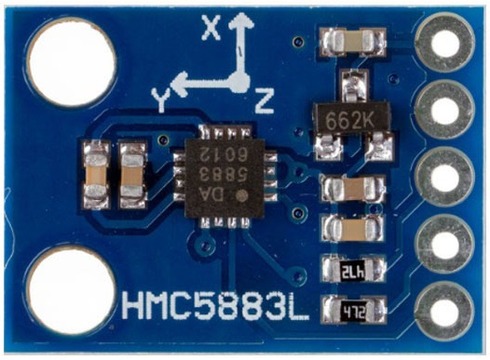
The design of the HMC5883L revolves around anisotropic magnetoresistive (AMR) technology, which facilitates the precise measurement of magnetic fields. It includes three-axis sensors, with field capacities spanning from ±1.3 to ±8.1 Gauss. This denotes its capability to measure magnetic fields across three distinct axes (X, Y, and Z), allowing it to sense the direction of the Earth’s magnetic field in a three-dimensional context.
The HMC5883L is equipped with numerous inherent features that simplify its incorporation into a variety of systems. Among these are an integrated ADC (Analog-to-Digital Converter) offering 12-bit data output, and an I2C serial bus interface. This interface is utilized for device communication, enabling it to transfer data to a microcontroller or another processing unit.
The HMC5883L Magnetometer Module is comprised of an HMC5883L Magnetometer IC, a Voltage Regulator IC, resistors, and capacitors, all consolidated within an integrated circuit. It uses a voltage regulator IC XC6206P332MR (662K).
Refer to HMC5883L datsheets to learn more: Download HMC5883L Datasheet
Specifications of HMC5883L
- Operating Voltage: 3V to 6V DC
- Operating Current: 100-130 μA
- I2C interface
- 1-2 degree heading accuracy
- Integrated 12-bit ADC
- 160Hz max data rate
- Range of -8 to +8 Gauss
- Data Output Rate: 0.75, 1.5, 3, 7.5, 15 Hz
Pinout of HMC5883L
The HMC5883L module has five pins as shown in this image below:
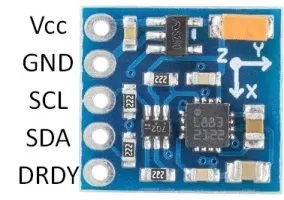
Here is a basic description of the typical pinout for an HMC5883L module.
- VCC: This is the power supply pin. It requires a DC voltage, typically 3V -6V.
- GND: This is the ground pin.
- SCL: This is the clock line for the I2C interface. It’s connected to the microcontroller’s I2C clock line.
- SDA: This is the data line for the I2C interface. It’s connected to the microcontroller’s I2C data line.
- DRDY: Data Ready. This pin goes low when new data is available. It’s optional and isn’t always used in basic applications.
Register Mapping & I2C Communication
| Register Address | Name | Access |
|---|---|---|
| 00 | Configuration Register A | Read/Write |
| 01 | Configuration Register B | Read/Write |
| 02 | Mode Register | Read/Write |
| 03 | Data Output X MSB Register | Read |
| 04 | Data Output X LSB Register | Read |
| 05 | Data Output Z MSB Register | Read |
| 06 | Data Output Z LSB Register | Read |
| 07 | Data Output Y MSB Register | Read |
| 08 | Data Output Y LSB Register | Read |
| 09 | Status Register | Read |
| 10 | Identification Register A | Read |
| 11 | Identification Register B | Read |
| 12 | Identification Register C | Read |
The HMC5883L magnetometer uses various internal registers to configure and receive data:
- Configuration Register A (0x00): Configures device operation, including output data rate and measurement configuration.
- Configuration Register B (0x01): Sets the device gain and sensitivity.
- Mode Register (0x02): Selects the operating mode, such as continuous measurement, single measurement, or idle mode.
- Data Output X Registers (0x03 and 0x04): Hold X-axis sensor readings.
- Data Output Y Registers (0x05 and 0x06): Hold Y-axis sensor readings.
- Data Output Z Registers (0x07 and 0x08): Hold Z-axis sensor readings.
- Status Register (0x09): Contains status flags about data output.
- Identification Registers (0x0A, 0x0B, 0x0C): Used to identify the device.
The HMC5883L employs the I2C communication protocol, functioning as a slave device. Its designated I2C device address is 0x1E. The corresponding addresses for its read and write operations are as follows:
- For write operations (SLA+W), the address is 0x3C.
- For read operations (SLA+R), the address is 0x3D.
Applications of HMC5883L
Some of the applications of HMC5883L Magnetometer in various fields are:
- Smart Devices: Auto-rotate and orientation features.
- GPS: Enhanced directional accuracy.
- Robotics: Improved navigation.
- Drones: Guidance and control.
- Gaming: Advanced motion tracking.
- AR/VR: Real-time orientation.
- Industrial Use: Satellite positioning, antenna tracking.
Interfacing HMC5883L Magnetometer with Raspberry Pi Pico
Let us interface the HMC5883L Magnetometer with Raspberry Pi Pico using MicroPython Code and read the magnetometer data for X, Y, Z axis along with the heading information.
Wiring Diagram
The connection diagram is very simple.

Connect the VCC & GND pin of HMC5883L magnetometer to 3.3V & GND Pin of Raspberry Pi Pico. Similarly, connect the SDA & SCL pin of Magnetometer to GP20 & A4 GP21 of Pico respectively.

Source Code/Program
Here is a MicroPython Code to interface HC5883L Magnetometer with Raspberry Pi Pico. Copy the following code and save it to your Raspberry Pi Pico Board with name main.py.
|
1 2 3 4 5 6 7 8 9 10 11 12 13 14 15 16 17 18 19 20 21 22 23 24 25 26 27 28 29 30 31 32 33 34 35 36 37 38 39 40 41 42 43 44 45 46 47 48 49 50 51 52 53 54 55 56 57 58 59 60 61 62 63 64 65 |
from machine import I2C, Pin import time import math # HMC5883L address and register addresses HMC5883L_ADDR = 0x1E CONFIG_REG_A = 0x00 CONFIG_REG_B = 0x01 MODE_REG = 0x02 DATA_REG = 0x03 # Conversion factor from raw value to uT # With default gain 1 Ga = 1090 LSb # And 1 Ga = 100 uT, therefore 1 LSb = 100 uT / 1090 LSb LSB_TO_UT = 100.0 / 1090.0 # Initialize I2C i2c = I2C(0, scl=Pin(21), sda=Pin(20), freq=100000) # Check if HMC5883L is connected if HMC5883L_ADDR not in i2c.scan(): raise ValueError('HMC5883L not found') # Write configuration to HMC5883L # Continuous measurement mode, 15Hz data output rate i2c.writeto_mem(HMC5883L_ADDR, CONFIG_REG_A, bytes([0x70])) i2c.writeto_mem(HMC5883L_ADDR, CONFIG_REG_B, bytes([0x20])) i2c.writeto_mem(HMC5883L_ADDR, MODE_REG, bytes([0x00])) while True: data = i2c.readfrom_mem(HMC5883L_ADDR, DATA_REG, 6) x = ((data[0] << 8) | data[1]) z = ((data[2] << 8) | data[3]) y = ((data[4] << 8) | data[5]) if x > 32767: x -= 65536 if y > 32767: y -= 65536 if z > 32767: z -= 65536 # Convert to uT x *= LSB_TO_UT y *= LSB_TO_UT z *= LSB_TO_UT # Calculate heading in degrees heading = math.atan2(y, x) # Convert radian to degree heading = math.degrees(heading) # Due to declination, the heading may need to be corrected # Declination is the error between magnetic north and true north, depending on your geographical location. # Here, let's assume we have a declination of 0 degrees. If you know the declination in your area, put it instead. declination_angle = 0.0 heading += declination_angle # Correct negative values if heading < 0: heading += 360 print("Magnetic field in X: %.2f uT, Y: %.2f uT, Z: %.2f uT, Heading: %.2f°" % (x, y, z, heading)) time.sleep(0.1) |
Once you run the code, the Thonny Shell will display the following readings.

The Shell display the Magnetometer reading in X, Y, Z axis in micro-Tesla (uT) and also the heading angle in degrees. You can rotate the magnetometer to observe the change in the readings.


2 Comments
I tried this code on my pico w with micropython, but I cannot set HMC5883L_ADDR = 0x1E. i2c.scan() returns 0x0d, but then it returns all 0 data. what am I doing wrong?
I got it working to the point where it prints out data, but the heading changes all the time and too much to be just ‘noise’.