


Overview
In this post, we will learn how to use Reyax RYS8830 GPS/GNSS Receiver Module to retrieve time and position data from satellite navigation systems. The RYS8830 module from Reyax is based on Sony CXD5605GF/CXD5605AGF technology & comes as a small SMD component. The RYS8830 GNSS modules can be used in tracking devices that need to be small and power-saving. The Reyax RYS8830 has a small form factor and ultra-low power consumption. The GPS/GNSS Module can be interfaced with any microcontroller & can be operated using a simple coin-cell battery.
The RYS8830 Module is a very small SMD Module and requires a PCB. So, in this tutorial, we will use an evaluation board (RYS8830 EVB). The RYS8830 Evaluation Board has an embedded power circuit along with the CP2102 Chip & a micro-USB port. So the board can be directly connected to the computer and using the GNNS Software you can start learning and exploring the feature of RYS8830 Chip.
Bill of Materials
You can buy the GPS/GNSS Module from the Amazon easily. You will also need a micro-usb cable. The component purchase link is given below.
| S.N. | Components Name | Quantity | Purchase Links |
|---|---|---|---|
| 1 | RYS8830 Chip | 1 | Amazon |
| 2 | RYS8830 EVB Board | 1 | http://reyax.com.cn/products/rys8830/ |
| 3 | Micro-USB Cable | 1 | Amazon | AliExpress |
What is GNNS (Global Navigation Satellite System) ?
GNNS stands for Global Navigation Satellite System. It refers to a constellation of satellites providing signals from space that transmit positioning and timing data to GNSS receivers. The receivers then use this data to determine location.

The performance of GNSS is assessed using four criteria:
1. Accuracy: the difference between a receiver’s measured and real position, speed, or time
2. Integrity: a system’s capacity to provide a threshold of confidence and, in the event of an anomaly in the positioning data, an alarm
3. Continuity: a system’s ability to function without interruption
4. Availability: the percentage of time a signal fulfills the above accuracy, integrity, and continuity criteria
Some basic terminology for GNNS System is as follows:
1. Global Positioning System (GPS) – United States
2. GLONASS (Globalnaja nawigazionnaja sputnikowaja Sistema) – Russia
3. Galileo – Europe
4. BeiDou – China
5. QZSS (Quasi-Zenith Satellite System) – Japan
Reyax RYS8830 & EVB
The REYAX RYS8830 is built on the high performance of the SONY CXD5605GF CXD5605AGF GNSS engine. The RYS8830 modules utilize concurrent reception of GNSS systems offering high sensitivity in a small SMD form factor.

It occupies a small SMD size of 121 mm2, which currently is the smallest GNSS module worldwide with an antenna. The operating voltage is around 1.65~1.95V. The frequency is 1561.098 MHz for BeiDou, 1575.42 MHz for GPS & 1602.5625 MHz for Glonass. RYS8830 has a built-in enhanced GNSS filter, a low noise amplifier, an embedded antenna, and it offers an option of an external antenna. the tracking sensitivity is around -161 dBm
Specifications
- GNSS Center Frequency: 1561.098 MHz (BeiDou), 1575.42 MHz (GPS), 1602.5625 MHz (Glonass)
- Navigation update rate: 1 Hz
- Accuracy: up to 1m
- Operating Temperature: -40°C to +85°C
- Dimensions: 11mm11mm2.2mm
- Power Supply Voltage: 1.8V
- Satellite acquisition Current: 19 mA
- Satellite tracking Current: 13 mA (GNSS continuous mode)
- Satellite tracking Current: 2.6 mA to 8.2 mA (GNSS low power mode)
- Idle Current: 3 mA (GNSS continuous mode)
RYS8830 Evaluation Board
The RYS8830 GNSS/GPS Module is very small that it requires a PCB for experiments and learning. But the Reyax Team has already developed the RYS8830 Evaluation Board that doesn’t need any PCBs.

The evaluation board has jumpers for UART or I2C Interface. It also has a reset button for resetting the board or restarting the module. The board consists of a CP2102 Chip which is a USB-UART Driver chip. The micro-USB port can be used to connect the module directly to the computer and also the GNNS Software.
Download: GNSS Monitor For Customer
The GNSS Monitor is a very useful software to evaluate GNSS receiver modules. Using this software, it is possible to connect to the modules to GNSS Transmitter by establishing a serial connection.

The software is very use to use and has user-friendly interface. You can download the software from the following link below:
After downloading the software, you can extract and install it on your PC System. During installation, you may encounter several issues. You may need to download several other software like Microsoft Framework etc to make the GNSS Software working.
Get Time & Position Data with the GNSS Monitor Software
First we need to establish a connection to the RYS8830 EVB evaluation board with the PC. So use a long Micro-USB Data cable to connect RYS8830 EVB to the computer. Once connected a red light will flash up indicating the evaluation board is correctly powered.

The next step is to start the serial connection between the GNSS Monitor and the RYS8830 EVB:
1. Click on “Setup(S)” in the GNSS Monitor software
2. Click on “Serial Port(S)”; A new dialog “Serial Port” pops up
3. Now enter the following settings as shown in the image below
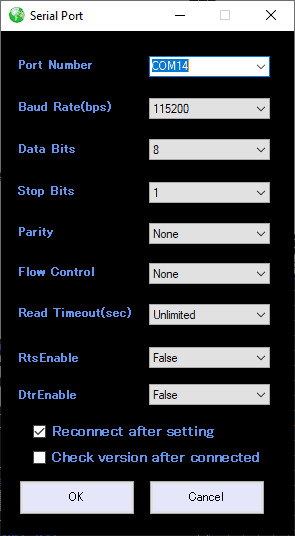
4. At last click on the OK button and a serial connection to the RY8830_EVB will be established
Retrieving Data from the Module
The Reyax RYS8830 GNSS receiver Module offer three modes to start a device:
1. Hot Start:
The hot start is when the GNSS receiver remembers the time (UTC), the last calculated position, and a sufficient number of satellites in sight (e.g. quite four satellites), and a few information about the satellites constellation. The receiver used the stored information and makes an effort to lock onto equivalent satellites and calculate a replacement position. The hot start is merely applicable when the receiver is started within the same location where it had been turned off.
2. Warm Start:
The warm start is when the GNSS receiver remembers only some data, such as the time & last calculated position. In contrast to the hot start, the receiver does not remember which satellites were in view. The warm start takes longer than a hot start but not as long as a cold start.
3. Cold Start:
The cold start is when the GNSS receiver is switched on for the first time or does not remember the previous data. The cold start takes much longer than the other hot & warm start.
Since the RYS8830 module on the evaluation board is turned on for the first time, the cold start (COLD) should be pressed. When pressed, a signal is sent to the module and it starts to lock onto some satellites. You should see some log messages and a list of satellites. After some minutes, the GNSS Monitor should show the current time and position.

This is how you can get the Time & Position Data using RYS8830 GPS/GNSS Module. The detailed video instruction given below can help you to understand in more detail about the module.
Video Tutorial & Guide

If you want to learn about GPS & Navigation System, you can follow some of our old projects here: APG GPS Module






3 Comments
Hi, cool article! Almost better than the original!
Btw. you can keep my screenshots!
Hi Michael, sorry to know that was your image. I picked the image randomly from google and some images were provided by the Reyax Team. Anyway thank you so much for the comment and let keeping me your images. I saw your original post and was inspired by your writing and some of the content in this article is taken from your article as a reference. Well Thanks.
My GNSS Module always in Green light some time and not able to read any data. What is mean by that.\ ?