Video production has come a long way in recent years. With the rise of artificial intelligence (AI), creating high-quality videos has become easier and faster. One of the most exciting advancements is the use of text to speech AI to generate realistic voice-overs that can convey emotion. This technology allows video creators to add depth and feeling to their content, making it more engaging and relatable. In this blog post, we’ll explore how AI voice generators are changing the way we produce videos, and how tools like AI video upscaler and AI voice generators are making the process even more efficient.

What is AI Voice Generation?
AI voice generation is the technology that allows computers to produce human-like voices. These voices can be used in various applications, including video production, audiobooks, and virtual assistants. The most common way to generate these voices is by using text to speech AI. This technology reads text and converts it into spoken words, mimicking the natural tone, pace, and emotion of human speech.
By using AI voice generators, video producers can create realistic voiceovers without needing to hire voice actors. The technology has improved so much that AI-generated voices sound almost identical to real people. With text to speech AI, creators can choose different voices and even adjust the tone to match the mood of the video. Whether it’s a serious documentary or a fun YouTube video, AI can help make the voiceover sound just right.
The Importance of Emotion in Video Production
Emotion plays a big role in how we connect with videos. A video that can evoke feelings like happiness, sadness, excitement, or fear tends to have a stronger impact on the audience. This is where AI voice generators come in. By using AI voice generators, video creators can easily add emotion to their voiceovers, ensuring that the tone of the voice matches the video’s content. For example, if the video is about a happy celebration, the voiceover could be energetic and cheerful. If it’s about a touching story, the voiceover could be calm and sincere.
AI voice generator is great for producing voices that match the mood of the video. This means that creators don’t have to spend time adjusting the voice manually or re-recording it over and over again. The AI can generate the perfect voice that brings the video to life. With the use of AI video upscalers, creators can further enhance the quality of their videos, ensuring that both the visuals and the audio are top-notch.
How AI Voice Generators Are Changing the Industry
AI voice generators are already transforming the video production industry. They help save time and money, and make video production more accessible to everyone, even those with limited budgets. Before AI, creating professional-quality voiceovers meant hiring a voice actor, renting studio space, and spending hours recording. Now, with AI voice generators, anyone can add a high-quality voiceover to their video without leaving their computer.
In addition to being time-saving, AI voice generators also offer flexibility. Video creators can easily modify the voice, change the tone, and even adjust the speed of the speech. This flexibility allows creators to experiment with different styles and find the perfect match for their video. Whether you’re making an animated video, a tutorial, or an explainer video, AI voice generators provide a quick and efficient way to add a voiceover.
Benefits of AI in Video Production
There are several benefits to using AI in video production. First, it significantly reduces the time and effort required to produce videos. With AI video upscalers, video quality can be improved without the need for expensive equipment or manual adjustments. AI can also help with tasks like editing, color correction, and audio enhancement. These tools make it easier for creators to produce professional-quality videos without needing advanced skills or expensive software.
Another benefit is the ability to create a consistent voice across multiple videos. If you’re creating a series of videos or an entire project, using text to speech AI ensures that the voiceover stays consistent throughout. You don’t have to worry about different voice actors sounding too different from each other or trying to match tones across different recordings. AI allows you to maintain a unified voice that enhances the overall quality of the video series.
How AI Voice Generators Help Improve Creativity
AI voice generators also help video creators unlock their creativity. Since these tools are so easy to use, creators can focus more on the content of their videos instead of worrying about technical details. For example, with AI voice generation, you don’t have to spend hours trying to record the perfect voiceover. The AI takes care of that, giving you more time to experiment with the video’s visuals, music, and overall style.
Furthermore, AI voice generators allow for customization. You can select different voice types, accents, and languages, making your videos accessible to a global audience. This customization can also help you cater to specific target audiences. If you’re creating a video for a particular demographic, you can choose a voice that resonates with them, making the video more engaging and relatable.
How to Use CapCut’s AI Voice Generator
CapCut is a popular video editing tool that offers an easy way to use AI voice generators. Here’s a simple guide to using CapCut PC’s AI voice generator in just three steps:
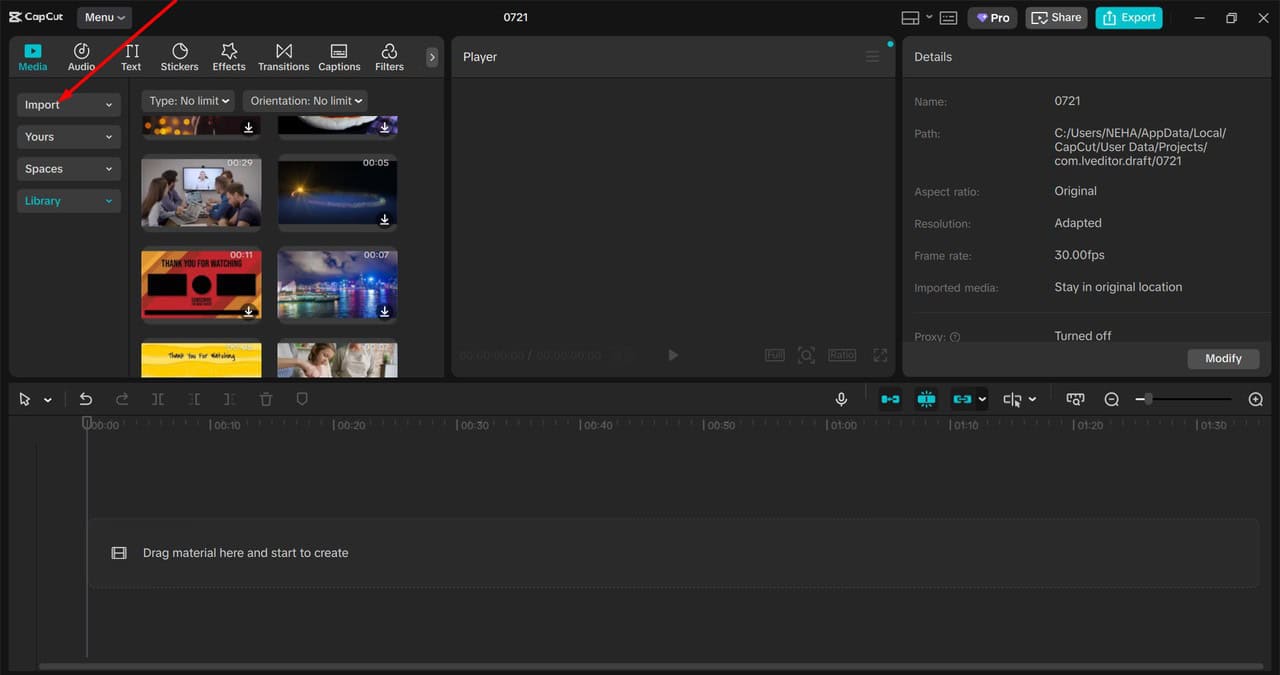
Step 1: Import Video
First, open CapCut’s desktop version and upload your video. You can easily drag and drop your video file onto the platform to get started. This step sets up your project and prepares it for voiceover work.
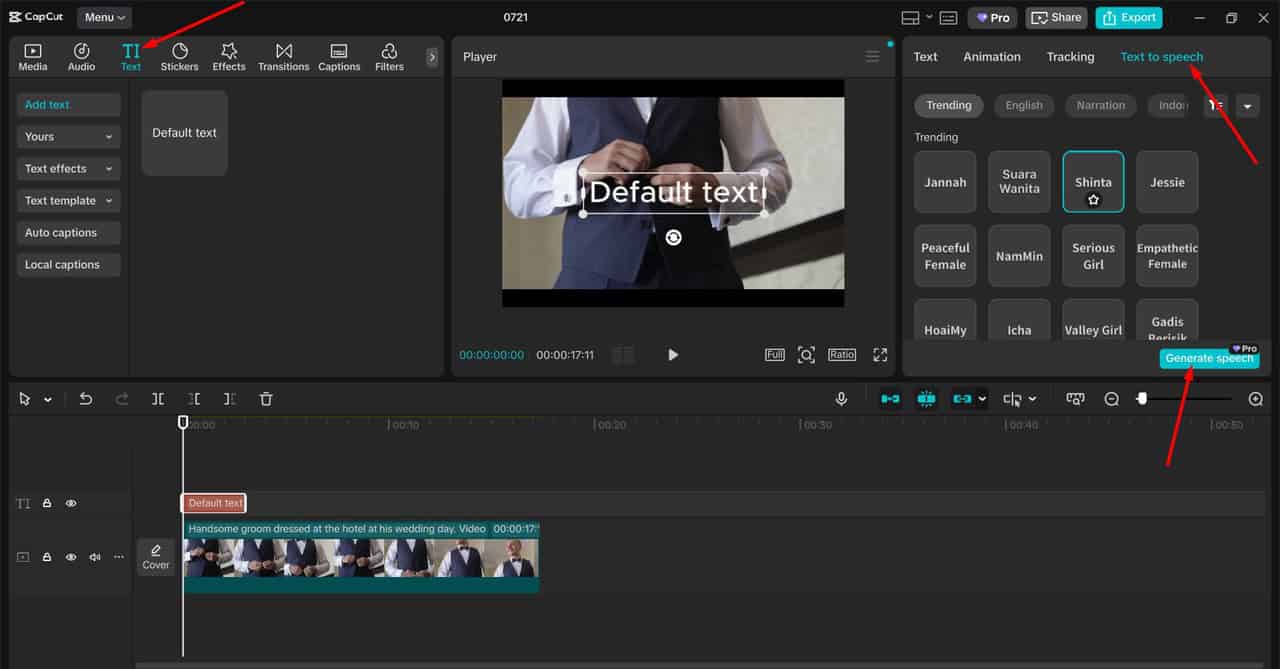
Step 2: Use Text-to-Speech AI
Next, select the “Text to speech” feature in CapCut. You can type the text you want the voiceover to say, choose the voice style, and adjust the tone or emotion. This tool allows you to customize the voice so that it matches the mood and style of your video perfectly.
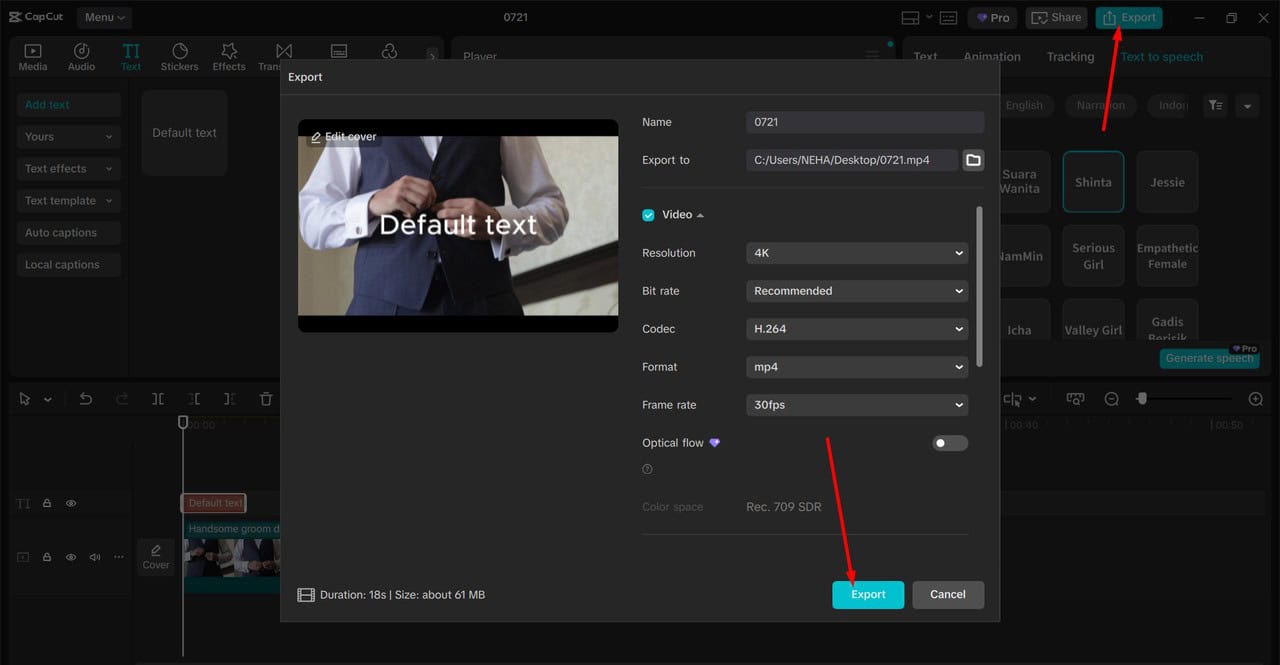
Step 3: Export Video
Once you’re happy with the voiceover, click export to save your video. CapCut will generate the final video with the AI-generated voiceover included. You can then use your video for your project, whether it’s for social media, YouTube, or any other platform.
CapCut makes it easy for anyone to create high-quality videos with AI-generated voiceovers. With just these three steps, you can produce professional-level videos without needing advanced skills or equipment.
The Future of AI in Video Production
As AI continues to evolve, we can expect even more exciting developments in video production. AI voice generators will become even more sophisticated, offering more realistic voices and even greater customization. Future advancements could include real-time voice modulation, allowing creators to adjust the tone and emotion of the voice on the fly. Additionally, AI-powered AI video upscalers will keep improving, offering even better video quality and sharper visuals.
The integration of AI into video production tools will make it easier for creators to produce high-quality content without relying on expensive resources or technical expertise. With AI, anyone can become a professional video producer, no matter their experience level or budget.
Conclusion
In conclusion, AI voice generators are revolutionizing the video production industry by providing an easy and efficient way to add emotion and depth to videos. With tools like text-to-speech AI, AI video upscaler, and AI voice generator, creators can produce high-quality content quickly and cost-effectively. As AI technology continues to improve, the future of video production looks bright. Whether you’re a beginner or a seasoned pro, these tools make it possible to create engaging and emotional videos that will capture the attention of your audience.