Close Menu
  • Articles
    • Learn Electronics
    • Product Review
    • Tech Articles
  • Electronics Circuits
    • 555 Timer Projects
    • Op-Amp Circuits
    • Power Electronics
  • Microcontrollers
    • Arduino Projects
    • STM32 Projects
    • AMB82-Mini IoT AI Camera
    • BLE Projects
  • IoT Projects
    • ESP8266 Projects
    • ESP32 Projects
    • ESP32 MicroPython
    • ESP32-CAM Projects
    • LoRa/LoRaWAN Projects
  • Raspberry Pi
    • Raspberry Pi Projects
    • Raspberry Pi Pico Projects
    • Raspberry Pi Pico W Projects
  • Electronics Calculator
Facebook X (Twitter) Instagram
  • About Us
  • Disclaimer
  • Privacy Policy
  • Contact Us
  • Advertise With Us
Facebook X (Twitter) Instagram Pinterest YouTube LinkedIn
How To Electronics
  • Articles
    • Learn Electronics
    • Product Review
    • Tech Articles
  • Electronics Circuits
    • 555 Timer Projects
    • Op-Amp Circuits
    • Power Electronics
  • Microcontrollers
    • Arduino Projects
    • STM32 Projects
    • AMB82-Mini IoT AI Camera
    • BLE Projects
  • IoT Projects
    • ESP8266 Projects
    • ESP32 Projects
    • ESP32 MicroPython
    • ESP32-CAM Projects
    • LoRa/LoRaWAN Projects
  • Raspberry Pi
    • Raspberry Pi Projects
    • Raspberry Pi Pico Projects
    • Raspberry Pi Pico W Projects
  • Electronics Calculator
How To Electronics
Home » Laser Security System using 555 Timer IC & LDR
555 Timer Projects Electronics Circuits

Laser Security System using 555 Timer IC & LDR

Mamtaz AlamBy Mamtaz AlamUpdated:May 13, 20234 Mins Read
Share Facebook Twitter LinkedIn Telegram Reddit WhatsApp
Laser Security System using 555 Timer IC & LDR
Share
Facebook Twitter LinkedIn Pinterest Email Reddit Telegram WhatsApp

Overview

This post is all about Laser Light Security System using 555 Timer IC & LDR. In today’s world, safety and security are of paramount importance for both homes and businesses. To that end, we present an exciting and cost-effective DIY project: the Laser Light Security System. This project utilizes a simple yet effective combination of a laser beam, an LDR (Light Dependent Resistor), a 555 timer IC, a relay, an LED, and a buzzer to create an intrusion detection solution.

When the laser beam is interrupted, the system triggers an alarm and activates an LED, alerting you to the possible presence of an intruder. Earlier we build the Laser Security System using Arduino & Laser diode.

Not only is this project easy to assemble and understand, but it also offers the opportunity to learn about basic electronic components, their functions, and how they interact with one another. Furthermore, this security system can be customized and scaled up to suit various applications, from securing a single doorway to covering multiple access points within a property.


Components Required

The following are the components required for this Laser Security System Project:

  1. 555 timer IC
  2. LDR (Light Dependent Resistor)
  3. 5V Relay
  4. LED (any color)
  5. Siren or buzzer
  6. A laser pointer or Laser Diode Module
  7. Resistors: 10K, 1K, 220E, 330E
  8. Potentiometer 10K
  9. Electrolytic Capacitor: 10uF
  10. Ceramic Capacitor: 0.1uF – 2
  11. Diode 1N4007
  12. Breadboard or PCB
  13. Jumper wires
  14. Power supply (5V-12V)


Circuit Diagram & Connections

Here is the schematic of the Laser Security System designed using 555 Timer IC & LDR.

Here we need to set up the 555 timer IC in monostable mode. Then by connecting the LDR and the potentiometer in a voltage divider configuration to trigger the 555 timer. Then we can use the output of the 555 timer to drive a relay, which in turn activates the siren/buzzer and an LED when the laser beam is interrupted.
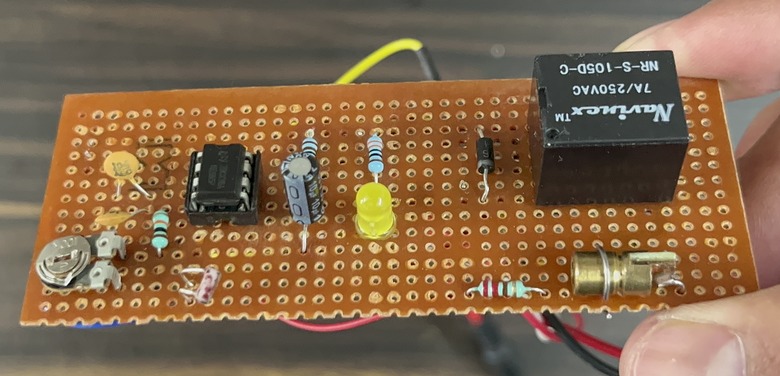
You can assemble the circuit in a Zero PCB Board.
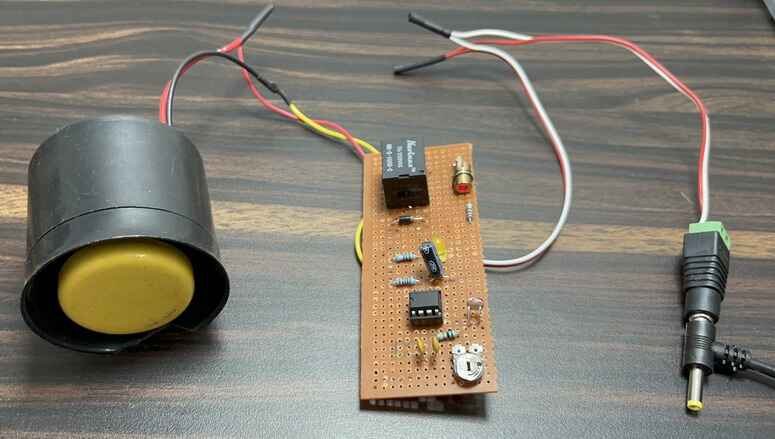

Working of Laser Security System using 555 Timer IC & LDR

The laser light security system using 555 Timer operates by monitoring the presence of a continuous laser beam. At the heart of the circuit is a 555 timer IC, configured in monostable mode, which responds to changes in light levels detected by the Light Dependent Resistor (LDR). A laser pointer or laser diode module is used to provide a steady beam of light, which is aimed directly at the LDR. The LDR’s resistance varies according to the amount of light it receives. When the laser beam is uninterrupted, the LDR’s resistance is low.


A 10K potentiometer is connected in series with the LDR to form a voltage divider. This allows for adjusting the system’s sensitivity to changes in the LDR’s resistance. When the laser beam is interrupted, the LDR’s resistance increases, causing a change in the voltage at the trigger input (pin 2) of the 555 timer IC. This change in voltage initiates the monostable mode operation of the 555 timer, generating a pulse at its output (pin 3).

Laser Light Security System LDR

The output pulse from the 555 timer drives a relay through an NPN transistor. The relay, in turn, activates the alarm (siren/buzzer) and an LED, indicating that the laser beam has been broken. The relay remains energized for the duration of the output pulse, providing a clear indication of a security breach.


Testing & Demo

  1. Aim the laser pointer or laser diode module at the LDR, ensuring that the light falls directly on the LDR.
  2. Adjust the 10K potentiometer until the relay is off (LED and siren/buzzer are off) when the laser beam is incident on the LDR.
  3. How to make Laser Light Security System with 555 Timer

  4. When the laser beam is interrupted, the LDR’s resistance increases, triggering the 555 timer IC. This, in turn, activates the relay, LED, and siren/buzzer.

Note: Remember to always exercise caution when working with lasers, as they can cause eye damage. Use appropriate safety measures, such as laser safety goggles, and do not point the laser at people or animals.

Share. Facebook Twitter Pinterest LinkedIn Tumblr Email Reddit Telegram WhatsApp
Previous ArticleHow to Control Stepper Motor with A4988 Driver & ESP8266
Next Article How to Control Stepper Motor with DRV8825 Driver & ESP8266

Related Posts

Water Level Alert using Float Sensor & 555 Timer

Water Level Alert using Float Sensor & 555 Timer

2K
Adjustable Auto On Off Delay Timer Circuit Using 555 IC

555 Based Adjustable Auto On Off Delay Timer Circuit

Updated:February 14, 20252K

12V DC to 220V AC Inverter Circuit & PCB

Updated:February 2, 20251460K
DIY Smart Blind Stick using Op-Amp & IR Sensor

DIY Smart Blind Stick using Op-Amp & IR Sensor

Updated:February 2, 202515K
Square Wave Generator Circuit with Op Amp IC LM358

Square Wave Generator Circuit with Op Amp IC LM358

Updated:February 2, 202513K
Gas Leak Detection & Alarm using 555 Timer IC

Gas Leak Detection & Alarm using 555 Timer IC

Updated:February 2, 202525K
Add A Comment

CommentsCancel reply

Latest Posts
IoT Based PM & Air Quality Monitoring System using ESP32

IoT Based PM & Air Quality Monitoring System using ESP32

May 31, 2026
DIY ESP32 MLX90640 IR Thermal Camera with Live Web Display

DIY ESP32 MLX90640 IR Thermal Camera with Live Web Display

May 10, 2026
IoT Activity Tracker with ESP32 & Accelerometer Gyroscope

IoT Activity Tracker with ESP32 & Accelerometer/Gyroscope

May 2, 2026
A Guide to Sourcing Obsolete ICs for Vintage Projects

Beyond AliExpress: A Guide to Sourcing Obsolete ICs for Vintage Projects

April 21, 2026

ESP32 IoT Vehicle Motion Analyzer with MPU6050 & LIS3MDL

April 27, 2026
Building a Smart Sensor Node with a BLE Microcontroller

Building a Smart Sensor Node with a BLE Microcontroller

February 26, 2026
High-Accuracy Pitch, Roll, Yaw with ESP32 & BNO08x IMU

High-Accuracy Pitch, Roll, Yaw with ESP32 & BNO08x IMU

April 27, 2026
DIY Colorimeter using AS7265x Spectroscopy Sensor & ESP32

DIY Colorimeter using AS7265x Spectroscopy Sensor & ESP32

February 1, 2026
Top Posts & Pages
  • How to use INA219 DC Current Sensor Module with Arduino
    How to use INA219 DC Current Sensor Module with Arduino
  • 12V DC to 220V AC Inverter Circuit & PCB
    12V DC to 220V AC Inverter Circuit & PCB
  • Designing of MPPT Solar Charge Controller using Arduino
    Designing of MPPT Solar Charge Controller using Arduino
  • ECG Graph Monitoring with AD8232 ECG Sensor & Arduino
    ECG Graph Monitoring with AD8232 ECG Sensor & Arduino
  • How to use INA226 DC Current Sensor with Arduino
    How to use INA226 DC Current Sensor with Arduino
  • Buck Converter: Basics, Working, Design & Application
    Buck Converter: Basics, Working, Design & Application
  • How to use Modbus RTU with ESP32 to read Sensor Data
    How to use Modbus RTU with ESP32 to read Sensor Data
  • IoT AC Energy Meter with PZEM-004T & ESP32 WebServer
    IoT AC Energy Meter with PZEM-004T & ESP32 WebServer
Categories
  • Arduino Projects (197)
  • Articles (60)
    • Learn Electronics (19)
    • Product Review (15)
    • Tech Articles (28)
  • Electronics Circuits (46)
    • 555 Timer Projects (21)
    • Op-Amp Circuits (7)
    • Power Electronics (13)
  • IoT Projects (204)
    • ESP32 MicroPython (7)
    • ESP32 Projects (81)
    • ESP32-CAM Projects (15)
    • ESP8266 Projects (76)
    • LoRa/LoRaWAN Projects (22)
  • Microcontrollers (38)
    • AMB82-Mini IoT AI Camera (4)
    • BLE Projects (18)
    • STM32 Projects (19)
  • Raspberry Pi (93)
    • Raspberry Pi Pico Projects (57)
    • Raspberry Pi Pico W Projects (12)
    • Raspberry Pi Projects (24)
Follow Us
  • Facebook
  • Twitter
  • Pinterest
  • Instagram
  • YouTube
About Us

“‘How to Electronics’ is a vibrant community for electronics enthusiasts and professionals. We deliver latest insights in areas such as Embedded Systems, Power Electronics, AI, IoT, and Robotics. Our goal is to stimulate innovation and provide practical solutions for students, organizations, and industries. Join us to transform learning into a joyful journey of discovery and innovation.

Copyright © How To Electronics. All rights reserved.
  • About Us
  • Disclaimer
  • Privacy Policy
  • Contact Us
  • Advertise With Us

Type above and press Enter to search. Press Esc to cancel.

Ad Blocker Enabled!
Ad Blocker Enabled!
Looks like you're using an ad blocker. Please allow ads on our site. We rely on advertising to help fund our site.