


Overview
In this tutorial, we will learn how to use PIR Motion Sensor with Raspberry Pi Pico for Human Detection. We will detect whether someone was present in the sensor detection area through the Raspberry Pi Pico. If a person is detected, the light will be turned on, and the light will be automatically turned off after a period of time. You can check the PIR Sensor Arduino Tutorial for learning more in detail.
Connecting PIR sensors to a microcontroller is really simple. The PIR acts as a digital output, it can be high voltage or low voltage, so all you need to do is listen for the pin to flip high (detected) or low (not detected) by listening to a digital input on your Arduino.
Components Required
In this guide, I used Elecrow Raspberry Pi Pico Starter Kit to test different Modules. You can buy the kit and perform some other operations as well. From this kit, you can use the following components.
1. Raspberry Pi Pico Board -1
2. PIR Motion Sensor – 1
3. RGB LED Module – 1
4. Breadboard -1
5. Jumper Wires – 10
6. Micro-USB Cable
PIR Motion Sensor
A passive infrared (PIR) sensor recognizes infrared light emitted from nearby objects. You may assume that “passive” IR sensors mean these devices are less complicated than their active counterparts, but you’d be mistaken. A passive IR sensor’s functionality may be more difficult to understand.

First, realize that everything — humans, animals, even inanimate objects — emits a certain amount of IR radiation. How much IR radiation they emit relates to the body or object’s warmth and material makeup. Humans can’t see IR, but we’ve designed electronic detection devices to pick up these signals. PIR sensors are used in thermal sensing applications, such as security and motion detection. They are commonly used in security alarms, motion detection alarms, and automatic lighting applications.
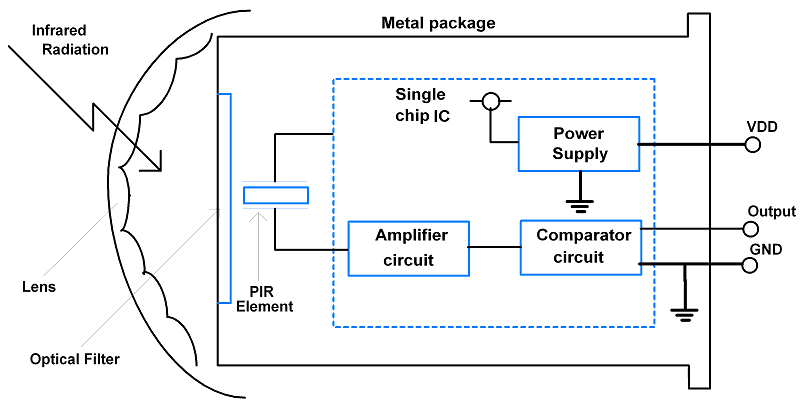
Passive infrared (PIR) sensors use a pair of pyroelectric sensors to detect heat energy in the surrounding environment. These two sensors sit beside each other, and when the signal differential between the two sensors changes (if a person enters the room, for example), the sensor will engage. That may mean it triggers an alarm, notifies authorities, or maybe turns on a floodlight. IR radiation focuses on each of the two pyroelectric sensors using a series of lenses constructed as the sensor’s housing. These lenses widen the device’s sensing area. While the lens setup and sensor electronics are sophisticated technology, these units are easy to use in a practical application.
Circuit Diagram & Hardware Setup
The circuit for interfacing PIR Motion Sensor with Raspberry Pi Pico is given below. The RGB LED on the circuit will get activated whenever the motion is detected.

Connect the PIR Sensor VCC, GND & Out pin to Raspberry Pi Pico 5V (VBUS), GND & GP0 Pin.
Similarly connect the R, G & B Pin of the RGB LED to Raspberry Pi Pico GP2, GP3 & GP4 Pin respectively. Connect the GND Pin of RGB LED to Pico GND Pin.

MicroPython Code/Program
Copy the following code and paste it into the Thonny Editor.
|
1 2 3 4 5 6 7 8 9 10 11 12 13 14 15 16 17 18 19 20 21 22 |
from machine import Pin,PWM from utime import sleep PIR = Pin(0, Pin.IN, Pin.PULL_DOWN) Led_R = PWM(Pin(2)) Led_G = PWM(Pin(3)) Led_B = PWM(Pin(4)) Led_R.freq(2000) Led_G.freq(2000) Led_B.freq(2000) if __name__ == '__main__': while True: print(PIR.value()) if PIR.value() == 1: Led_R.duty_u16(65535) Led_G.duty_u16(65535) Led_B.duty_u16(65535) sleep(3) else: Led_R.duty_u16(0) Led_G.duty_u16(0) Led_B.duty_u16(0) |
Run the script and start testing the above-connected circuit.

When you bring your hand infront of the PIR Sensor, the RGB LED will turn ON for 3 seconds. When no motion is detected, there is no turning ON/OFF LED.


