Close Menu
  • Articles
    • Learn Electronics
    • Product Review
    • Tech Articles
  • Electronics Circuits
    • 555 Timer Projects
    • Op-Amp Circuits
    • Power Electronics
  • Microcontrollers
    • Arduino Projects
    • STM32 Projects
    • AMB82-Mini IoT AI Camera
    • BLE Projects
  • IoT Projects
    • ESP8266 Projects
    • ESP32 Projects
    • ESP32 MicroPython
    • ESP32-CAM Projects
    • LoRa/LoRaWAN Projects
  • Raspberry Pi
    • Raspberry Pi Projects
    • Raspberry Pi Pico Projects
    • Raspberry Pi Pico W Projects
  • Electronics Calculator
Facebook X (Twitter) Instagram
  • About Us
  • Disclaimer
  • Privacy Policy
  • Contact Us
  • Advertise With Us
Facebook X (Twitter) Instagram Pinterest YouTube LinkedIn
How To Electronics
  • Articles
    • Learn Electronics
    • Product Review
    • Tech Articles
  • Electronics Circuits
    • 555 Timer Projects
    • Op-Amp Circuits
    • Power Electronics
  • Microcontrollers
    • Arduino Projects
    • STM32 Projects
    • AMB82-Mini IoT AI Camera
    • BLE Projects
  • IoT Projects
    • ESP8266 Projects
    • ESP32 Projects
    • ESP32 MicroPython
    • ESP32-CAM Projects
    • LoRa/LoRaWAN Projects
  • Raspberry Pi
    • Raspberry Pi Projects
    • Raspberry Pi Pico Projects
    • Raspberry Pi Pico W Projects
  • Electronics Calculator
How To Electronics
Home » ESP32 & ILI9488 TFT Touch Screen Based Video Games
ESP32 Projects

ESP32 & ILI9488 TFT Touch Screen Based Video Games

Mamtaz AlamBy Mamtaz AlamUpdated:August 21, 20221 Comment6 Mins Read
Share Facebook Twitter LinkedIn Telegram Reddit WhatsApp
ESP32 TFT Touch Screen
Share
Facebook Twitter LinkedIn Pinterest Email Reddit Telegram WhatsApp

Overview

In this project, we will make few video games using ESP32 & 3.5″ ILI9488 TFT Touch Screen Display. The customized board is manufacture by Makerfabs and has a combination of ESP32-WROVER chip + 3.5″ TFT Display + 2 MP Camera + SD Card slot.

But in this project, we will not be using the Camera or the SD Card slot. Rather we will use the ESP32 & ILI9488 TFT Touch Screen Display and write the Arduino Code for video game support. The board can be programmed with the Arduino Code or Micropython code. But this section explains the use of Arduino Code to make video games.


ESP32 3.5″ TFT Touch(Capacitive) with Camera

This is a beautiful 3.5” touchscreen display, based on ESP32-WROVER chip, with a built-in 2M pixel OV2640 camera. The combination of all these gives a perfect platform for ESP32 Application like Video Games.

ESP32 3.5" TFT Touch with Camera

The TFT LCD driver is basically ILI9488 & has a dimension of 3.5″ with 320×480 screen resolution. The ILI9488 LCD uses SPI for communication with the ESP32 chip. The SPI main clock could be up to 60M~80M, make the display smooth enough for videos. The camera module on this board is an OV2640 Camera with a 2MP resolution.

with this camera, you can make applications such as remote photography, face recognition & security system projects. While the camera is not used, you can freely use all these pins with the breakout connectors. You can then connect the ESP32 display with sensors or modules & use it for any IoT applications. The ESP32 chip support Arduino or MicroPython programming

The board is having a micro SD-Card slot for attaching an external SD-Card. The SD Card can be used for storing files and images. There is a type C USB Port, basically a USB to UART converter for ESP32 programming. You can connect a Type-C data cable to the board & directly upload the code to the Board.

ESP32 TFT Touch Screen Camera

Specification

1. 3.5 inch display, 320×480
2. Capacitive/Resistive Touch
3. ESP32-WROVER Controller
4. WIFI/ BLE Connection.
5. Onboard USB2UART convertor for ESP32 programming
6. 2M pixel OV2640 Camera
7. OV2640 supports output images up to 2 million pixels
8. LCD 3.5-inch Amorphous-TFT-LCD for mobile-phone or handy electrical equipment
9. LCD Driver: ILI9488
10. LCD Resolution: 320*480
11. Micro SD card slot on the board
12. NS2009: A 4-wire resistive touch screen control circuit
13. FT6236: single-chip capacitive touch panel controller Integrated Circuit
14. Power supply: 5V, Type-C USB


Purchase Link

There are two versions of ESP32 3.5″ TFT Touch Screen with Camera. One is the Capacitive Type and the other the resistive type. You can use any of the display that you want. The purchase Link for both the display is given below.
1. Resistive Type ESP32 TFT Touch Screen Camera – Purchase Link
2. Capacitive Type ESP32 TFT Touch Screen Camera – Purchase Link


Preparing & Programming the Board

1.Install the ESP32 boards supporting
You need to install ESP32 Board to the Arduino IDE. To do that Select “File>Preferences>settings>Additional Boards Manager URLs” to fill the link: https://dl.espressif.com/dl/package_esp32_index.json

2.Install the LovyanGFX Library
LovyanGFX Library is a library for LCD Graphics driver with touch for ESP32 and SAMD51. It supports the TFT Touch Screen Display like ILI9163, ILI9342, ILI9341, ILI9486, ILI9488, ST7735, ST7789, ST7796, SSD1351. Download and add this library to the Arduino IDE.

LovyanGFX Library

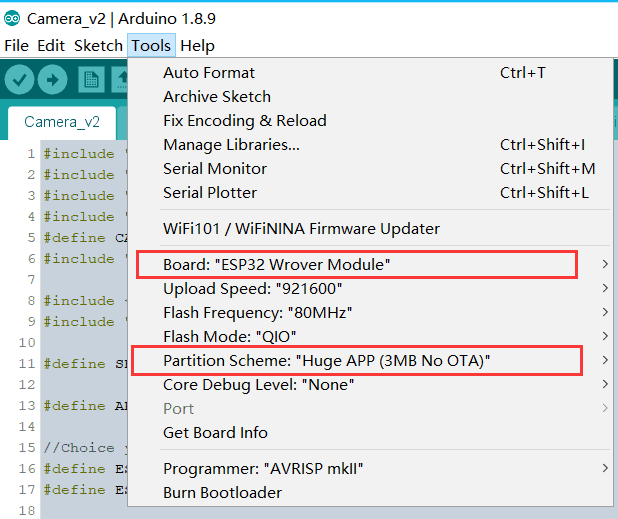
3.Setting ESP32 Parameter in Tools Menu


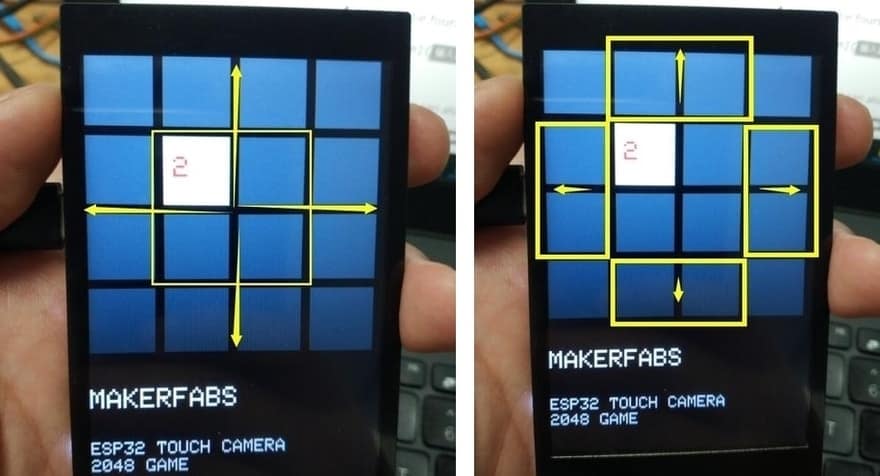
ESP32 2048 Video Game
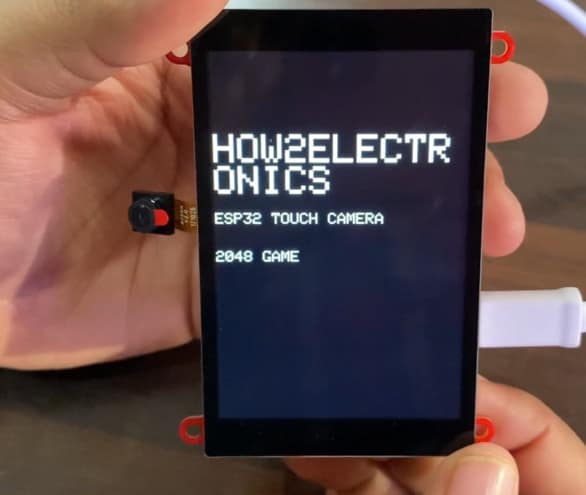
2048 Game

2048 is often played on a gray 4×4 grid, with numbered tiles that slide when a player moves them using the four arrow keys. Every turn, a new tile will randomly appear in an empty spot on the board with a value of either 2 or 4. Tiles slide as far as possible in the chosen direction until they are stopped by either another tile or the edge of the grid. If two tiles of the same number collide while moving, they will merge into a tile with the total value of the two tiles that collided. The resulting tile cannot merge with another tile again in the same move.

ESP32 2048 Video Game

How To Play?

  1. Click on the first row with your finger the second and the third are up.
  2. Click with your finger on the fourth row and the second and third rows are down.
  3. Click on the first column with your finger and the second and third columns are left.
  4. Click on the fourth column with your finger and the second and third columns are right.
  5. Of course, you can also use your fingers to slide around from the middle four squares.

Source Code/Program

The given link contains the code/program folder for ESP32 TFT Touch Screen Display based 2048 Video game. You can download the code and extract it. The select the ESP32 Board & upload the code to the ESP32 Board.

Source Code

Before uploading code, select either the touchscreen type is resistive or capacitive.

1
2
/#define NS2009_TOUCH   //Resistive screen driver
#define FT6236_TOUCH    //Capacitive screen driver


ESP32 Flappy Bird Video Game

ESP32 Flappy Bird Game

Flappy Bird is an arcade-style game in which the player controls the bird Faby, which moves persistently to the right. The player is tasked with navigating Faby through pairs of pipes that have equally sized gaps placed at random heights. Faby automatically descends and only ascends when the player taps the touchscreen. Each successful pass through a pair of pipes awards the player one point. Colliding with a pipe or the ground ends the gameplay.

Source Code/Program

The given link contains the code/program folder for ESP32 ILI9488 TFT Touch Screen Display based Flappy Bird Video Game. You can download the code and extract it. The select the ESP32 Board & upload the code to the ESP32 Board.

Source Code

Before uploading code, select either the touchscreen type is resistive or capacitive.

1
2
/#define NS2009_TOUCH   //Resistive screen driver
#define FT6236_TOUCH    //Capacitive screen driver

You can use the same product to make your own ESP32 Video Games or Game Console.


Video Tutorial & Guide

Touch Screen Camera + Video Game + Slide Shower | ESP32 TFT Touch Screen Camera
Watch this video on YouTube.

You can use this product for so many other applications like imaging, photography, photo veiewer and drawing. You can check this post (ESP32 Touch Camera Projects) for some other cool projects.

Apart from this, here are a few ESP32 TFT Display based great projects for you:
1. ESP32 DHT11 Weather Monitoring on TFT Touch Display
2. Measure Wind Speed with Anemometer on ESP32 TFT Display
3. Ultrasonic Range Finder with ESP32 TFT Display & HC-SR04


Share. Facebook Twitter Pinterest LinkedIn Tumblr Email Reddit Telegram WhatsApp
Previous ArticleHow to use Reyax RYLR890 LoRa Module with Arduino
Next Article ESP32 TFT Touch Screen Display Camera Based Projects

Related Posts

ESP32 Fingerprint Attendance System with Live Web Dashboard

ESP32 Fingerprint Attendance System with Live Web Dashboard

Updated:June 16, 2026
IoT Based PM & Air Quality Monitoring System using ESP32

IoT Based PM & Air Quality Monitoring System using ESP32

Updated:June 14, 2026
DIY ESP32 MLX90640 IR Thermal Camera with Live Web Display

DIY ESP32 MLX90640 IR Thermal Camera with Live Web Display

Updated:May 10, 20261K
IoT Activity Tracker with ESP32 & Accelerometer Gyroscope

IoT Activity Tracker with ESP32 & Accelerometer/Gyroscope

Updated:May 2, 2026

ESP32 IoT Vehicle Motion Analyzer with MPU6050 & LIS3MDL

Updated:April 27, 20261K
High-Accuracy Pitch, Roll, Yaw with ESP32 & BNO08x IMU

High-Accuracy Pitch, Roll, Yaw with ESP32 & BNO08x IMU

Updated:April 27, 20262K
View 1 Comment

1 Comment

  1. Jennifer He - Makerfabs on December 19, 2020 9:30 AM

    Wow, Great article, your tutorial is very detail, thank you so much for your work!

    Reply

CommentsCancel reply

Latest Posts
ESP32 Fingerprint Attendance System with Live Web Dashboard

ESP32 Fingerprint Attendance System with Live Web Dashboard

June 16, 2026
IoT Based PM & Air Quality Monitoring System using ESP32

IoT Based PM & Air Quality Monitoring System using ESP32

June 14, 2026
DIY ESP32 MLX90640 IR Thermal Camera with Live Web Display

DIY ESP32 MLX90640 IR Thermal Camera with Live Web Display

May 10, 2026
IoT Activity Tracker with ESP32 & Accelerometer Gyroscope

IoT Activity Tracker with ESP32 & Accelerometer/Gyroscope

May 2, 2026
A Guide to Sourcing Obsolete ICs for Vintage Projects

Beyond AliExpress: A Guide to Sourcing Obsolete ICs for Vintage Projects

April 21, 2026

ESP32 IoT Vehicle Motion Analyzer with MPU6050 & LIS3MDL

April 27, 2026
Building a Smart Sensor Node with a BLE Microcontroller

Building a Smart Sensor Node with a BLE Microcontroller

February 26, 2026
High-Accuracy Pitch, Roll, Yaw with ESP32 & BNO08x IMU

High-Accuracy Pitch, Roll, Yaw with ESP32 & BNO08x IMU

April 27, 2026
Top Posts & Pages
  • IoT Based PM & Air Quality Monitoring System using ESP32
    IoT Based PM & Air Quality Monitoring System using ESP32
  • How to use LDR Sensor Module with Arduino
    How to use LDR Sensor Module with Arduino
  • 12V DC to 220V AC Inverter Circuit & PCB
    12V DC to 220V AC Inverter Circuit & PCB
  • Buck Converter: Basics, Working, Design & Application
    Buck Converter: Basics, Working, Design & Application
  • IoT AC Energy Meter with PZEM-004T & ESP32 WebServer
    IoT AC Energy Meter with PZEM-004T & ESP32 WebServer
  • How to use Modbus RTU with ESP32 to read Sensor Data
    How to use Modbus RTU with ESP32 to read Sensor Data
  • ECG Graph Monitoring with AD8232 ECG Sensor & Arduino
    ECG Graph Monitoring with AD8232 ECG Sensor & Arduino
  • Silicon Controlled Rectifier (SCR): Construction, Working & Applications
    Silicon Controlled Rectifier (SCR): Construction, Working & Applications
Categories
  • Arduino Projects (197)
  • Articles (60)
    • Learn Electronics (19)
    • Product Review (15)
    • Tech Articles (28)
  • Electronics Circuits (46)
    • 555 Timer Projects (21)
    • Op-Amp Circuits (7)
    • Power Electronics (13)
  • IoT Projects (205)
    • ESP32 MicroPython (7)
    • ESP32 Projects (82)
    • ESP32-CAM Projects (15)
    • ESP8266 Projects (76)
    • LoRa/LoRaWAN Projects (22)
  • Microcontrollers (38)
    • AMB82-Mini IoT AI Camera (4)
    • BLE Projects (18)
    • STM32 Projects (19)
  • Raspberry Pi (93)
    • Raspberry Pi Pico Projects (57)
    • Raspberry Pi Pico W Projects (12)
    • Raspberry Pi Projects (24)
Follow Us
  • Facebook
  • Twitter
  • Pinterest
  • Instagram
  • YouTube
About Us

“‘How to Electronics’ is a vibrant community for electronics enthusiasts and professionals. We deliver latest insights in areas such as Embedded Systems, Power Electronics, AI, IoT, and Robotics. Our goal is to stimulate innovation and provide practical solutions for students, organizations, and industries. Join us to transform learning into a joyful journey of discovery and innovation.

Copyright © How To Electronics. All rights reserved.
  • About Us
  • Disclaimer
  • Privacy Policy
  • Contact Us
  • Advertise With Us

Type above and press Enter to search. Press Esc to cancel.

Ad Blocker Enabled!
Ad Blocker Enabled!
Looks like you're using an ad blocker. Please allow ads on our site. We rely on advertising to help fund our site.