Close Menu
  • Articles
    • Learn Electronics
    • Product Review
    • Tech Articles
  • Electronics Circuits
    • 555 Timer Projects
    • Op-Amp Circuits
    • Power Electronics
  • Microcontrollers
    • Arduino Projects
    • STM32 Projects
    • AMB82-Mini IoT AI Camera
    • BLE Projects
  • IoT Projects
    • ESP8266 Projects
    • ESP32 Projects
    • ESP32 MicroPython
    • ESP32-CAM Projects
    • LoRa/LoRaWAN Projects
  • Raspberry Pi
    • Raspberry Pi Projects
    • Raspberry Pi Pico Projects
    • Raspberry Pi Pico W Projects
  • Electronics Calculator
Facebook X (Twitter) Instagram
  • About Us
  • Disclaimer
  • Privacy Policy
  • Contact Us
  • Advertise With Us
Facebook X (Twitter) Instagram Pinterest YouTube LinkedIn
How To Electronics
  • Articles
    • Learn Electronics
    • Product Review
    • Tech Articles
  • Electronics Circuits
    • 555 Timer Projects
    • Op-Amp Circuits
    • Power Electronics
  • Microcontrollers
    • Arduino Projects
    • STM32 Projects
    • AMB82-Mini IoT AI Camera
    • BLE Projects
  • IoT Projects
    • ESP8266 Projects
    • ESP32 Projects
    • ESP32 MicroPython
    • ESP32-CAM Projects
    • LoRa/LoRaWAN Projects
  • Raspberry Pi
    • Raspberry Pi Projects
    • Raspberry Pi Pico Projects
    • Raspberry Pi Pico W Projects
  • Electronics Calculator
How To Electronics
Home » Gas Level Monitor On Internet Using ESP8266 & Gas Sensor
ESP8266 Projects IoT Projects

Gas Level Monitor On Internet Using ESP8266 & Gas Sensor

Mamtaz AlamBy Mamtaz AlamUpdated:November 5, 202315 Comments4 Mins Read
Share Facebook Twitter LinkedIn Telegram Reddit WhatsApp
Gas Monitoring ESP8266 Gas Sensor
Share
Facebook Twitter LinkedIn Pinterest Email Reddit Telegram WhatsApp

Gas Level Monitoring Over Internet Using ESP8266 & Gas Sensor

In this project, we will learn about Gas Level Monitor On Internet Using ESP8266 & Gas Sensor Module, i.e MQ135. We will measure the quantity of gas in percentage and send it over the internet using the thingspeak server. With this system, the data can be monitored remotely staying at any part of the world. We just need gas/smoke/LPG sensor like MQ2/MQ3/MQ5/MQ7/MQ135 that is directly connected to Nodemcu ESP8266-12E Module.

ThingSpeak is an open-source Internet of Things (IoT) application and API to store and retrieve data from things using the HTTP protocol over the Internet or via a Local Area Network.

You can check our earlier projects while are similar to the current project:

  • Alcohol Level Meter using Arduino & MQ-135 Alcohol/Gas Sensor
  • Arduino Smoke Level Detector using MQ-135 Sensor with Alert Alarm
  • Gas Leak Alarm System using MQ2 & Arduino
  • Gas Leakage Detector with SMS Alert using GSM Module & Arduino


Bill of Materials

The following are the components required for the project. All the components can be purchased from Amazon.

S.N.Components NameQuantityPurchase Links
1NodeMCU ESP8266 1Amazon | AliExpress
2MQ-135 Air Quality Sensor1Amazon | AliExpress
3Connecting Wires10Amazon | AliExpress
4Breadboard1Amazon | AliExpress

MQ135 Gas/Smoke Sensor

Description

The MQ-135 gas sensor senses gases like ammonia nitrogen, oxygen, alcohols, aromatic compounds, sulfide, and smoke. The MQ-3 gas sensor has a lower conductivity to clean the air as a gas sensing material. In the atmosphere, we can find polluting gases, but the conductivity of the gas sensor increases as the concentration of polluting gas increases. MQ-135 gas sensor can be implemented to detect the smoke, benzene, steam, and other harmful gases. It has the potential to detect different harmful gases. It is with low cost and is particularly suitable for Air quality monitoring applications.

MQ135 Gas Smoke Sensor

The MQ135 sensor is a signal output indicator instruction. It has two outputs: analog output and TTL output. The TTL output is a low signal light that can be accessed through the IO ports on the Microcontroller. The analog output is a concentration, i.e. increasing voltage is directly proportional to increasing concentration. This sensor has a long life and reliable stability as well.

Features

• High Sensitivity
• High sensitivity to Ammonia, Sulfide, and Benze
• Stable and Long Life
• Detection Range: 10 – 300 ppm NH3, 10 – 1000 ppm Benzene, 10 – 300 Alcohol
• Heater Voltage: 5.0V
• Dimensions: 18mm Diameter, 17mm High excluding pins, Pins – 6mm High
• Long life and low cost


Circuit Diagram & Connections

Make a connection as per the circuit diagram below. Connect the VCC pin of MQ135 to Vin of NodeMCU and GND to GND. Connect analog pin A0 of MQ135 to Analog pin A0 of NodeMCU.

Circuit Diagram Gas Level Monitoring ESP8266


Setting Thingspeak & Getting API Key:

  1. Go to https://thingspeak.com/ and create an account if you do not have one. Login to your account.

  2. Create a new channel by clicking on the button. Enter the basic details of the channel. Then Scroll down and save the channel. You can follow the video guide below.

  1. Then go to API keys copy and paste this key to a separate notepad file. You will need it later while programming.

Source Code

Here is a program for Gas Level Monitor On Internet Using ESP8266 & Gas Sensor MQ135. Copy this code and upload it to Nodemcu.

Change the wifi SSID, password, and thingspeak API key.

1
2
3
4
5
6
7
8
9
10
11
12
13
14
15
16
17
18
19
20
21
22
23
24
25
26
27
28
29
30
31
32
33
34
35
36
37
38
39
40
41
42
43
44
45
46
47
48
49
50
51
52
53
54
55
56
#include <ESP8266WiFi.h>
String apiKey = "SKP9YQY2CFVNK919"; // Enter your Write API key from ThingSpeak
const char *ssid = "Alexahome"; // replace with your wifi ssid and wpa2 key
const char *pass = "hngzhowxiantan";
const char* server = "api.thingspeak.com";
WiFiClient client;
void setup()
{
Serial.begin(115200);
delay(10);
Serial.println("Connecting to ");
Serial.println(ssid);
WiFi.begin(ssid, pass);
while (WiFi.status() != WL_CONNECTED)
{
delay(500);
Serial.print(".");
}
Serial.println("");
Serial.println("WiFi connected");
}
void loop()
{
float h = analogRead(A0);
if (isnan(h))
{
Serial.println("Failed to read from MQ-5 sensor!");
return;
}
if (client.connect(server, 80)) // "184.106.153.149" or api.thingspeak.com
{
String postStr = apiKey;
postStr += "&field1=";
postStr += String(h/1023*100);
postStr += "r\n";
client.print("POST /update HTTP/1.1\n");
client.print("Host: api.thingspeak.com\n");
client.print("Connection: close\n");
client.print("X-THINGSPEAKAPIKEY: " + apiKey + "\n");
client.print("Content-Type: application/x-www-form-urlencoded\n");
client.print("Content-Length: ");
client.print(postStr.length());
client.print("\n\n");
client.print(postStr);
Serial.print("Gas Level: ");
Serial.println(h/1023*100);
Serial.println("Data Send to Thingspeak");
}
delay(500);
client.stop();
Serial.println("Waiting...");
// thingspeak needs minimum 15 sec delay between updates.
delay(1500);
}


Gas Level Monitor On Internet Using ESP8266 & Gas Sensor

After the circuit is assembled on a breadboard, code should be uploaded.
Gas Level Monitoring Over IOT

Once code uploading is done open the serial monitor to see whether the wifi is connected or not. Make sure the baud rate should be 115200. If wifi is connected then you can see the gas level displayed in percentage and data will be sent to thingspeak.
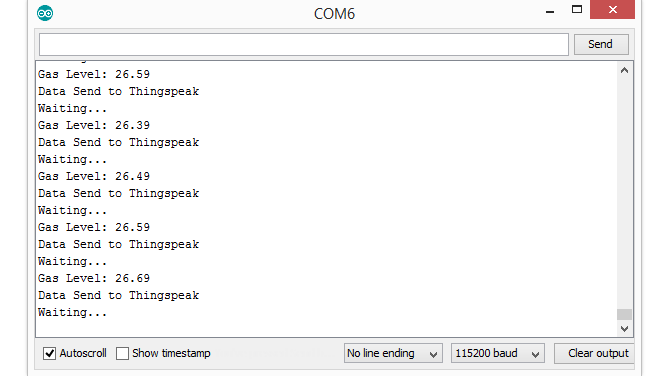
You can now introduce gas or smoke or perfume at the MQ135 and see the changes in a rise in the percentage value of gas level.

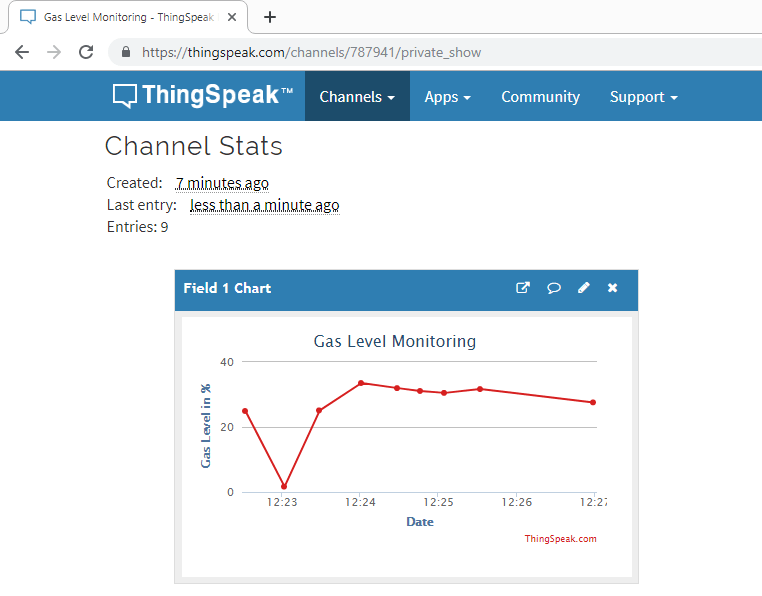
Open the thingspeak channel and select pubic/private view. Here you can see the data uploaded after the interval of 15 seconds.

Video Preview & Explanation

IOT Based Gas Level Monitoring over Internet Using ESP8266
Watch this video on YouTube.

Share. Facebook Twitter Pinterest LinkedIn Tumblr Email Reddit Telegram WhatsApp
Previous ArticleIoT Live Weather Station Monitoring Using NodeMCU ESP8266
Next Article Touch Based Door Lock System Using Arduino & Touch Sensor TTP223

Related Posts

IoT Based PM & Air Quality Monitoring System using ESP32

IoT Based PM & Air Quality Monitoring System using ESP32

DIY ESP32 MLX90640 IR Thermal Camera with Live Web Display

DIY ESP32 MLX90640 IR Thermal Camera with Live Web Display

Updated:May 10, 20261K
IoT Activity Tracker with ESP32 & Accelerometer Gyroscope

IoT Activity Tracker with ESP32 & Accelerometer/Gyroscope

Updated:May 2, 2026

ESP32 IoT Vehicle Motion Analyzer with MPU6050 & LIS3MDL

Updated:April 27, 20261K
High-Accuracy Pitch, Roll, Yaw with ESP32 & BNO08x IMU

High-Accuracy Pitch, Roll, Yaw with ESP32 & BNO08x IMU

Updated:April 27, 20262K
DIY Colorimeter using AS7265x Spectroscopy Sensor & ESP32

DIY Colorimeter using AS7265x Spectroscopy Sensor & ESP32

Updated:February 1, 20261K
View 15 Comments

15 Comments

  1. grishma on October 1, 2019 7:00 PM

    i uoloaded this code but nothing comes in serial monitor.please help me.

    Reply
  2. prince sharma on May 6, 2020 8:48 PM

    Didn’t show the graph in thingspeak

    Reply
  3. Mario on June 4, 2020 10:57 PM

    I have the same issue. In monitor it works but not in Thingspeak

    Reply
  4. Aparna on November 22, 2020 12:24 PM

    How can we calibrate MQ135

    Reply
  5. Todd Sharrard on January 30, 2021 8:31 PM

    not a good lab to do – author has not updated code to work correctly with Thinkspeak

    Reply
  6. Nishit on May 2, 2021 2:23 PM

    same problem

    Reply
  7. Rakesh on May 12, 2021 8:49 PM

    Senosr data is displayed in serial monitor ,but the data is not same in JSON format in thingspeak?? it is showing null why
    please me the solution

    Reply
  8. Wade Alex on October 21, 2021 8:05 PM

    Anyone solved the issue with thingspeak not showing the values? I can see my entries, but nothing on the graph.

    Reply
  9. Wade GG on October 21, 2021 9:25 PM

    UPDATE:
    I solved the issue and here is the link for the code :

    https://docs.google.com/document/d/1Xt4i5q6X_nxIBbx6qLLffofYwJqJ592F4WzdNPaJl8o/edit?usp=sharing

    Reply
  10. abreham on October 23, 2021 1:58 PM

    where is the scheme?

    Reply
  11. Valery on October 30, 2022 5:04 PM

    The first line of the sketch should be the library of mq-135 :
    #include <MQ135.h>

    Reply
  12. Nexa on April 8, 2023 6:59 AM

    Really good post. I’m a 14 yrs old girl coder and I had to make a circuit for a competition and found so many sites but they never contained correct info. I found this so useful with making mine, and I hope I’d win a prize! thank you so much whoever you are or whereeve you are! Love u so much!
    Nexa Osbourne

    Reply
    • Ed on November 17, 2023 11:51 PM

      That is extraordinary as everyone else here seems to stumble upon the code not being correct, whereas contrary to your statement, many other sites do contain correct code

      Reply
  13. hh on April 8, 2023 7:00 AM

    hi!

    Reply
  14. Jose DeMunck on July 16, 2023 12:31 AM

    Author never included the MQUnified sensors library? awesome….

    Reply

CommentsCancel reply

Latest Posts
IoT Based PM & Air Quality Monitoring System using ESP32

IoT Based PM & Air Quality Monitoring System using ESP32

May 31, 2026
DIY ESP32 MLX90640 IR Thermal Camera with Live Web Display

DIY ESP32 MLX90640 IR Thermal Camera with Live Web Display

May 10, 2026
IoT Activity Tracker with ESP32 & Accelerometer Gyroscope

IoT Activity Tracker with ESP32 & Accelerometer/Gyroscope

May 2, 2026
A Guide to Sourcing Obsolete ICs for Vintage Projects

Beyond AliExpress: A Guide to Sourcing Obsolete ICs for Vintage Projects

April 21, 2026

ESP32 IoT Vehicle Motion Analyzer with MPU6050 & LIS3MDL

April 27, 2026
Building a Smart Sensor Node with a BLE Microcontroller

Building a Smart Sensor Node with a BLE Microcontroller

February 26, 2026
High-Accuracy Pitch, Roll, Yaw with ESP32 & BNO08x IMU

High-Accuracy Pitch, Roll, Yaw with ESP32 & BNO08x IMU

April 27, 2026
DIY Colorimeter using AS7265x Spectroscopy Sensor & ESP32

DIY Colorimeter using AS7265x Spectroscopy Sensor & ESP32

February 1, 2026
Top Posts & Pages
  • IoT Based PM & Air Quality Monitoring System using ESP32
    IoT Based PM & Air Quality Monitoring System using ESP32
  • 12V DC to 220V AC Inverter Circuit & PCB
    12V DC to 220V AC Inverter Circuit & PCB
  • IoT AC Energy Meter with PZEM-004T & ESP32 WebServer
    IoT AC Energy Meter with PZEM-004T & ESP32 WebServer
  • Buck Converter: Basics, Working, Design & Application
    Buck Converter: Basics, Working, Design & Application
  • ESP32 CAN Bus Tutorial | Interfacing MCP2515 CAN Module with ESP32
    ESP32 CAN Bus Tutorial | Interfacing MCP2515 CAN Module with ESP32
  • ECG Graph Monitoring with AD8232 ECG Sensor & Arduino
    ECG Graph Monitoring with AD8232 ECG Sensor & Arduino
  • L293D Dual H-Bridge Motor Driver IC Pins, Circuit, Working
    L293D Dual H-Bridge Motor Driver IC Pins, Circuit, Working
  • LD2410 Sensor with ESP32 - Human Presence Detection
    LD2410 Sensor with ESP32 - Human Presence Detection
Categories
  • Arduino Projects (197)
  • Articles (60)
    • Learn Electronics (19)
    • Product Review (15)
    • Tech Articles (28)
  • Electronics Circuits (46)
    • 555 Timer Projects (21)
    • Op-Amp Circuits (7)
    • Power Electronics (13)
  • IoT Projects (204)
    • ESP32 MicroPython (7)
    • ESP32 Projects (81)
    • ESP32-CAM Projects (15)
    • ESP8266 Projects (76)
    • LoRa/LoRaWAN Projects (22)
  • Microcontrollers (38)
    • AMB82-Mini IoT AI Camera (4)
    • BLE Projects (18)
    • STM32 Projects (19)
  • Raspberry Pi (93)
    • Raspberry Pi Pico Projects (57)
    • Raspberry Pi Pico W Projects (12)
    • Raspberry Pi Projects (24)
Follow Us
  • Facebook
  • Twitter
  • Pinterest
  • Instagram
  • YouTube
About Us

“‘How to Electronics’ is a vibrant community for electronics enthusiasts and professionals. We deliver latest insights in areas such as Embedded Systems, Power Electronics, AI, IoT, and Robotics. Our goal is to stimulate innovation and provide practical solutions for students, organizations, and industries. Join us to transform learning into a joyful journey of discovery and innovation.

Copyright © How To Electronics. All rights reserved.
  • About Us
  • Disclaimer
  • Privacy Policy
  • Contact Us
  • Advertise With Us

Type above and press Enter to search. Press Esc to cancel.

Ad Blocker Enabled!
Ad Blocker Enabled!
Looks like you're using an ad blocker. Please allow ads on our site. We rely on advertising to help fund our site.



