

Overview
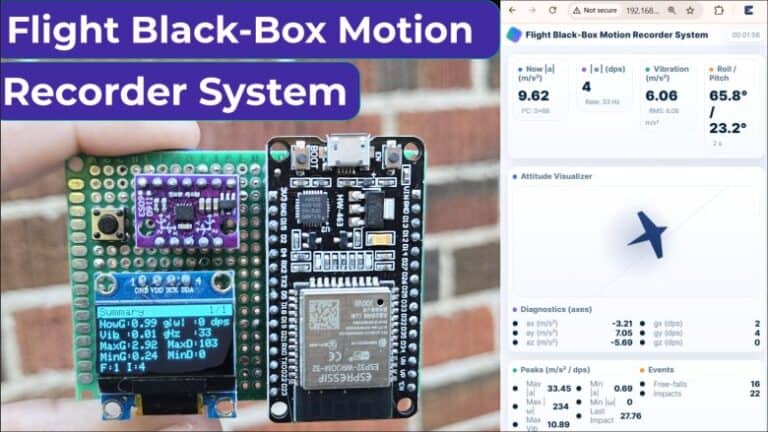
In this project, we will build a Flight Black-Box Motion Recorder System using ESP32 and the BMI160 IMU sensor. The BMI160 is a highly integrated 6-axis motion sensor that combines a 3-axis accelerometer and a 3-axis gyroscope in a single compact chip.
The ESP32–BMI160 Flight Black-Box Motion Recorder System is a demonstration device designed to study and analyze flight motion. It can also be used as a functional prototype that mimics the behavior of real aircraft black-box motion monitoring systems.
The device continuously tracks acceleration, rotation, vibration, orientation, and key motion events such as free-falls and impacts. Data is visualized on an onboard OLED screen and a beautifully designed real-time web dashboard. This compact system works like a mini flight recorder, perfect for drones, RC aircraft, vehicles, or motion-analysis experiments.
Before moving ahead, you can take a look at some tutorials & a few projects built using the BMI160 accelerometer & gyroscope module:
- DIY Pedometer using BMI160 ESP32
- BMI160 ESP32 Interfacing Guide
- BMI160 Arduino Interfacing Guide
- BMI160 Raspberry Pi Pico Interfacing Guide
Bill of Materials
To build the Flight Black-Box Motion Recorder System, we need following components.
| S.N. | Components Name | Quantity | Purchase Link |
|---|---|---|---|
| 1 | ESP32 Board | 1 | Amazon | AliExpress |
| 2 | BMI160 Accelerometer Gyroscope | 1 | Amazon | AliExpress |
| 3 | 0.96" OLED Display | 1 | Amazon | AliExpress |
| Push Button Switch | 1 | Amazon | AliExpress | |
| Resistor 1K | 1 | Amazon | AliExpress | |
| 3.7V Lithium-ion Battery | 1 | Amazon | AliExpress | |
| Boost Converter Module | 1 | Amazon | AliExpress | |
| Slide Switch | 1 | Amazon | AliExpress |
BMI160 Accelerometer/Gyroscope Module
The BMI160 is a high-performance, ultra-low-power 6-axis Inertial Measurement Unit (IMU) that integrates a 3-axis accelerometer and a 3-axis gyroscope into a single compact package. Designed by Bosch Sensortec, it delivers precise motion, orientation, and vibration measurements, making it ideal for modern embedded systems. It supports I²C/SPI communication.
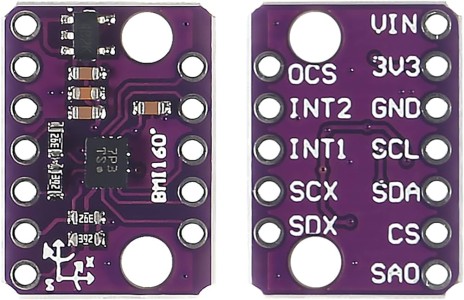
Technically, the BMI160 offers a wide selection of measurement ranges, including ±2g to ±16g for acceleration and ±125°/s to ±2000°/s for angular velocity. It features 16-bit output resolution, excellent noise performance, and advanced power modes—from full operation at under 1 mA to 3 µA in suspend mode—making it well-suited for battery-powered applications. The sensor also includes a 1024-byte FIFO, two programmable interrupt engines, and support for programmable sampling rates up to 1600 Hz, enabling efficient data logging and real-time motion tracking.
With built-in features such as step counting, motion detection, gesture recognition, and 6D orientation sensing, the BMI160 stands out as a versatile and highly capable IMU for robotics, mobile devices, augmented reality, cameras, toys, drones, and navigation systems.
Flight Black-Box Motion Recorder using ESP32 & BMI160
Lets build the hardware part of the Flight Black-Box Motion Recorder using ESP32 & BMI160. We will see the schematic, hardware, circuit etc and understand the system in detail.
Block Diagram of Flight Black-Box Motion Recorder
A Black-Box Motion Recorder System is a compact, self-powered device designed to capture, analyze, and visualize motion activity from moving platforms such as drones, RC aircraft, vehicles, or handheld devices. It continuously records acceleration, rotation, vibration, orientation, and event-based motion such as impacts or free-falls, allowing users to understand real-world dynamics, stability, and abnormal behavior.
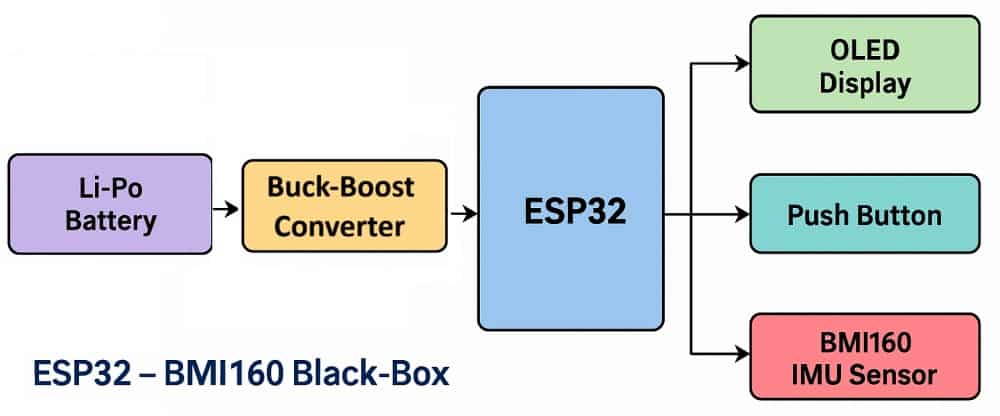
Based on the block diagram, the system consists of the following functional units:
- Li-Po Battery → Buck-Boost Converter – Supplies a stable 5V to power the device.
- ESP32 Microcontroller – Reads motion data, processes acceleration and rotation, detects events, and manages storage.
- BMI160 IMU Sensor – Provides 6-axis acceleration and gyroscope measurements.
- OLED Display – Shows real-time motion values, orientation, peaks, and diagnostics.
- Push Button – Allows page switching, reset operations, and calibration control.
Circuit Diagram/Schematic
First, let’s look at the hardware design of the ESP32-based Flight Black-Box Motion Recorder System, which captures motion data during flight and displays it on an OLED screen.
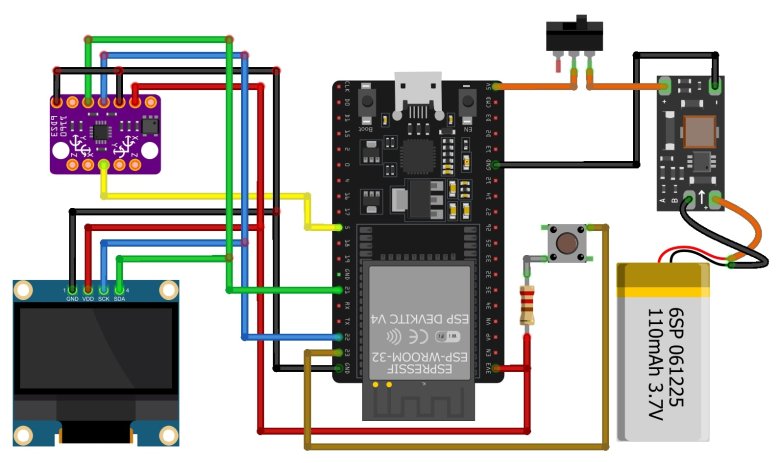
In this system, the ESP32 is the main controller that handles motion processing, orientation calculation, event detection, data logging, and Wi-Fi dashboard hosting. The BMI160 IMU sensor provides precise 3-axis acceleration and 3-axis gyroscope data required to analyze flight dynamics. The OLED display shows real-time motion parameters such as G-force, rotation, vibration, orientation, peaks, and diagnostic information.
Both the BMI160 sensor and the OLED display share the same I²C bus on the ESP32 (SDA and SCL pins). A push button connected to GPIO 23 is used for page switching, resetting peaks, and entering calibration mode during startup.
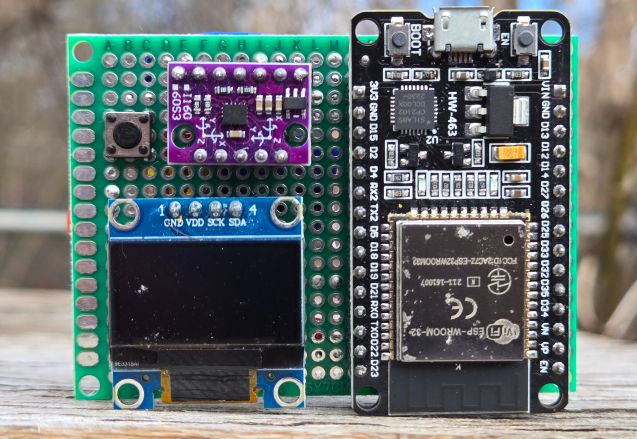
A 3.7 V Li-Po battery powers the entire circuit. Since the ESP32 requires 5 V, a buck-boost converter is used to regulate the battery voltage to a stable 5 V. This converter must be adjusted to exactly 5 V before use, as many modules ship with a default output around 12 V.
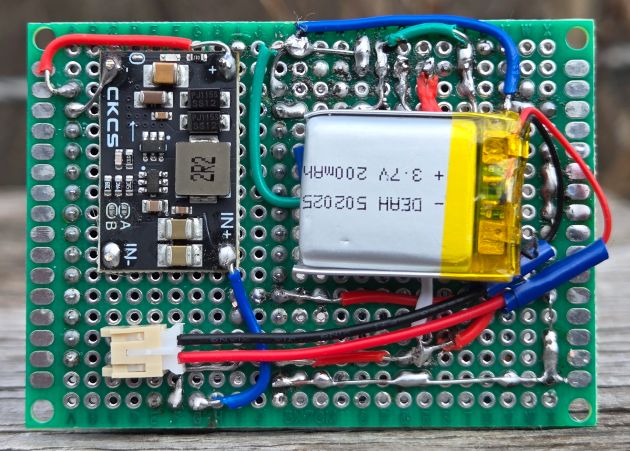
All components are mounted on a zero-PCB protoboard for a compact and durable assembly. Female headers hold the ESP32, OLED, and BMI160 modules in place, while a slide switch provides convenient on/off control.
PCB Ordering Online
To order the PCB, visit the HQ NextPCB Official Website and upload the Gerber file using the Quote Now option. You can then choose your required parameters, such as Material Type, Dimensions, Quantity, Thickness, and Solder Mask Color.
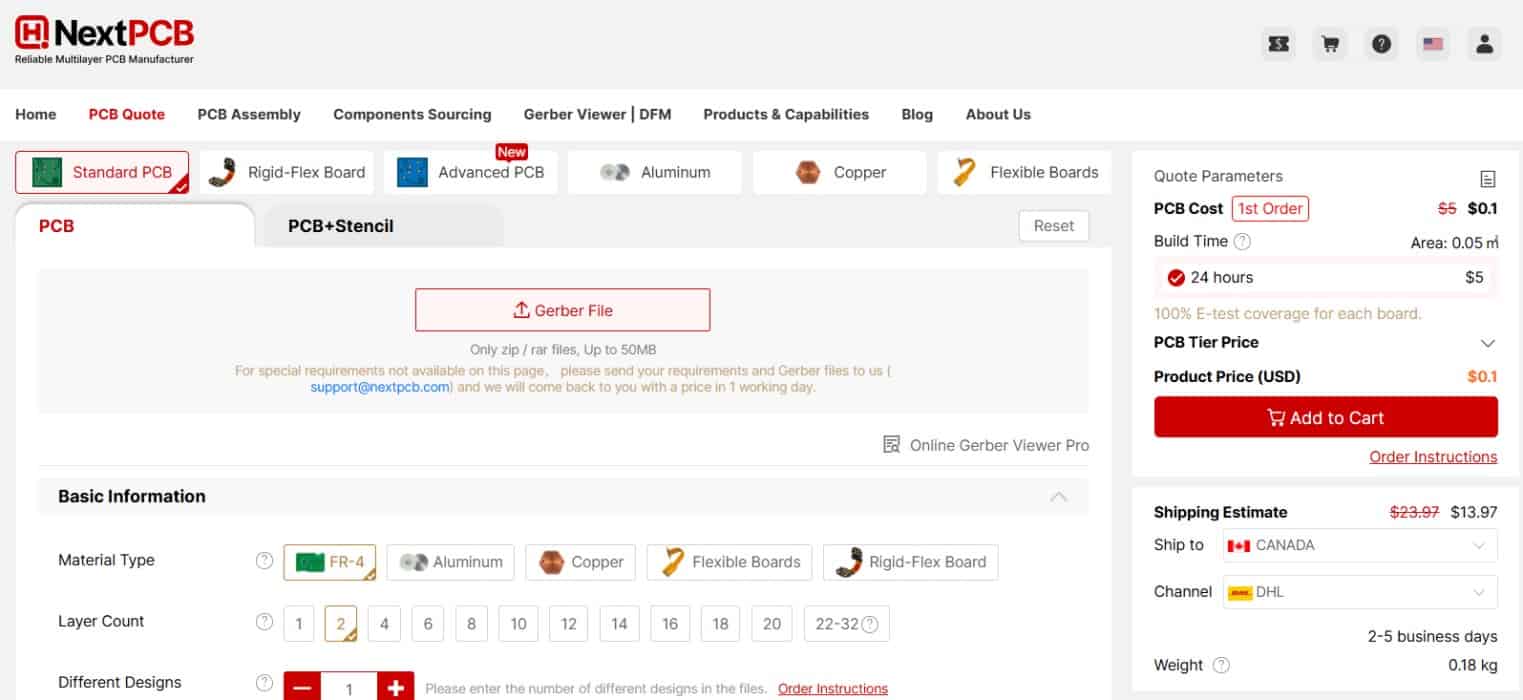
HQ NextPCB is making PCB prototyping more affordable for new users by offering 0.1$ total cost when PCB price ≤ $10 on your first PCB order. They also offer $0 shipping cost when shipping cost ≤ $10. With this promotion, you can enjoy free shipping on your first order—no restrictions on size, layers, or quantity.
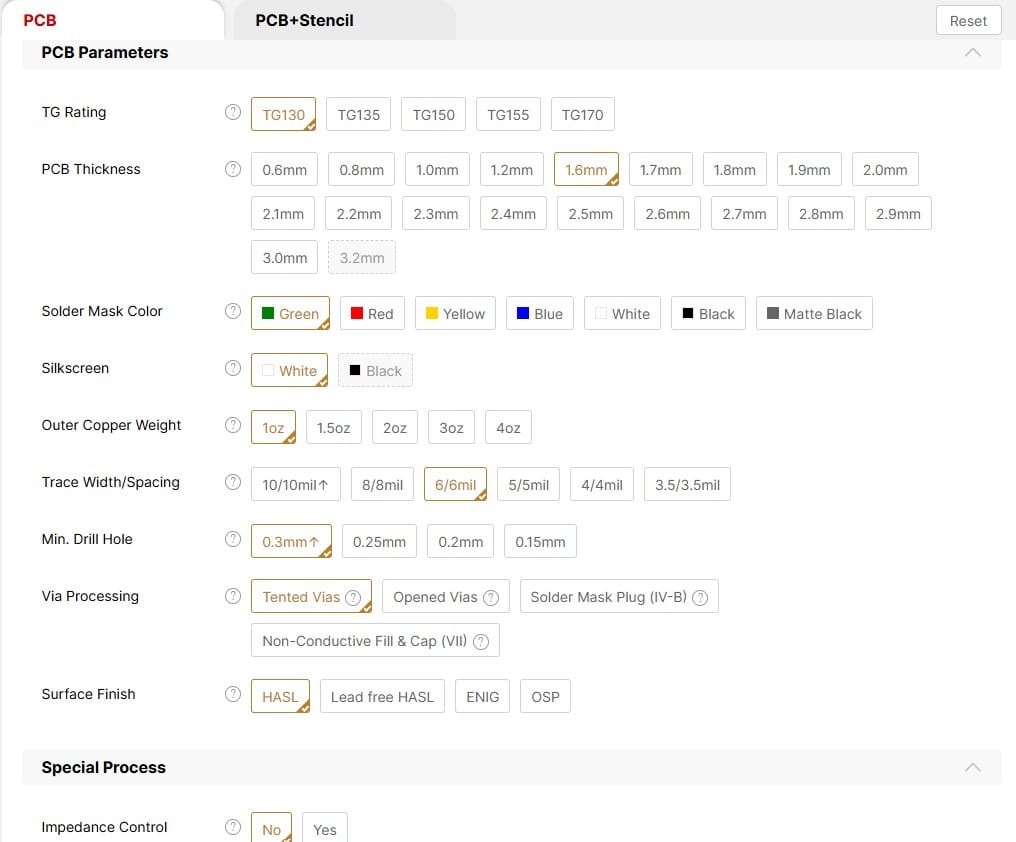
Here is the campaign detail: Unlock $0.1 PCB Prototyping. You can also use the DFM Analysis tool called HQDFM for PCB analysis.
Once all the details are filled in, select your country and shipping method. After confirming everything, you can place the order and wait for your boards to arrive.
Source Code/Program
Lets go the program/code of the Flight Motion Recorder System using BMI160 & ESP32. The following program turns the ESP32 + BMI160 + OLED into a flight black-box motion recorder with both an onboard display and a live web dashboard.
From the following lines in main.ino file, you need to change the WiFi SSID and Password. Replace it with your home network credentials.
|
1 2 |
const char* WIFI_SSID = "******************"; const char* WIFI_PASSWORD = "******************"; |
The code has two files main.ino file and webpage.h file. The webpage file is seperated from main code and integrated in the header file.
main.ino code
|
1 2 3 4 5 6 7 8 9 10 11 12 13 14 15 16 17 18 19 20 21 22 23 24 25 26 27 28 29 30 31 32 33 34 35 36 37 38 39 40 41 42 43 44 45 46 47 48 49 50 51 52 53 54 55 56 57 58 59 60 61 62 63 64 65 66 67 68 69 70 71 72 73 74 75 76 77 78 79 80 81 82 83 84 85 86 87 88 89 90 91 92 93 94 95 96 97 98 99 100 101 102 103 104 105 106 107 108 109 110 111 112 113 114 115 116 117 118 119 120 121 122 123 124 125 126 127 128 129 130 131 132 133 134 135 136 137 138 139 140 141 142 143 144 145 146 147 148 149 150 151 152 153 154 155 156 157 158 159 160 161 162 163 164 165 166 167 168 169 170 171 172 173 174 175 176 177 178 179 180 181 182 183 184 185 186 187 188 189 190 191 192 193 194 195 196 197 198 199 200 201 202 203 204 205 206 207 208 209 210 211 212 213 214 215 216 217 218 219 220 221 222 223 224 225 226 227 228 229 230 231 232 233 234 235 236 237 238 239 240 241 242 243 244 245 246 247 248 249 250 251 252 253 254 255 256 257 258 259 260 261 262 263 264 265 266 267 268 269 270 271 272 273 274 275 276 277 278 279 280 281 282 283 284 285 286 287 288 289 290 291 292 293 294 295 296 297 298 299 300 301 302 303 304 305 306 307 308 309 310 311 312 313 314 315 316 317 318 319 320 321 322 323 324 325 326 327 328 329 330 331 332 333 334 335 336 337 338 339 340 341 342 343 344 345 346 347 348 349 350 351 352 353 354 355 356 357 358 359 360 361 362 363 364 365 366 367 368 369 370 371 372 373 374 375 376 377 378 379 380 381 382 383 384 385 386 387 388 389 390 391 392 393 394 395 396 397 398 399 400 401 402 403 404 405 406 407 408 409 410 411 412 413 414 415 416 417 418 419 420 421 422 423 424 425 426 427 428 429 430 431 432 433 434 435 436 437 438 439 440 441 442 443 444 445 446 447 448 449 450 451 452 453 454 455 456 457 458 459 460 461 462 463 464 465 466 467 468 469 470 471 472 473 474 475 476 477 478 479 480 481 482 483 484 485 486 487 488 489 490 491 492 493 494 495 496 497 498 499 500 501 502 503 504 505 506 507 508 509 510 511 512 513 514 515 516 517 518 519 520 521 522 523 524 525 526 527 528 529 530 531 532 533 534 535 536 537 538 539 540 541 542 543 544 545 546 547 548 549 550 551 552 553 554 555 556 557 558 559 560 561 562 563 564 565 566 567 568 569 570 571 572 573 574 575 576 577 578 579 580 581 582 583 584 585 586 587 588 589 590 591 592 593 594 595 596 597 |
#include <Wire.h> #include <Adafruit_GFX.h> #include <Adafruit_SSD1306.h> #include <Preferences.h> #include <WiFi.h> #include <WebServer.h> #include "webpage.h" // <-- keep webpage.h in the same folder // ===================== Wi-Fi / Web (STA-only) ===================== const char* WIFI_SSID = "**************"; const char* WIFI_PASSWORD = "**************"; WebServer server(80); struct Telemetry { float nowG=0, gyroAbs=0, vibRms=0; float roll=0, pitch=0; float ax=0, ay=0, az=0, gx=0, gy=0, gz=0; float hz=0; uint32_t lastEventAgeMs=0; uint8_t addr=0x68; } telem; // ===================== OLED ===================== #define OLED_W 128 #define OLED_H 64 #define OLED_ADDR 0x3C Adafruit_SSD1306 oled(OLED_W, OLED_H, &Wire); // ---------- Layout ---------- static inline int rowY(int i){ return 12 + 10*i; } // rows at 12,22,32,42,52 const int COL1_X = 2; const int COL2_X = 66; // ===================== Pins ===================== #define SDA_PIN 21 #define SCL_PIN 22 #define BUTTON_PIN 23 // push-button to 3V3, using INPUT_PULLDOWN // ===================== BMI160 (register-level) ===================== static const uint8_t BMI160_ADDR_PRIMARY = 0x68; static const uint8_t BMI160_ADDR_ALT = 0x69; static const uint8_t REG_GYRO_START = 0x0C; // GxL..GzH static const uint8_t REG_ACCEL_START = 0x12; // AxL..AzH static const uint8_t REG_CMD = 0x7E; static const uint8_t CMD_SOFTRESET = 0xB6; static const uint8_t CMD_ACC_NORMAL = 0x11; static const uint8_t CMD_GYR_NORMAL = 0x15; static const float ACC_LSB_PER_G = 16384.0f; // ±2g default static const float GYRO_LSB_PER_DPS = 131.0f; // ±250 dps default uint8_t bmi_addr = BMI160_ADDR_PRIMARY; // ===================== Persistence (NVS) ===================== Preferences prefs; struct Calib { float ax_off=0, ay_off=0, az_off=0; // g (aim: az ~ +1g at rest) float gx_off=0, gy_off=0, gz_off=0; // dps } calib; struct Peaks { float maxG=0.0f, minG= 999.0f; float maxDPS=0.0f, minDPS=99999.0f; float maxVib=0.0f; float lastImpactG=0.0f; uint32_t freefalls=0, impacts=0, events=0; } peaks; void loadNVS() { prefs.begin("bb-rec", true); calib.ax_off = prefs.getFloat("ax_off", 0.0f); calib.ay_off = prefs.getFloat("ay_off", 0.0f); calib.az_off = prefs.getFloat("az_off", 0.0f); calib.gx_off = prefs.getFloat("gx_off", 0.0f); calib.gy_off = prefs.getFloat("gy_off", 0.0f); calib.gz_off = prefs.getFloat("gz_off", 0.0f); peaks.maxG = prefs.getFloat("maxG", 0.0f); peaks.minG = prefs.getFloat("minG", 999.0f); peaks.maxDPS = prefs.getFloat("maxDPS", 0.0f); peaks.minDPS = prefs.getFloat("minDPS", 99999.0f); peaks.maxVib = prefs.getFloat("maxVib", 0.0f); peaks.lastImpactG= prefs.getFloat("lastImp", 0.0f); peaks.freefalls = prefs.getULong("freefalls", 0); peaks.impacts = prefs.getULong("impacts", 0); peaks.events = prefs.getULong("events", 0); prefs.end(); } void saveNVS() { prefs.begin("bb-rec", false); prefs.putFloat("ax_off", calib.ax_off); prefs.putFloat("ay_off", calib.ay_off); prefs.putFloat("az_off", calib.az_off); prefs.putFloat("gx_off", calib.gx_off); prefs.putFloat("gy_off", calib.gy_off); prefs.putFloat("gz_off", calib.gz_off); prefs.putFloat("maxG", peaks.maxG); prefs.putFloat("minG", peaks.minG); prefs.putFloat("maxDPS", peaks.maxDPS); prefs.putFloat("minDPS", peaks.minDPS); prefs.putFloat("maxVib", peaks.maxVib); prefs.putFloat("lastImp",peaks.lastImpactG); prefs.putULong("freefalls", peaks.freefalls); prefs.putULong("impacts", peaks.impacts); prefs.putULong("events", peaks.events); prefs.end(); } void clearPeaks(){ peaks = Peaks(); saveNVS(); } // ===================== I2C helpers ===================== bool i2cWriteReg(uint8_t addr, uint8_t reg, uint8_t val) { Wire.beginTransmission(addr); Wire.write(reg); Wire.write(val); return Wire.endTransmission() == 0; } bool i2cReadBytes(uint8_t addr, uint8_t startReg, uint8_t len, uint8_t* buf) { Wire.beginTransmission(addr); Wire.write(startReg); if (Wire.endTransmission(false) != 0) return false; uint8_t got = Wire.requestFrom(addr, len); if (got != len) return false; for (uint8_t i=0;i<len;i++) buf[i]=Wire.read(); return true; } static inline int16_t to_i16(uint8_t lo, uint8_t hi) { return (int16_t)((uint16_t)lo | ((uint16_t)hi << 8)); } // ===================== BMI160 bring-up ===================== bool bmi160Begin() { for (uint8_t attempt=0; attempt<2; ++attempt) { uint8_t addr = (attempt==0)? BMI160_ADDR_PRIMARY : BMI160_ADDR_ALT; if (!i2cWriteReg(addr, REG_CMD, CMD_SOFTRESET)) continue; delay(100); if (!i2cWriteReg(addr, REG_CMD, CMD_ACC_NORMAL)) continue; delay(50); if (!i2cWriteReg(addr, REG_CMD, CMD_GYR_NORMAL)) continue; delay(60); uint8_t tmp[6]; if (!i2cReadBytes(addr, REG_ACCEL_START, 6, tmp)) continue; bmi_addr = addr; return true; } return false; } bool readAccel_g(float& ax, float& ay, float& az) { uint8_t b[6]; if (!i2cReadBytes(bmi_addr, REG_ACCEL_START, 6, b)) return false; ax = to_i16(b[0], b[1]) / ACC_LSB_PER_G; ay = to_i16(b[2], b[3]) / ACC_LSB_PER_G; az = to_i16(b[4], b[5]) / ACC_LSB_PER_G; return true; } bool readGyro_dps(float& gx, float& gy, float& gz) { uint8_t b[6]; if (!i2cReadBytes(bmi_addr, REG_GYRO_START, 6, b)) return false; gx = to_i16(b[0], b[1]) / GYRO_LSB_PER_DPS; gy = to_i16(b[2], b[3]) / GYRO_LSB_PER_DPS; gz = to_i16(b[4], b[5]) / GYRO_LSB_PER_DPS; return true; } // ===================== Sampling / Filters ===================== static const float SAMPLE_HZ = 200.0f; static const uint32_t SAMPLE_US= (uint32_t)(1e6f / SAMPLE_HZ); float roll_deg=0, pitch_deg=0; const int VIB_WIN = 64; float vibBuf[VIB_WIN]; int vibIdx=0; int vibCnt=0; const int CHART_W = 124; // safe bars between x=2..125 (inclusive) float chartA[CHART_W]; int chA=0; float chartG[CHART_W]; int chG=0; float chartV[CHART_W]; int chV=0; float measuredHz = 0.0f; uint32_t fpsCount=0, fpsLastMs=0; // ===================== Events / Thresholds ===================== const float FREEFALL_G = 0.25f; const uint32_t FREEFALL_MIN_MS = 30; const float IMPACT_G = 2.5f; bool inFreefall=false; uint32_t freefallStartMs=0; uint32_t lastEventMs=0; // ===================== Pages ===================== enum Page { PAGE_HOME=0, // Summary (very compact) PAGE_ACCEL, // Accel chart PAGE_GYRO, // Gyro chart PAGE_VIB, // Vib RMS chart PAGE_ORIENT, // Orientation (bubble + numbers) PAGE_PEAKS_A, // MaxG / MinG / MaxVib PAGE_PEAKS_B, // MaxDPS / MinDPS / LastImpactG PAGE_EVENTS, // Freefalls / Impacts / Last event PAGE_DIAG_A, // Addr/Hz + ax/ay PAGE_DIAG_B, // az + gx/gy/gz + |a|/|w| PAGE_COUNT }; int page = PAGE_HOME; // ===================== Button ===================== struct ButtonState { bool last=false; uint32_t lastMs=0; bool pressed=false; uint32_t startMs=0; } btn; const uint16_t DEBOUNCE_MS=30, LONGPRESS_MS=1200; void pollButton(uint32_t nowMs) { bool lvl = digitalRead(BUTTON_PIN); // pulldown: LOW idle, HIGH pressed if (lvl != btn.last && (nowMs - btn.lastMs) >= DEBOUNCE_MS) { btn.last = lvl; btn.lastMs = nowMs; if (lvl) { btn.pressed = true; btn.startMs = nowMs; } else if (btn.pressed) { uint32_t dur = nowMs - btn.startMs; btn.pressed = false; if (dur >= LONGPRESS_MS) { clearPeaks(); oled.clearDisplay(); oled.fillRect(0,0,128,10,SSD1306_WHITE); oled.setTextColor(SSD1306_BLACK); oled.setTextSize(1); oled.setCursor(2,1); oled.print("Black-Box"); oled.setTextColor(SSD1306_WHITE); oled.setCursor(100,1); oled.print("OK"); oled.setCursor(COL1_X, rowY(2)); oled.print("Peaks reset"); oled.display(); delay(500); } else { page = (page + 1) % PAGE_COUNT; } } } } // ===================== UI helpers ===================== void header(const char* title) { oled.fillRect(0,0,128,10,SSD1306_WHITE); oled.setTextSize(1); oled.setTextColor(SSD1306_BLACK); oled.setCursor(2,1); oled.print(title); oled.setCursor(106,1); oled.print(page+1); oled.print('/'); oled.print(PAGE_COUNT); oled.setTextColor(SSD1306_WHITE); } void stripChart(const char* title, float* buf, int headIdx, float nowVal, float vmax, const char* unit) { header(title); oled.drawRect(1, 12, 126, 34, SSD1306_WHITE); int y0 = 45; // bottom inside for (int i=0;i<CHART_W;i++) { int idx = (headIdx + i) % CHART_W; float vv = buf[idx]; if (vv > vmax) vv = vmax; int h = (int)(vv * (32.0f / vmax)); int x = 2 + i; if (h > 0) oled.drawLine(x, y0, x, y0 - h, SSD1306_WHITE); } oled.setCursor(COL1_X, rowY(4)); if (unit[0]=='d') { oled.print((int)nowVal); oled.print(unit); } else { oled.print(nowVal,1); oled.print(unit); } } // ===================== Pages ===================== static inline float clampf(float v, float lo, float hi){ return v<lo?lo:(v>hi?hi:v); } void pageHome(float gRes, float gyroAbs, float vibRms) { header("Summary"); oled.setCursor(COL1_X, rowY(0)); oled.print("NowG:"); oled.print(gRes,2); oled.print(" g"); oled.setCursor(COL2_X, rowY(0)); oled.print("|w| :"); oled.print((int)gyroAbs); oled.print(" dps"); oled.setCursor(COL1_X, rowY(1)); oled.print("Vib :"); oled.print(vibRms,2); oled.print(" g"); oled.setCursor(COL2_X, rowY(1)); oled.print("Hz :"); oled.print((int)(measuredHz+0.5f)); oled.setCursor(COL1_X, rowY(2)); oled.print("MaxG:"); oled.print(peaks.maxG,2); oled.setCursor(COL2_X, rowY(2)); oled.print("MaxD:"); oled.print((int)peaks.maxDPS); oled.setCursor(COL1_X, rowY(3)); oled.print("MinG:"); oled.print(peaks.minG,2); oled.setCursor(COL2_X, rowY(3)); oled.print("MinD:"); oled.print((int)peaks.minDPS); oled.setCursor(COL1_X, rowY(4)); oled.print("F:"); oled.print(peaks.freefalls); oled.print(" I:"); oled.print(peaks.impacts); } void pageAccel(float gRes) { float v = fabsf(gRes - 1.0f); if (v > 2.0f) v = 2.0f; chartA[chA] = v; chA = (chA+1) % CHART_W; stripChart("Accel |a|-1g", chartA, chA, v, 2.0f, "g"); } void pageGyro(float gyroAbs) { float v = gyroAbs; if (v > 1200.0f) v = 1200.0f; chartG[chG] = v; chG = (chG+1) % CHART_W; stripChart("Gyro |w|", chartG, chG, gyroAbs, 1200.0f, "dps"); } void pageVib(float vibRms) { float v = vibRms; if (v > 2.0f) v = 2.0f; chartV[chV] = v; chV = (chV+1) % CHART_W; stripChart("Vibration RMS", chartV, chV, vibRms, 2.0f, "g"); } void pageOrient(float gRes) { header("Orientation"); int cx = 24; int cy = 29; int R = 14; oled.drawCircle(cx, cy, R, SSD1306_WHITE); int rx = (int)(clampf(roll_deg, -45, 45) * (R/45.0f)); int ry = (int)(clampf(pitch_deg,-45, 45) * (R/45.0f)); oled.fillCircle(cx+rx, cy-ry, 3, SSD1306_WHITE); oled.setCursor(COL2_X-10, rowY(1)); oled.print("Roll :"); oled.print(roll_deg,1); oled.setCursor(COL2_X-10, rowY(2)); oled.print("Pitch:"); oled.print(pitch_deg,1); oled.setCursor(COL2_X-10, rowY(3)); oled.print("|a|:"); oled.print(gRes,2); oled.print("g"); } void pagePeaksA() { header("Peaks A"); oled.setCursor(COL1_X, rowY(0)); oled.print("MaxG : "); oled.print(peaks.maxG,2); oled.print(" g"); oled.setCursor(COL1_X, rowY(1)); oled.print("MinG : "); oled.print(peaks.minG,2); oled.print(" g"); oled.setCursor(COL1_X, rowY(2)); oled.print("MaxV : "); oled.print(peaks.maxVib,2); oled.print(" g"); } void pagePeaksB() { header("Peaks B"); oled.setCursor(COL1_X, rowY(0)); oled.print("MaxD : "); oled.print((int)peaks.maxDPS); oled.print(" dps"); oled.setCursor(COL1_X, rowY(1)); oled.print("MinD : "); oled.print((int)peaks.minDPS); oled.print(" dps"); oled.setCursor(COL1_X, rowY(2)); oled.print("LastG: "); oled.print(peaks.lastImpactG,2); oled.print(" g"); } void pageEvents(uint32_t nowMs) { header("Events"); uint32_t ago = (lastEventMs==0)? 0 : (nowMs - lastEventMs); oled.setCursor(COL1_X, rowY(0)); oled.print("Freefalls: "); oled.print(peaks.freefalls); oled.setCursor(COL1_X, rowY(1)); oled.print("Impacts : "); oled.print(peaks.impacts); oled.setCursor(COL1_X, rowY(2)); if (lastEventMs==0) { oled.print("Last: None"); } else { if (ago < 1000) { oled.print("Last: "); oled.print(ago); oled.print(" ms"); } else if (ago < 60000) { oled.print("Last: "); oled.print((int)(ago/1000)); oled.print(" s"); } else { oled.print("Last: "); oled.print((int)(ago/60000)); oled.print(" min"); } } } void pageDiagA(float ax, float ay) { header("Diag A"); oled.setCursor(COL1_X, rowY(0)); oled.print("Addr: 0x"); oled.print(bmi_addr, HEX); oled.setCursor(COL1_X, rowY(1)); oled.print("Hz : "); oled.print((int)(measuredHz+0.5f)); oled.setCursor(COL1_X, rowY(2)); oled.print("ax : "); oled.print(ax,2); oled.print(" g"); oled.setCursor(COL1_X, rowY(3)); oled.print("ay : "); oled.print(ay,2); oled.print(" g"); } void pageDiagB(float az, float gx, float gy, float gz, float gRes, float gyroAbs) { header("Diag B"); oled.setCursor(COL1_X, rowY(0)); oled.print("az : "); oled.print(az,2); oled.print(" g"); oled.setCursor(COL1_X, rowY(1)); oled.print("gx : "); oled.print((int)gx); oled.print(" dps"); oled.setCursor(COL1_X, rowY(2)); oled.print("gy : "); oled.print((int)gy); oled.print(" dps"); oled.setCursor(COL1_X, rowY(3)); oled.print("gz : "); oled.print((int)gz); oled.print(" dps"); oled.setCursor(COL1_X, rowY(4)); oled.print("|a| : "); oled.print(gRes,2); oled.print(" g |w|:"); oled.print((int)gyroAbs); } // ===================== (moved here) Web handlers & helpers ===================== String uptimeString() { uint32_t ms = millis(); uint32_t s = ms / 1000; uint32_t m = s / 60; s %= 60; uint32_t h = m / 60; m %= 60; char buf[32]; snprintf(buf, sizeof(buf), "%02u:%02u:%02u", h, m, s); return String(buf); } void handleRoot() { server.send_P(200, "text/html", INDEX_HTML); } void handleData() { // Build compact JSON without extra libs String j = "{"; j += "\"nowG\":" + String(telem.nowG, 4); j += ",\"gyroAbs\":" + String(telem.gyroAbs, 2); j += ",\"vibRms\":" + String(telem.vibRms, 4); j += ",\"roll\":" + String(telem.roll, 3); j += ",\"pitch\":" + String(telem.pitch, 3); j += ",\"ax\":" + String(telem.ax, 4); j += ",\"ay\":" + String(telem.ay, 4); j += ",\"az\":" + String(telem.az, 4); j += ",\"gx\":" + String(telem.gx, 2); j += ",\"gy\":" + String(telem.gy, 2); j += ",\"gz\":" + String(telem.gz, 2); j += ",\"hz\":" + String(telem.hz, 1); j += ",\"addr\":" + String((unsigned)telem.addr); j += ",\"peaks\":{"; j += "\"maxG\":" + String(peaks.maxG,2) + ","; j += "\"minG\":" + String(peaks.minG,2) + ","; j += "\"maxDPS\":" + String(peaks.maxDPS,0) + ","; j += "\"minDPS\":" + String(peaks.minDPS,0) + ","; j += "\"maxVib\":" + String(peaks.maxVib,2) + ","; j += "\"lastImpactG\":" + String(peaks.lastImpactG,2); j += "}"; j += ",\"counts\":{"; j += "\"freefalls\":" + String(peaks.freefalls) + ","; j += "\"impacts\":" + String(peaks.impacts) + ","; j += "\"events\":" + String(peaks.events); j += "}"; uint32_t nowMs = millis(); uint32_t ageMs = (lastEventMs==0)? 0 : (nowMs - lastEventMs); j += ",\"lastEventAgeMs\":" + String(ageMs); j += ",\"uptime\":\"" + uptimeString() + "\""; j += "}"; server.send(200, "application/json", j); } // ===================== Setup / Loop ===================== void runCalibration(); // forward (implemented earlier) void setup() { Serial.begin(115200); Wire.begin(SDA_PIN, SCL_PIN, 400000); pinMode(BUTTON_PIN, INPUT_PULLDOWN); if (!oled.begin(SSD1306_SWITCHCAPVCC, OLED_ADDR)) { /* headless ok */ } else { oled.clearDisplay(); header("Black-Box Ready"); oled.setCursor(COL1_X, rowY(2)); oled.print("Press btn to cycle pages"); oled.display(); delay(400); } loadNVS(); if (!bmi160Begin()) { oled.clearDisplay(); header("IMU Fail"); oled.setCursor(COL1_X, rowY(2)); oled.print("Check wiring 0x68/0x69"); oled.display(); } // Hold button at boot to calibrate if (digitalRead(BUTTON_PIN) == HIGH) runCalibration(); for (int i=0;i<VIB_WIN;i++) vibBuf[i]=0; for (int i=0;i<CHART_W;i++) { chartA[i]=0; chartG[i]=0; chartV[i]=0; } fpsLastMs = millis(); // ---- Wi-Fi bring-up (STA only) ---- WiFi.mode(WIFI_STA); WiFi.begin(WIFI_SSID, WIFI_PASSWORD); Serial.print("Connecting to WiFi"); unsigned long t0 = millis(); while (WiFi.status() != WL_CONNECTED && millis() - t0 < 15000) { Serial.print("."); delay(300); } Serial.println(); if (WiFi.status() == WL_CONNECTED) { Serial.print("WiFi: "); Serial.println(WiFi.localIP()); } else { Serial.println("WiFi not connected (STA only). Server still starts."); } // ---- HTTP routes ---- server.on("/", handleRoot); server.on("/data", HTTP_GET, handleData); server.begin(); Serial.println("HTTP server started"); } void loop() { static uint32_t nextSample = micros(); uint32_t now = micros(); pollButton(millis()); if ((int32_t)(now - nextSample) < 0) { server.handleClient(); return; } nextSample += SAMPLE_US; float ax, ay, az, gx, gy, gz; if (!readAccel_g(ax, ay, az)) { server.handleClient(); return; } if (!readGyro_dps(gx, gy, gz)) { server.handleClient(); return; } // Apply calibration ax -= calib.ax_off; ay -= calib.ay_off; az -= calib.az_off; gx -= calib.gx_off; gy -= calib.gy_off; gz -= calib.gz_off; float gRes = sqrtf(ax*ax + ay*ay + az*az); float gyroAbs = sqrtf(gx*gx + gy*gy + gz*gz); // Complementary filter float dt = SAMPLE_US / 1e6f; float rollAcc = atan2f(ay, az) * 180.0f / PI; float pitchAcc = atan2f(-ax, sqrtf(ay*ay + az*az)) * 180.0f / PI; roll_deg = 0.98f*(roll_deg + gx*dt) + 0.02f*rollAcc; pitch_deg = 0.98f*(pitch_deg + gy*dt) + 0.02f*pitchAcc; // Vibration RMS (|a|-1g) float hp = gRes - 1.0f; vibBuf[vibIdx] = hp*hp; vibIdx = (vibIdx+1) % VIB_WIN; if (vibCnt < VIB_WIN) vibCnt++; float vibSum=0.0f; for (int i=0;i<vibCnt;i++) vibSum += vibBuf[i]; float vibRms = sqrtf(vibSum / (float)(vibCnt>0?vibCnt:1)); // Peaks/mins bool changed=false; if (gRes > peaks.maxG) { peaks.maxG = gRes; changed=true; } if (gRes < peaks.minG) { peaks.minG = gRes; changed=true; } if (gyroAbs > peaks.maxDPS) { peaks.maxDPS = gyroAbs; changed=true; } if (gyroAbs < peaks.minDPS) { peaks.minDPS = gyroAbs; changed=true; } if (vibRms > peaks.maxVib) { peaks.maxVib = vibRms; changed=true; } if (changed) saveNVS(); // Events uint32_t nowMs = millis(); if (!inFreefall && gRes < FREEFALL_G) { inFreefall = true; freefallStartMs = nowMs; } else if (inFreefall && gRes >= FREEFALL_G) { if (nowMs - freefallStartMs >= FREEFALL_MIN_MS) { peaks.freefalls++; peaks.events++; saveNVS(); lastEventMs = nowMs; } inFreefall = false; } if (gRes >= IMPACT_G) { peaks.impacts++; peaks.events++; peaks.lastImpactG = gRes; saveNVS(); lastEventMs = nowMs; } // Charts (bounded width/height) float aDisp = fabsf(gRes - 1.0f); if (aDisp > 2.0f) aDisp = 2.0f; chartA[chA] = aDisp; chA = (chA+1) % CHART_W; float gDisp = gyroAbs; if (gDisp > 1200.0f) gDisp = 1200.0f; chartG[chG] = gDisp; chG = (chG+1) % CHART_W; float vDisp = vibRms; if (vDisp > 2.0f) vDisp = 2.0f; chartV[chV] = vDisp; chV = (chV+1) % CHART_W; // Measured loop rate fpsCount++; uint32_t ms = millis(); if (ms - fpsLastMs >= 1000) { measuredHz = (float)fpsCount * 1000.0f / (float)(ms - fpsLastMs); fpsCount = 0; fpsLastMs = ms; } // Update telemetry snapshot for web telem.nowG = gRes; telem.gyroAbs = gyroAbs; telem.vibRms = vibRms; telem.roll = roll_deg; telem.pitch = pitch_deg; telem.ax = ax; telem.ay = ay; telem.az = az; telem.gx = gx; telem.gy = gy; telem.gz = gz; telem.hz = measuredHz; telem.addr = bmi_addr; telem.lastEventAgeMs = (lastEventMs==0)? 0 : (ms - lastEventMs); // Draw page oled.clearDisplay(); switch (page) { case PAGE_HOME: pageHome(gRes, gyroAbs, vibRms); break; case PAGE_ACCEL: pageAccel(gRes); break; case PAGE_GYRO: pageGyro(gyroAbs); break; case PAGE_VIB: pageVib(vibRms); break; case PAGE_ORIENT: pageOrient(gRes); break; case PAGE_PEAKS_A: pagePeaksA(); break; case PAGE_PEAKS_B: pagePeaksB(); break; case PAGE_EVENTS: pageEvents(ms); break; case PAGE_DIAG_A: pageDiagA(ax, ay); break; case PAGE_DIAG_B: pageDiagB(az, gx, gy, gz, gRes, gyroAbs); break; } oled.display(); // Serve web requests server.handleClient(); } // ===================== Calibration (hold button at boot) ===================== void runCalibration() { oled.clearDisplay(); oled.fillRect(0,0,128,10,SSD1306_WHITE); oled.setTextColor(SSD1306_BLACK); oled.setTextSize(1); oled.setCursor(2,1); oled.print("Calibrating..."); oled.setTextColor(SSD1306_WHITE); // Progress bar frame in row 1 oled.drawRect(2, rowY(1)-2, 124, 8, SSD1306_WHITE); oled.display(); const int N=200; float sax=0, say=0, saz=0, sgx=0, sgy=0, sgz=0; for (int i=0;i<N;i++) { float ax, ay, az, gx, gy, gz; if (!readAccel_g(ax,ay,az)) { i--; continue; } if (!readGyro_dps(gx,gy,gz)) { i--; continue; } sax+=ax; say+=ay; saz+=az; sgx+=gx; sgy+=gy; sgz+=gz; int w = (i+1) * 122 / N; oled.fillRect(3, rowY(1)-1, w, 6, SSD1306_WHITE); oled.display(); delay(3); } float axm=sax/N, aym=say/N, azm=saz/N; float gxm=sgx/N, gym=sgy/N, gzm=sgz/N; calib.ax_off = axm; calib.ay_off = aym; calib.az_off = azm - 1.0f; // want +1g on Z at rest calib.gx_off = gxm; calib.gy_off = gym; calib.gz_off = gzm; saveNVS(); oled.clearDisplay(); oled.fillRect(0,0,128,10,SSD1306_WHITE); oled.setTextColor(SSD1306_BLACK); oled.setCursor(2,1); oled.print("Calib Done"); oled.setTextColor(SSD1306_WHITE); oled.setCursor(COL1_X, rowY(1)); oled.printf("ax %.3f ay %.3f", calib.ax_off, calib.ay_off); oled.setCursor(COL1_X, rowY(2)); oled.printf("az %.3f", calib.az_off); oled.setCursor(COL1_X, rowY(3)); oled.printf("gx %.2f gy %.2f", calib.gx_off, calib.gy_off); oled.setCursor(COL1_X, rowY(4)); oled.printf("gz %.2f", calib.gz_off); oled.display(); delay(800); } |
webpage.h code
|
1 2 3 4 5 6 7 8 9 10 11 12 13 14 15 16 17 18 19 20 21 22 23 24 25 26 27 28 29 30 31 32 33 34 35 36 37 38 39 40 41 42 43 44 45 46 47 48 49 50 51 52 53 54 55 56 57 58 59 60 61 62 63 64 65 66 67 68 69 70 71 72 73 74 75 76 77 78 79 80 81 82 83 84 85 86 87 88 89 90 91 92 93 94 95 96 97 98 99 100 101 102 103 104 105 106 107 108 109 110 111 112 113 114 115 116 117 118 119 120 121 122 123 124 125 126 127 128 129 130 131 132 133 134 135 136 137 138 139 140 141 142 143 144 145 146 147 148 149 150 151 152 153 154 155 156 157 158 159 160 161 162 163 164 165 166 167 168 169 170 171 172 173 174 175 176 177 178 179 180 181 182 183 184 185 186 187 188 189 190 191 192 193 194 195 196 197 198 199 200 201 202 203 204 205 206 207 208 209 210 211 212 213 214 215 216 217 218 219 220 221 222 223 224 225 226 227 228 229 230 231 232 233 234 235 236 237 238 239 240 241 242 243 244 245 246 247 248 249 250 251 252 253 254 255 256 257 258 259 260 261 262 263 264 265 266 267 268 269 270 271 272 273 274 275 276 277 278 279 280 281 282 283 284 285 286 287 288 289 290 291 292 293 294 295 296 297 298 299 300 301 302 303 304 305 306 307 308 309 310 311 312 313 314 315 316 317 318 |
#pragma once #include <pgmspace.h> const char INDEX_HTML[] PROGMEM = R"rawliteral( <!DOCTYPE html> <html lang="en"> <head> <meta charset="utf-8" /> <meta name="viewport" content="width=device-width,initial-scale=1" /> <title>Flight Black-Box Motion Recorder System</title> <style> :root{ --page:#f6f9ff; --panel:#ffffff; --panel2:#f8fbff; --text:#0a2742; --muted:#647e97; --border:#e3ecf7; --grid:#e9eef6; --blue:#2b76ff; --vio:#7b61ff; --teal:#15b89a; --orange:#ff8c3a; --shadow: 0 8px 22px rgba(21,44,88,.10); --radius: 14px; --kpi-h: 86px; --plane-h: 160px; --chart-h: 100px; --gutter: 12px; --pad: 10px; --title: 12px; --val: 22px; } *{box-sizing:border-box} html,body{height:100%} body{ margin:0;color:var(--text); font-family: Inter, system-ui, -apple-system, "Segoe UI", Roboto, Ubuntu, Helvetica, Arial; background: radial-gradient(1100px 700px at 10% -30%, #eaf2ff 0%, transparent 55%), radial-gradient(800px 500px at 120% 30%, #eef2ff 0%, transparent 60%), linear-gradient(180deg,#f8fbff, var(--page)); } header{ position:sticky;top:0;z-index:10; backdrop-filter:saturate(1.1) blur(6px); background:linear-gradient(90deg,rgba(255,255,255,.9),rgba(255,255,255,.9)); border-bottom:1px solid var(--border); padding:6px 12px; display:flex; align-items:center; gap:8px; } header .logo{ width:22px;height:22px;border-radius:6px; background: conic-gradient(from 180deg, var(--blue), var(--vio), var(--teal), var(--blue)); box-shadow: inset 0 0 3px rgba(255,255,255,.7), 0 0 0 1px #dfe8fa; animation: spin 10s linear infinite;} @keyframes spin{to{transform:rotate(360deg)}} header h1{margin:0;font-size:14px;letter-spacing:.2px;font-weight:800} header .pill{margin-left:auto;font-size:11px;color:var(--muted); padding:4px 8px;border-radius:999px;border:1px solid var(--border); background: var(--panel); box-shadow: var(--shadow);} main{ padding:12px; display:grid; gap:var(--gutter); grid-template-columns:repeat(12,1fr); max-width:1180px; margin:0 auto; } .card{ grid-column:span 12; position:relative; overflow:hidden; border-radius:var(--radius); padding:var(--pad); border:1px solid var(--border); background: linear-gradient(180deg, var(--panel), var(--panel2)); box-shadow: var(--shadow); } .row{display:grid; gap:var(--gutter); grid-template-columns:repeat(12,1fr)} .span-3{grid-column:span 3}.span-4{grid-column:span 4}.span-5{grid-column:span 5}.span-6{grid-column:span 6}.span-7{grid-column:span 7}.span-12{grid-column:span 12} .kpi{ border:1px solid var(--border); border-radius:12px; padding:8px; min-height:var(--kpi-h); background: linear-gradient(180deg,#ffffff,#f8fbff); } .kpi h3{ margin:0 0 4px; color:var(--muted); font-size:var(--title); font-weight:800; letter-spacing:.2px } .kpi .val{ font-size:var(--val); font-weight:900; letter-spacing:.2px } .kpi .sub{ color:var(--muted); font-size:10px; margin-left:6px } .chart{ height:var(--chart-h); border-radius:12px; border:1px solid var(--border); background: linear-gradient(180deg,#ffffff,#f7faff); position:relative; overflow:hidden } .chart canvas{ width:100%; height:100%; display:block } .chart .shine{ position:absolute; inset:0; background:linear-gradient(90deg, transparent, rgba(0,0,0,.04), transparent); transform:translateX(-100%); animation: sweep 7s ease-in-out infinite } @keyframes sweep{50%{transform:translateX(100%)}100%{transform:translateX(100%)}} /* Bullet key-value rows (no numbers) */ .kv{ display:grid; grid-template-columns: 12px 1fr auto; align-items:center; gap:6px 10px; } .bullet{ width:8px; height:8px; border-radius:50%; background:#0a2742; box-shadow: 0 1px 3px rgba(0,0,0,.15); } .label{ font-size:12px; color:var(--muted) } .val{ font-weight:800; font-size:13px; color:var(--text) } /* Attitude */ .plane-wrap{ position:relative; height:var(--plane-h); border-radius:12px; border:1px solid var(--border); background: linear-gradient(180deg,#ffffff,#f6f9ff); overflow:hidden } .sky{ position:absolute; inset:0; opacity:.45; background: radial-gradient(3px 3px at 10% 30%, #b0c2e3, transparent 60%), radial-gradient(2px 2px at 40% 60%, #b0c2e3, transparent 60%), radial-gradient(2px 2px at 70% 20%, #b0c2e3, transparent 60%), radial-gradient(3px 3px at 85% 75%, #b0c2e3, transparent 60%), radial-gradient(2px 2px at 25% 80%, #b0c2e3, transparent 60%); animation: twinkle 6s ease-in-out infinite alternate } @keyframes twinkle{from{opacity:.25}to{opacity:.55}} .horizon{position:absolute; left:0; right:0; top:50%; height:1px; background:#d8e2f2; transform-origin:50% 50%} .plane{ position:absolute; left:50%; top:50%; width:96px; height:96px; transform:translate(-50%,-50%); display:grid; place-items:center; filter: drop-shadow(0 6px 18px rgba(20,40,90,.22)); transition: transform 120ms linear } .plane svg{ width:96px; height:96px } .plane path{ fill:url(#fuselageDark); stroke:#324b77; stroke-width:.8 } .bank-glow{ position:absolute; left:50%; top:50%; transform:translate(-50%,-50%); width:180px; height:180px; border-radius:50%; background:radial-gradient(closest-side, rgba(30,70,140,.14), transparent 70%) } h3[accent]{ font-weight:800; font-size:var(--title); letter-spacing:.2px; margin:0 0 8px; color:var(--muted) } h3 .dot{ display:inline-block; width:7px; height:7px; border-radius:50%; margin-right:6px; vertical-align:middle } .blue .dot{ background:var(--blue) } .vio .dot{ background:var(--vio) } .teal .dot{ background:var(--teal) } .orange .dot{ background:var(--orange) } @media (max-width: 980px){ .span-7,.span-5{grid-column:span 12} :root{ --plane-h: 180px } } </style> </head> <body> <header> <div class="logo" aria-hidden="true"></div> <h1>Flight Black-Box Motion Recorder System</h1> <div class="pill" id="uptime">—</div> </header> <main> <!-- KPI Row --> <section class="card span-12" style="padding:8px;"> <div class="row"> <div class="span-3"> <div class="kpi"> <h3 class="blue" accent><span class="dot"></span>Now |a| (m/s²)</h3> <div class="val" id="nowA_ms2">—</div> <span class="sub" id="addr">I²C: —</span> </div> </div> <div class="span-3"> <div class="kpi"> <h3 class="vio" accent><span class="dot"></span>|ω| (dps)</h3> <div class="val" id="gyroAbs">—</div> <span class="sub" id="hz">Rate: — Hz</span> </div> </div> <div class="span-3"> <div class="kpi"> <h3 class="teal" accent><span class="dot"></span>Vibration (m/s²)</h3> <div class="val" id="vib_ms2">—</div> <span class="sub" id="vibRms">RMS: —</span> </div> </div> <div class="span-3"> <div class="kpi"> <h3 class="orange" accent><span class="dot"></span>Roll / Pitch</h3> <div class="val"><span id="roll">—</span>° / <span id="pitch">—</span>°</div> <span class="sub" id="lastEvent">Last: —</span> </div> </div> </div> </section> <!-- Visualizer (7) + Diagnostics (5) --> <section class="card span-12" style="padding:8px;"> <div class="row"> <div class="span-7"> <h3 class="blue" accent><span class="dot"></span>Attitude Visualizer</h3> <div class="plane-wrap"> <div class="sky"></div> <div class="horizon" id="horizon"></div> <div class="bank-glow" id="bankGlow"></div> <div class="plane" id="plane"> <svg viewBox="0 0 100 100" xmlns="http://www.w3.org/2000/svg" role="img" aria-label="plane"> <defs> <linearGradient id="fuselageDark" x1="0" x2="1" y1="0" y2="1"> <stop offset="0%" stop-color="#2a4a8a"/> <stop offset="55%" stop-color="#1f3b73"/> <stop offset="100%" stop-color="#16325f"/> </linearGradient> </defs> <path d="M50 12 L57 28 L92 40 L92 48 L57 48 L50 86 L43 48 L8 48 L8 40 L43 28 Z"/> <path d="M46 30 Q50 26 54 30 L50 40 Z" fill="#dce6f8" opacity=".6" stroke="none"/> </svg> </div> </div> </div> <!-- Diagnostics: ax/ay/az (left column), gx/gy/gz (right column) --> <div class="span-5"> <h3 class="vio" accent><span class="dot"></span>Diagnostics (axes)</h3> <div class="row"> <div class="span-6"> <div class="kv"><div class="bullet"></div><div class="label">ax (m/s²)</div><div class="val" id="ax_ms2">—</div></div> <div class="kv"><div class="bullet"></div><div class="label">ay (m/s²)</div><div class="val" id="ay_ms2">—</div></div> <div class="kv"><div class="bullet"></div><div class="label">az (m/s²)</div><div class="val" id="az_ms2">—</div></div> </div> <div class="span-6"> <div class="kv"><div class="bullet"></div><div class="label">gx (dps)</div><div class="val" id="gx">—</div></div> <div class="kv"><div class="bullet"></div><div class="label">gy (dps)</div><div class="val" id="gy">—</div></div> <div class="kv"><div class="bullet"></div><div class="label">gz (dps)</div><div class="val" id="gz">—</div></div> </div> </div> </div> </div> </section> <!-- Peaks & Events (bulleted, tidy) --> <section class="card span-12" style="padding:8px;"> <div class="row"> <div class="span-6"> <h3 class="teal" accent><span class="dot"></span>Peaks (m/s² / dps)</h3> <div class="row"> <div class="span-6"> <div class="kv"><div class="bullet"></div><div class="label">Max |a|</div><div class="val" id="maxA_ms2">—</div></div> <div class="kv"><div class="bullet"></div><div class="label">Max |ω|</div><div class="val" id="maxDPS">—</div></div> <div class="kv"><div class="bullet"></div><div class="label">Max Vib</div><div class="val" id="maxVib_ms2">—</div></div> </div> <div class="span-6"> <div class="kv"><div class="bullet"></div><div class="label">Min |a|</div><div class="val" id="minA_ms2">—</div></div> <div class="kv"><div class="bullet"></div><div class="label">Min |ω|</div><div class="val" id="minDPS">—</div></div> <div class="kv"><div class="bullet"></div><div class="label">Last Impact</div><div class="val" id="lastImpact_ms2">—</div></div> </div> </div> </div> <div class="span-6"> <h3 class="orange" accent><span class="dot"></span>Events</h3> <div class="kv"><div class="bullet"></div><div class="label">Free-falls</div><div class="val" id="freefalls">—</div></div> <div class="kv"><div class="bullet"></div><div class="label">Impacts</div><div class="val" id="impacts">—</div></div> </div> </div> </section> <!-- Charts Row --> <section class="card span-12" style="padding:8px;"> <div class="row"> <div class="span-4"> <h3 class="blue" accent><span class="dot"></span>Accel |a|-1g (m/s²)</h3> <div class="chart"><span class="shine"></span><canvas id="cAccel"></canvas></div> </div> <div class="span-4"> <h3 class="vio" accent><span class="dot"></span>Gyro |ω| (dps)</h3> <div class="chart"><span class="shine"></span><canvas id="cGyro"></canvas></div> </div> <div class="span-4"> <h3 class="teal" accent><span class="dot"></span>Vibration RMS (m/s²)</h3> <div class="chart"><span class="shine"></span><canvas id="cVib"></canvas></div> </div> </div> </section> </main> <script> (() => { const el = id => document.getElementById(id); const G = 9.81; // m/s² per g function makeChart(canvasId, ymax, colorTop, colorBottom) { const c = el(canvasId), ctx = c.getContext('2d'); const W = c.width = c.clientWidth || 360; const H = c.height = c.clientHeight || 100; const N = 200; const data = new Array(N).fill(0); function draw() { ctx.clearRect(0,0,W,H); ctx.strokeStyle = "#e9eef6"; ctx.lineWidth = 1; for (let y=0;y<H;y+=20){ ctx.beginPath(); ctx.moveTo(0,y+0.5); ctx.lineTo(W,y+0.5); ctx.stroke(); } const g = ctx.createLinearGradient(0,0,0,H); g.addColorStop(0, colorTop); g.addColorStop(1, colorBottom); ctx.lineWidth = 2; ctx.strokeStyle = g; ctx.beginPath(); for (let i=0;i<N;i++){ const vx = (i/(N-1))*W; const v = Math.min(ymax, Math.max(0, data[i])); const vy = H - (v/ymax)*(H-8) - 4; if(i===0) ctx.moveTo(vx,vy); else ctx.lineTo(vx,vy); } ctx.stroke(); } function push(v){ data.push(v); data.shift(); draw(); } draw(); return { push }; } const chartAccel = makeChart('cAccel', 2*G, 'rgba(43,118,255,0.95)','rgba(43,118,255,0.20)'); const chartGyro = makeChart('cGyro', 1200.0, 'rgba(123,97,255,0.95)','rgba(123,97,255,0.20)'); const chartVib = makeChart('cVib', 2*G, 'rgba(21,184,154,0.95)','rgba(21,184,154,0.20)'); function fmtMs(ms){ if(!ms) return 'None'; if(ms<1000) return ms+' ms'; const s=Math.floor(ms/1000); return s<60? s+' s' : Math.floor(s/60)+' min'; } function clamp(v,lo,hi){ return v<lo?lo:v>hi?hi:v; } function updatePlane(roll, pitch){ const p = el('plane'), h = el('horizon'), glow = el('bankGlow'); const r = clamp(roll,-70,70), pch = clamp(pitch,-35,35); p.style.transform = `translate(-50%,-50%) rotate(${r}deg) translateY(${pch*-0.8}px)`; h.style.transform = `translateY(-50%) rotate(${-r*0.6}deg) translateY(${pch*1.1}px)`; glow.style.background = `radial-gradient(closest-side, rgba(30,70,140,${Math.min(0.08 + Math.abs(r)/180, 0.18)}), transparent 70%)`; } async function tick(){ try{ const r = await fetch('/data',{cache:'no-store'}); if(!r.ok) throw new Error('HTTP '+r.status); const d = await r.json(); // g -> m/s² conversions const nowA_ms2 = d.nowG*G, vib_ms2 = d.vibRms*G; const ax_ms2 = d.ax*G, ay_ms2 = d.ay*G, az_ms2 = d.az*G; const maxA_ms2 = d.peaks.maxG*G, minA_ms2 = d.peaks.minG*G; const lastImp_ms2 = d.peaks.lastImpactG*G, maxVib_ms2 = d.peaks.maxVib*G; // KPIs el('nowA_ms2').textContent = nowA_ms2.toFixed(2); el('gyroAbs').textContent = Math.round(d.gyroAbs); el('vib_ms2').textContent = vib_ms2.toFixed(2); el('vibRms').textContent = `RMS: ${vib_ms2.toFixed(2)} m/s²`; el('hz').textContent = `Rate: ${Math.round(d.hz)} Hz`; el('roll').textContent = d.roll.toFixed(1); el('pitch').textContent = d.pitch.toFixed(1); el('addr').textContent = `I²C: 0x${d.addr.toString(16)}`; el('lastEvent').textContent= fmtMs(d.lastEventAgeMs); el('uptime').textContent = d.uptime; // Diagnostics el('ax_ms2').textContent = ax_ms2.toFixed(2); el('ay_ms2').textContent = ay_ms2.toFixed(2); el('az_ms2').textContent = az_ms2.toFixed(2); el('gx').textContent = Math.round(d.gx); el('gy').textContent = Math.round(d.gy); el('gz').textContent = Math.round(d.gz); // Peaks & events el('maxA_ms2').textContent = maxA_ms2.toFixed(2); el('minA_ms2').textContent = minA_ms2.toFixed(2); el('maxDPS').textContent = Math.round(d.peaks.maxDPS); el('minDPS').textContent = Math.round(d.peaks.minDPS); el('maxVib_ms2').textContent = maxVib_ms2.toFixed(2); el('lastImpact_ms2').textContent= lastImp_ms2.toFixed(2); el('freefalls').textContent = d.counts.freefalls; el('impacts').textContent = d.counts.impacts; // Charts chartAccel.push(Math.min(2*G, Math.abs(d.nowG - 1.0)*G)); chartGyro.push(Math.min(1200, d.gyroAbs)); chartVib.push(Math.min(2*G, vib_ms2)); updatePlane(d.roll, d.pitch); }catch(e){ // silent retry }finally{ setTimeout(tick, 120); } } tick(); })(); </script> </body> </html> )rawliteral"; |
At the top of the main code, it includes libraries for I²C (Wire), the OLED (Adafruit_GFX / SSD1306), non-volatile storage (Preferences), Wi-Fi, and a simple HTTP server. It defines your Wi-Fi credentials and creates a WebServer on port 80. A Telemetry struct holds the latest motion values (G-force, gyro magnitude, vibration RMS, roll, pitch, raw axes, sampling rate, etc.) which are later sent to the webpage as JSON.
The BMI160 is accessed at register level: helper functions i2cWriteReg, i2cReadBytes, readAccel_g, and readGyro_dps talk directly to the sensor, while bmi160Begin() does a soft reset and puts the accelerometer and gyro into normal mode. Calibration offsets and peak statistics are stored in flash using Preferences; loadNVS() and saveNVS() read and write those values, and clearPeaks() resets them. The code then implements a 200 Hz sampling loop, computes |a| and |ω|, runs a complementary filter to estimate roll and pitch, and calculates a vibration RMS window.
Events such as free-fall and impacts are detected using thresholds on |a|; counters and peak values are updated and saved to NVS. Several page functions (pageHome, pageAccel, pageGyro, pageVib, pageOrient, pagePeaksA/B, pageEvents, pageDiagA/B) draw different views on the OLED, including scrolling strip charts. A debounced push button cycles through pages on short press and clears peaks on long press.
Wi-Fi is configured in STA mode; the ESP32 connects to your router, starts an HTTP server, and serves the HTML UI from webpage.h at /. The /data handler builds a compact JSON string from the telem struct and peaks/event counters so the web page can update its gauges and graphs in real time. The loop() function ties everything together: it samples the IMU at a fixed rate, updates telemetry and peaks, draws the selected OLED page, and continuously services incoming web requests. A separate runCalibration() routine (triggered by holding the button at boot) averages multiple samples to compute new offsets and shows progress on the OLED.
Testing the ESP32 BMI160 Flight Black-Box Motion Recorder System
To test the Flight Black-Box Motion Recorder System, you need to upload the above code to the ESP32 Board. Once uploading is done, the OLED starts showing the flight data.
Data Visualization on OLED Display
The OLED Display has 10 pages. The push button is used to navigate to different pages from 1 to 10. Press the push button and you will see details of different BMI160 Data.
- Short press – Cycles through the 10 OLED pages, so you can view different BMI160 motion data screens.
- Long press (~1.2 s) – Clears all stored peaks/events and shows a “Peaks reset” message.
- Hold while powering/resetting – Starts the calibration routine to learn new sensor offsets.
-
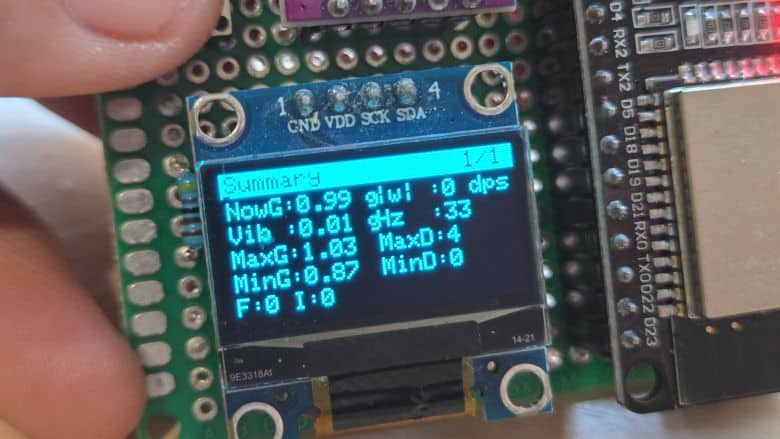
Page 1 – Summary:
On the first page, it shows the live G-force, gyro rotation magnitude, vibration level, sampling rate (Hz), and a quick overview of peak values and event counts, such as impacts and free-falls. -
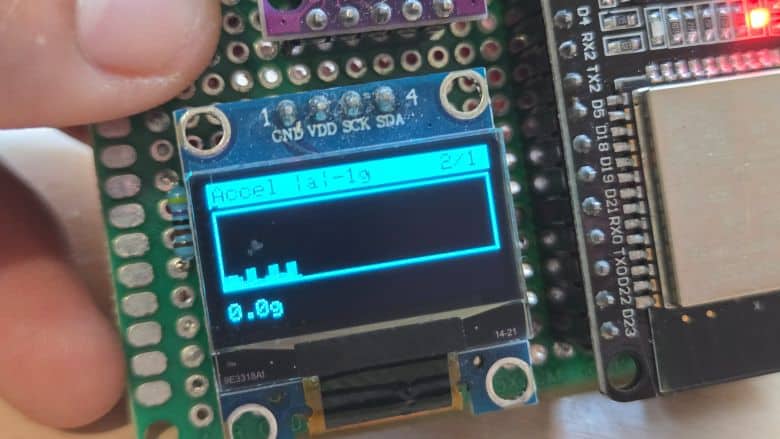
Page 2 – Acceleration Chart:
This page displays a real-time scrolling chart of acceleration (|a|−1g), allowing you to visually observe movement spikes, shaking, and flight stability. -
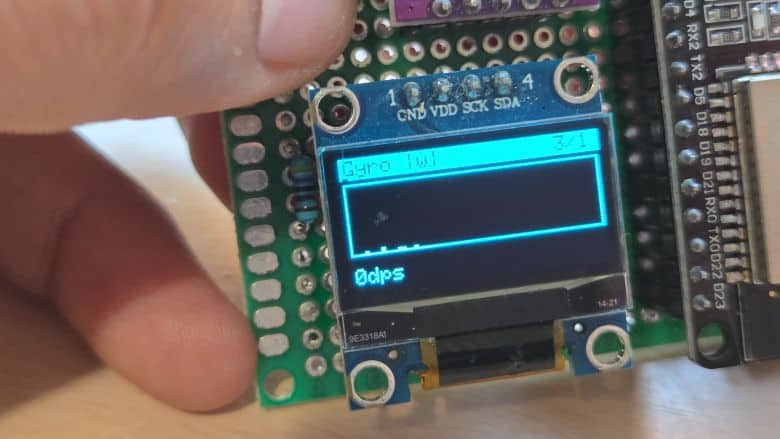
Page 3 – Gyroscope Chart:
Here you see a moving graph of the gyro magnitude (|ω|), showing how fast the device is rotating and helping you understand angular motion. -
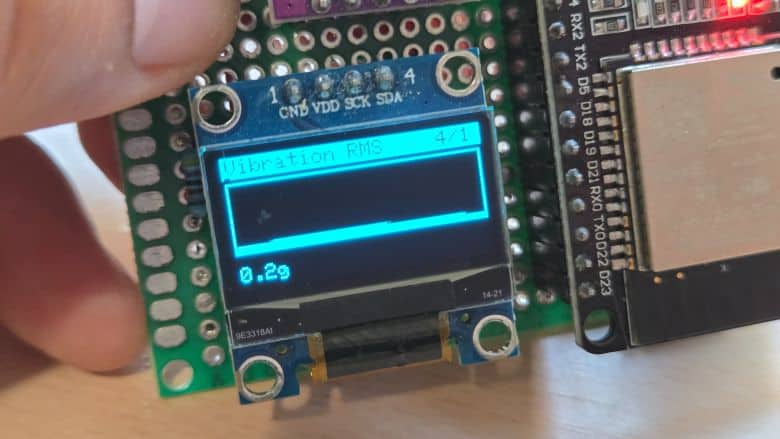
Page 4 – Vibration RMS Chart:
This page plots the vibration intensity using RMS calculations, making it easy to detect turbulence, mechanical vibration, or sudden shocks. -
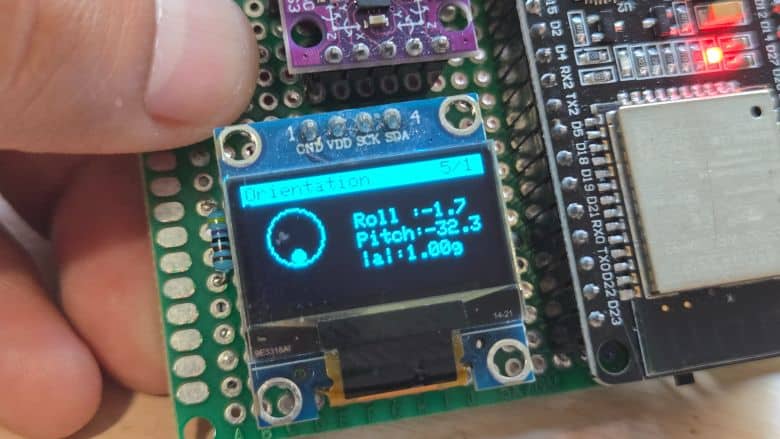
Page 5 – Orientation (Attitude Indicator):
It shows a bubble-style roll and pitch visualizer along with numeric roll, pitch, and G-force values—similar to an aircraft attitude indicator. -
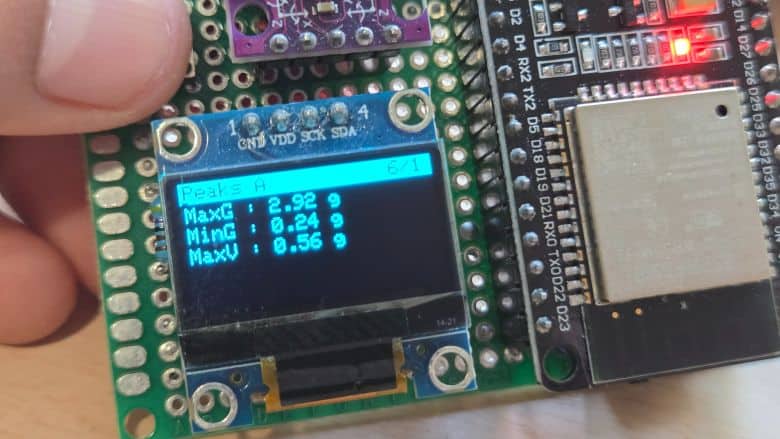
Page 6 – Peaks A:
This page displays maximum G-force, minimum G-force, and maximum vibration recorded since power-on or last reset. -
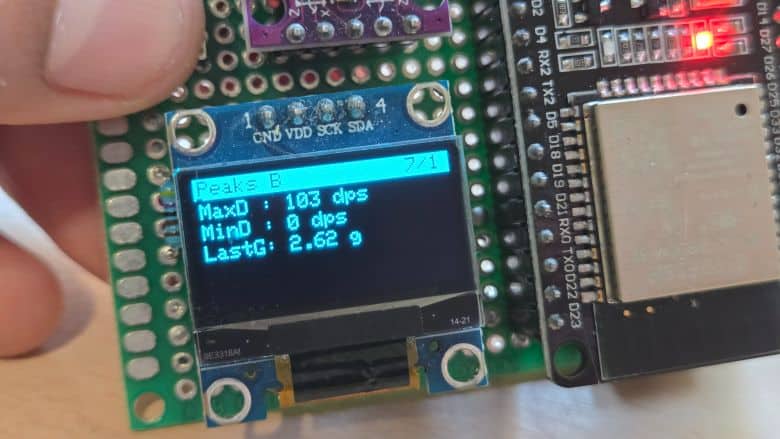
Page 7 – Peaks B:
It shows maximum and minimum rotational speed (DPS) along with the last detected impact G-force value. -
Page 8 – Events:
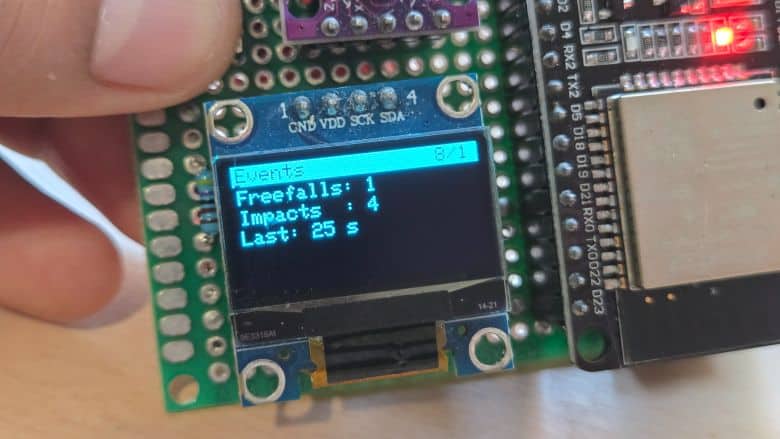
This page shows count of free-falls, impacts, and how long ago the last motion event happened in milliseconds, seconds, or minutes. -
Page 9 – Diagnostics A:
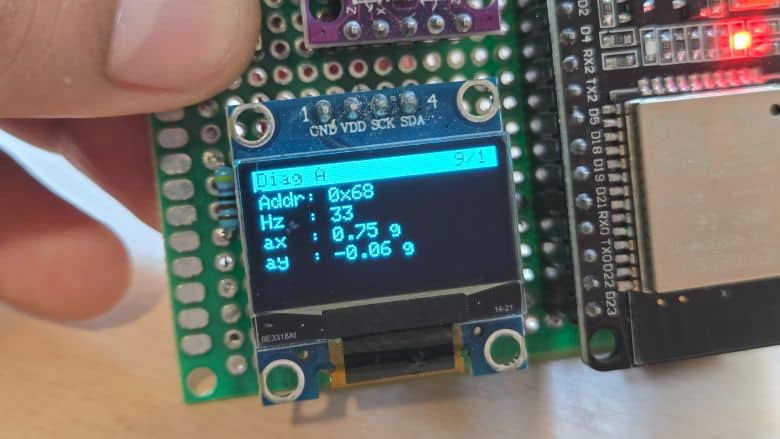
Here the IMU address, sampling frequency (Hz), and raw acceleration values (ax, ay) are shown for debugging and sensor verification. -
Page 10 – Diagnostics B:
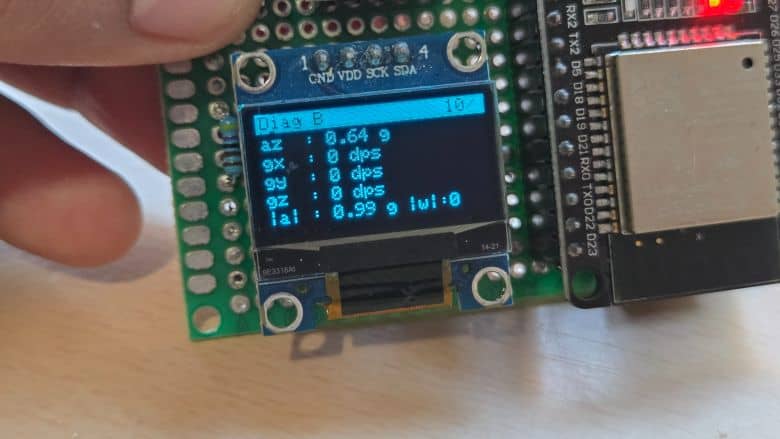
This page provides az, individual gyro axis values (gx, gy, gz), and combined magnitudes |a| and |ω|, helping you confirm the sensor’s accuracy and health.
Data Visualization on Web Dashboard
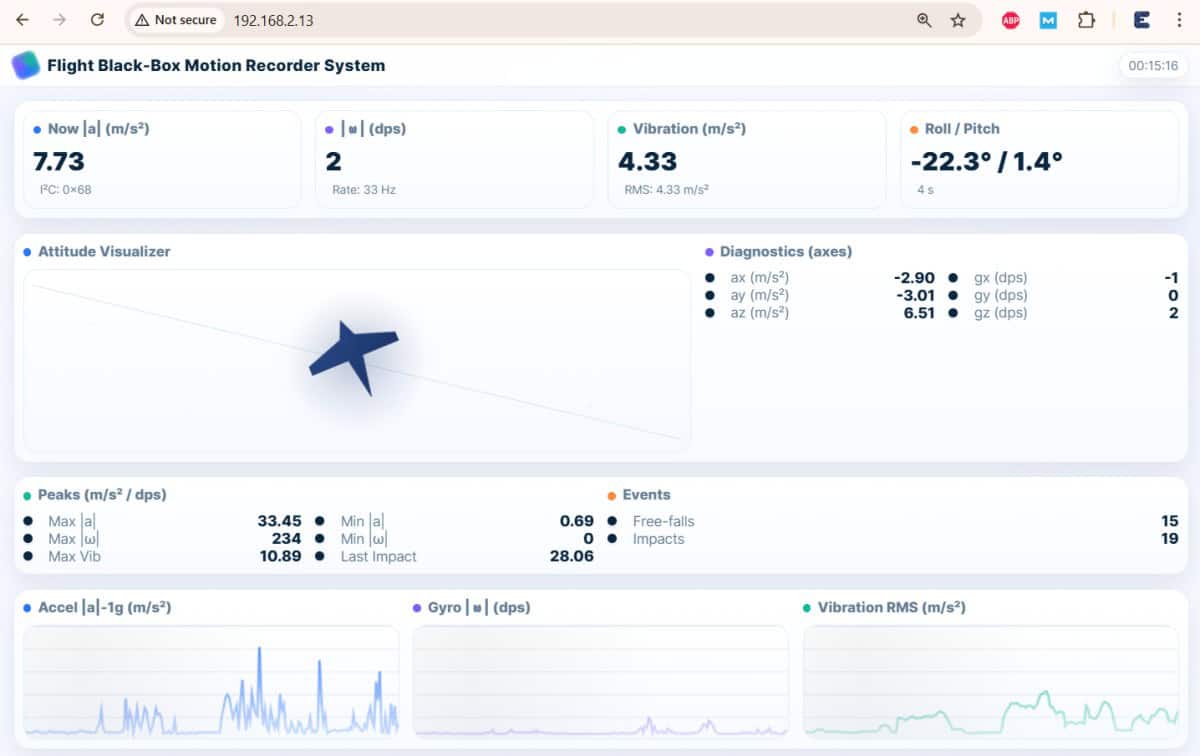
Since the ESP32 connects to the WiFi network. The ESP32 BMI160 Flight Black-Box Motion Recorder System can be monitored remotely on a Webpage connected to the same network on a local webserver.
The web dashboard displays all real-time motion data coming from the ESP32 and BMI160 sensor. It shows live acceleration, gyroscope values, vibration RMS, roll/pitch attitude, diagnostic axes, peaks, events, and smooth scrolling charts for accel, gyro, and vibration. The center also includes an animated airplane that tilts according to the device’s motion.
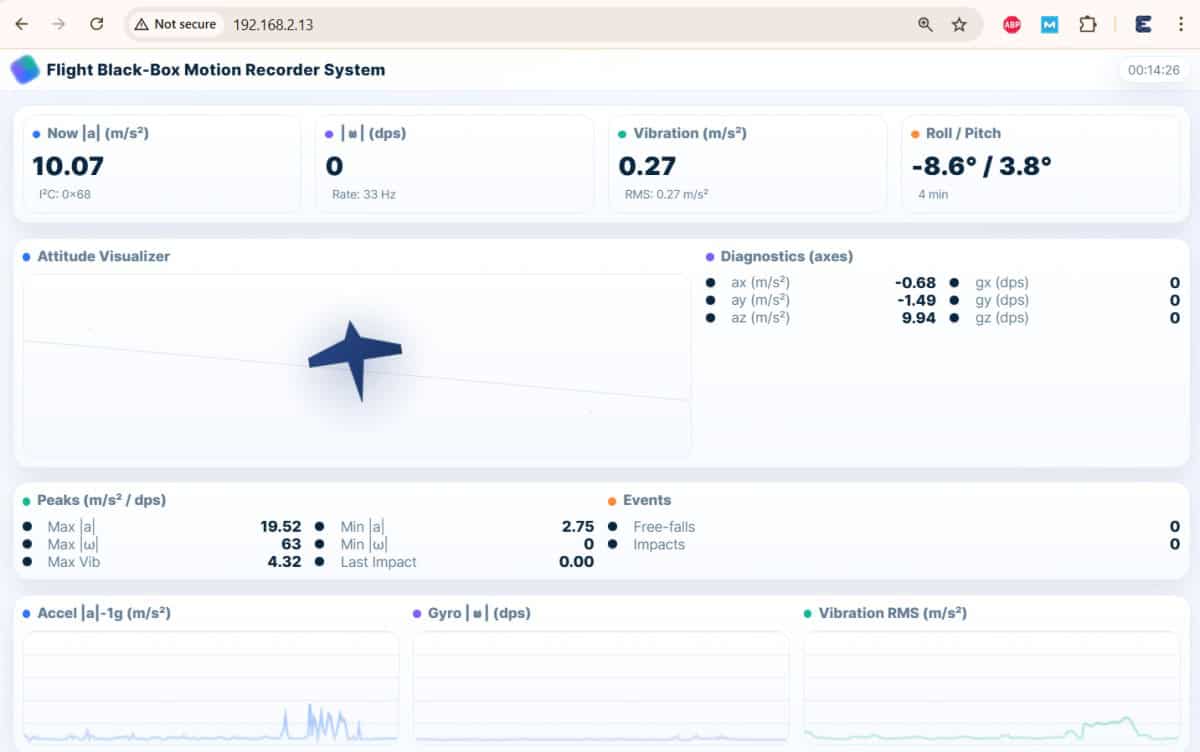
To test it, simply power your ESP32, connect your phone or laptop to the same Wi-Fi network, and open the device’s IP address (shown in the Serial Monitor). Move, shake, tilt, or drop the device gently and watch the numbers, airplane attitude, peaks, and charts update instantly on the webpage.
This project can be further improved by adding onboard SD-card logging, GPS integration, and a 3D WebGL attitude viewer for richer analysis. With these upgrades, it becomes a more complete and professional black-box recorder system.






1 Comment
WTF IS THE YELLOW WIRE ???!!!