


Overview
In this tutorial, we will be Interfacing the BMI160 Accelerometer & Gyroscope with ESP32. Earlier we used BMI160 with Arduino and also BMI160 with Raspberry Pi Pico. The BMI160 is a small, low-power, low-noise 16-bit inertial measurement unit (IMU) that integrates a 3-axis accelerometer and 3-axis gyroscope. It provides precise motion sensing for applications like augmented reality, fitness tracking, and indoor navigation.
This tutorial provides detailed information about the BMI160 Accelerometer Gyroscope Module, including its specifications and technical details. First, we will interface the BMI160 with an ESP32 board to read the raw acceleration and gyroscope values. Next, we will write an auto-calibration code to use with the acceleration measurement code to measure acceleration across all three axes. Finally, in the third example, we will use the gyroscope data to measure tilt angles such as pitch and roll. You can make a project called Flight Black-Box Motion Recorder using ESP32 and BMI160.
Bill of Materials
We will need the following components for this tutorial. You can purchase all the components from the given links.
| S.N. | Components Name | Quantity | Purchase Link |
|---|---|---|---|
| 1 | ESP32 Board | 1 | Amazon | AliExpress |
| 2 | BMI160 Accelerometer Gyroscope | 1 | Amazon | AliExpress |
| 3 | Connecting Wires | 10 | Amazon | AliExpress |
| 4 | Breadboard | 1 | Amazon | AliExpress |
BMI160 3 Axis Accelerometer & Gyroscope
The BMI160 is a high-performance, small, and ultra-low-power 16-bit Inertial Measurement Unit (IMU) that combines a 3-axis accelerometer and a 3-axis gyroscope in a single package.
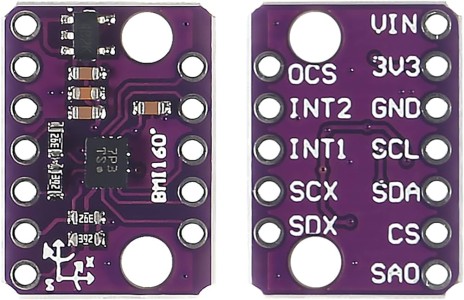
It is designed to deliver accurate and reliable motion sensing for a wide range of applications, such as augmented reality, indoor navigation, wearable devices, and gaming. The sensor offers advanced features like motion detection, step counting, and gesture recognition, making it versatile for modern technology needs.
The BMI160 supports both I2C and SPI interfaces for communication, making it compatible with a variety of microcontrollers and processors. It has a compact footprint of just 2.5 x 3.0 x 0.8 mm³, which is smaller than many competing IMUs, such as the MPU6050, and is well-suited for space-constrained devices like wearables. Refer to Bosch BMI160 Datasheet for more information.
Technical Specifications of BMI160
- Operating Voltage: 1.71 – 3.6 V (Breakout Board operates between 3.2V~6V)
- Power Consumption:
- Gyroscope: 900 µA (full operation)
- Gyroscope + Accelerometer: 950 µA (full operation)
- Accelerometer: 180 µA (full operation)
- Suspend Mode: 3 µA
- Motion Detection: 200 µA
- Acceleration Range: ±2g/±4g/±8g/±16g
- Gyroscopes Range: ±125°/s,±250°/s,±500°/s,±1000°/s,±2000°/s
- Acceleration Zero-g Offset: ±40mg
- Gyroscopes Zero-g Offset: ±10°/s
- Interfaces:
- Primary: I2C or SPI
- Secondary: High-speed SPI for optical image stabilization
- Noise Density:
- Accelerometer: 180 µg/√Hz
- Gyroscope: 0.008 °/s/√Hz
- Programmable Frequency: 25/32Hz~1600Hz
- 6D Detection and Location
- 16-bit Data Output
- Shock Resistance: 1000gx 200us
- 2 Independent Programmable Interrupt Generators
- In-built 1024 Byte FIFO
Applications of BMI160
- Augmented Reality: Tracks motion for virtual environments.
- Indoor Navigation: Supports step counting and positioning.
- Mobile Devices: For smartphones and smartwatches.
- Wearables: Powers fitness and health devices.
- Gaming: Tracks motion in controllers.
- Cameras: Stabilizes images.
- Drones & Toys: Enables motion sensing.
Pinout of BMI160
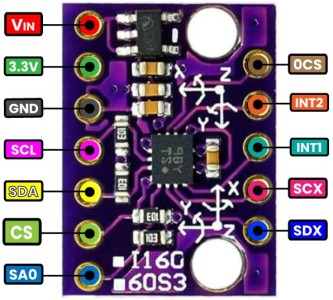
| Pin | Name | Description |
|---|---|---|
| VIN | VIN | Power input pin. Accepts 3.3V to 5V and steps it down for the BMI160 using an onboard regulator. |
| 3.3V | 3.3V | Regulated 3.3V output pin. |
| GND | GND | Ground pin. Connect to the ground of your system. |
| OCS | OCS | Optional Chip Select for secondary SPI interface (used in optical image stabilization). |
| INT1 | INT1 | Interrupt pin 1. Used for motion events or data-ready notifications. |
| INT2 | INT2 | Interrupt pin 2. An additional interrupt pin for more advanced use cases. |
| SCL/SCX | SCL or SCX | I2C clock line when using I2C communication. Acts as SPI clock (SCX) in SPI mode. |
| SDA/SDX | SDA or SDX | I2C data line when using I2C communication. Acts as SPI data (SDX) in SPI mode. |
| CS | CS | Chip Select pin for SPI communication. Used to select the BMI160 during SPI transactions. |
| SA0 | SA0 | I2C address selection pin. Connect to GND for address 0x68 or to 3.3V for 0x69. |
Interfacing BMI160 Accelerometer & Gyroscope with ESP32
Let us interface the BMI160 Gyroscope Accelerometer module with ESP32 Microcontroller Board. We can either use the module in SPI Mode or in I2C Mode. For this tutorial, we are using the I2C Mode as it is very easy to configure and requires less wiring as well.
Here is an interfacing circuit diagram for the connection between BMI160 and ESP32 Board.

| BMI160 Pin | ESP32 Pin | Description |
|---|---|---|
| 3.3V | 3.3V | Power input for the BMI160. |
| GND | GND | Ground connection. |
| SCL | 22 | I2C Clock line. |
| SDA | 21 | I2C Data line. |
| SA0 | GND | Sets I2C address to 0x68. |
Here we have connected the SA0 Pin to the GND. Connecting SA0 to GND sets the I2C address to 0x68. If connected to 3.3V, the I2C address would change to 0x69.
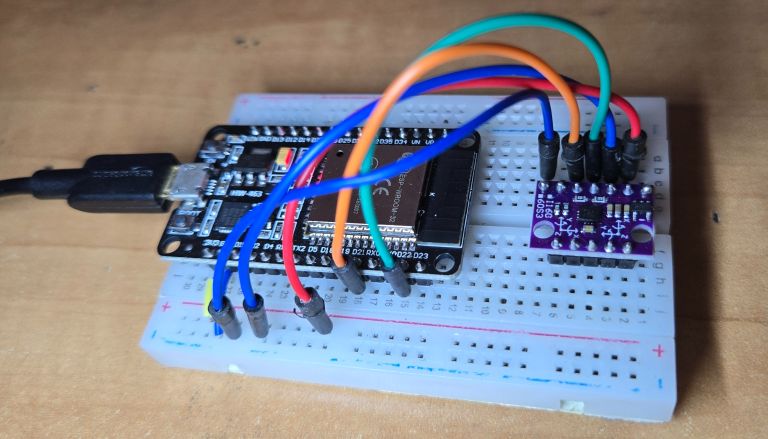
Use a simple breadboard and connect as shown in the circuit diagram above.
Code: Reading the BMI160 Raw Acceleration and Gyroscope Data
After hardware connection is done, now lets write an C++ Code to read the Raw Acceleration and Gyroscope Data from BMI160 Module & ESP32.
To get the BMI160 readings, a very well-written library is available. Download the BMI160 Library maintained by Hanyazou and add it to Arduino IDE via library manager.
The following code initializes the BMI160 sensor over I2C, reads raw accelerometer and gyroscope data and prints them to the Serial Monitor for real-time monitoring.
|
1 2 3 4 5 6 7 8 9 10 11 12 13 14 15 16 17 18 19 20 21 22 23 24 25 26 27 28 29 30 31 32 33 34 35 36 37 38 39 40 41 42 43 44 45 46 47 48 49 50 51 52 53 |
#include <BMI160Gen.h> //https://github.com/hanyazou/BMI160-Arduino #include <Wire.h> // I2C Configuration for ESP32 const int i2c_addr = 0x68; // Default I2C address for BMI160 const int sda_pin = 21; // I2C SDA Pin for ESP32 (default GPIO 21) const int scl_pin = 22; // I2C SCL Pin for ESP32 (default GPIO 22) void setup() { // Initialize Serial communication at 115200 baud rate Serial.begin(115200); while (!Serial); // Wait for Serial Monitor to connect (not required on ESP32) // Initialize I2C with custom SDA and SCL pins Wire.begin(sda_pin, scl_pin); // Initialize the BMI160 device in I2C mode if (!BMI160.begin(BMI160GenClass::I2C_MODE, i2c_addr)) { Serial.println("BMI160 initialization failed!"); while (1); // Halt if initialization fails } Serial.println("BMI160 initialized successfully in I2C mode!"); } void loop() { int gx, gy, gz; // Raw gyroscope values int ax, ay, az; // Raw accelerometer values // Read raw gyroscope measurements from the BMI160 BMI160.readGyro(gx, gy, gz); // Read raw accelerometer measurements from the BMI160 BMI160.readAccelerometer(ax, ay, az); // Display the gyroscope values (X, Y, Z) on the Serial Monitor Serial.print("Gyroscope Data (X, Y, Z): "); Serial.print(gx); Serial.print(", "); Serial.print(gy); Serial.print(", "); Serial.println(gz); // Display the accelerometer values (X, Y, Z) on the Serial Monitor Serial.print("Accelerometer Data (X, Y, Z): "); Serial.print(ax); Serial.print(", "); Serial.print(ay); Serial.print(", "); Serial.println(az); delay(100); // Delay for readability (500ms) } |
Copy the above code and paste it into your Arduino IDE. From the Board Manager, select the ESP32 Board and also the COM port. Then, upload the code to the ESP32.
After the code upload is complete, open the Serial Monitor. The Serial Monitor will display the raw acceleration and gyroscope data from the BMI160 Module.
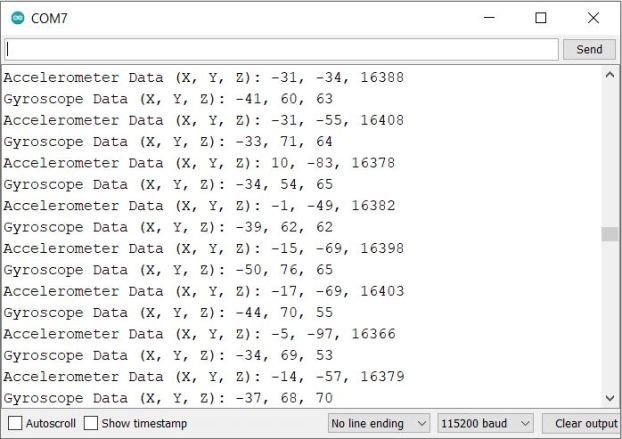
The values shown are when the BMI160 is placed on a flat surface without any movement or vibration.
When the sensor is shaken, moved, or tilted, you will observe significant changes in the values, as shown in the image below.
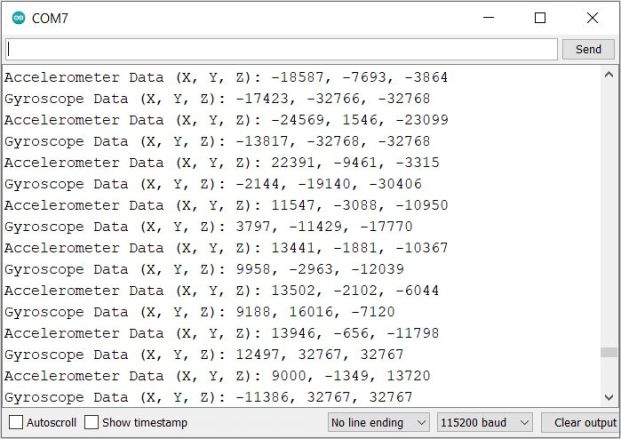
You can rotate or shake the BMI160 Module to observe the variations in the readings.
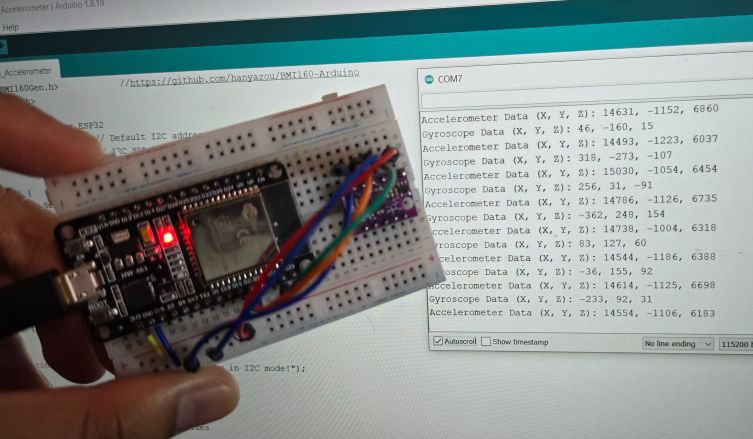
This demonstrates how you can use the BMI160 Accelerometer Gyroscope Module with ESP32 to read raw values effectively.
Code: Acceleration Measurement with BMI160 & ESP32
Using the ESP32 & BMI160 Accelerometer and Gyroscope Module, we can develop a C++ Code to read the Acceleration values. We have converted the raw readings into acceleration using the mathematical equations.
The following code initializes the BMI160 sensor using I2C communication. It sets the accelerometer to normal mode. The code performs auto-calibration to reduce noise and errors. It calculates offsets for the accelerometer during calibration.
After calibration, it reads raw accelerometer data from the X, Y, and Z axes. The raw values are converted to acceleration in m/s² and displayed on the Serial Monitor.
Raw values are converted to 𝑚/𝑠^2 using the formula:

Sensitivity for ±2g is 16384 LSB/g. Adjust if you use a different range.
The Z-axis also accounts for the effect of gravity during calibration. The final corrected acceleration values are displayed on the Serial Monitor.
|
1 2 3 4 5 6 7 8 9 10 11 12 13 14 15 16 17 18 19 20 21 22 23 24 25 26 27 28 29 30 31 32 33 34 35 36 37 38 39 40 41 42 43 44 45 46 47 48 49 50 51 52 53 54 55 56 57 58 59 60 61 62 63 64 65 |
#include <Wire.h> #define BMI160_I2C_ADDRESS 0x68 #define ACCEL_SENSITIVITY 16384.0 // Sensitivity for ±2g in LSB/g (adjust based on your configuration) void setup() { Serial.begin(115200); // Initialize Serial communication Wire.begin(); // Initialize I2C communication // Initialize BMI160 accelerometer Wire.beginTransmission(BMI160_I2C_ADDRESS); Wire.write(0x7E); // Command register Wire.write(0x11); // Set accelerometer to normal mode Wire.endTransmission(); delay(100); // Perform accelerometer auto-calibration autoCalibrateAccelerometer(); Serial.println("BMI160 Initialized and Calibrated"); } void loop() { int16_t ax, ay, az; // Read accelerometer data Wire.beginTransmission(BMI160_I2C_ADDRESS); Wire.write(0x12); // Start register for accelerometer data Wire.endTransmission(false); Wire.requestFrom(BMI160_I2C_ADDRESS, 6); if (Wire.available() == 6) { ax = (Wire.read() | (Wire.read() << 8)); ay = (Wire.read() | (Wire.read() << 8)); az = (Wire.read() | (Wire.read() << 8)); } // Convert raw accelerometer values to m/s^2 float ax_mps2 = ax * (9.81 / ACCEL_SENSITIVITY); float ay_mps2 = ay * (9.81 / ACCEL_SENSITIVITY); float az_mps2 = az * (9.81 / ACCEL_SENSITIVITY); // Print accelerometer values in m/s^2 Serial.print("Accel (m/s^2): "); Serial.print(ax_mps2, 2); Serial.print(", "); Serial.print(ay_mps2, 2); Serial.print(", "); Serial.println(az_mps2, 2); delay(100); } void autoCalibrateAccelerometer() { // Configure accelerometer for auto-calibration Wire.beginTransmission(BMI160_I2C_ADDRESS); Wire.write(0x7E); // Command register Wire.write(0x37); // Start accelerometer offset calibration Wire.endTransmission(); delay(100); // Wait for calibration to complete delay(1000); Serial.println("Accelerometer Auto-Calibration Complete"); } |
After uploading the code, the ESP32 is ready for testing. Open your Serial Monitor to see the results. The device will first calculate the offsets and perform auto-calibration. Once calibration is complete, it will start printing the acceleration values for the X, Y, and Z axes.
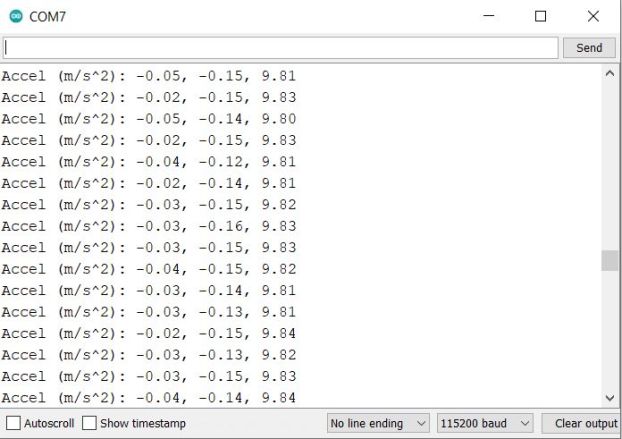
When the sensor is at rest, with no shaking or trembling movements, the acceleration in the X and Y axes will be close to zero, while the Z axis acceleration will be approximately 9.8 m/s² due to gravity.
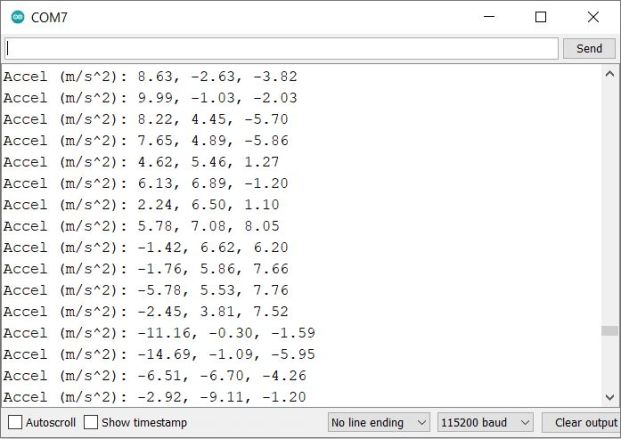
When you rotate, shake, tremble, or move the BMI160 Sensor, the acceleration values will change drastically.
The readings are quick and highly sensitive, providing real-time feedback.
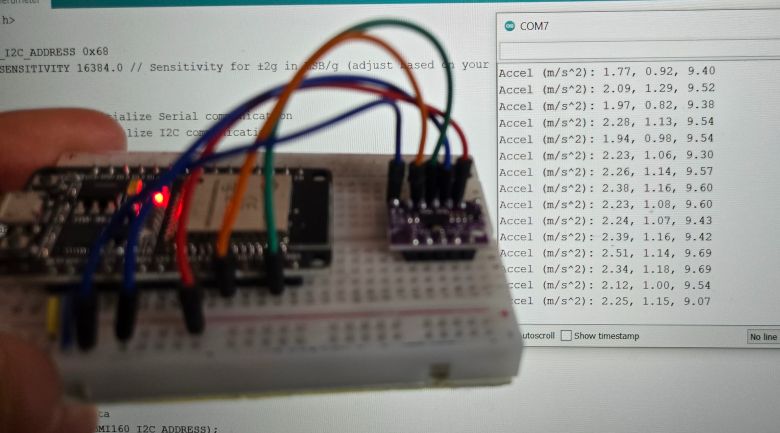
This is how you can use the BMI160 Accelerometer Gyroscope Module with ESP32 to measure acceleration.
Code: Tilt Angle Measurement with BMI160 & ESP32
As we measured acceleration above, we can also use the BMI160 Module with ESP32 to measure the tilt angles also called as Pitch, Roll, Yaw. But in the code, we are only measuring the Pitch and Roll. The Yaw measurement requires magnetometer.
The following code initializes the BMI160 sensor using I2C communication. It sets the accelerometer to normal mode. The code performs auto-calibration to calculate offsets and reduce noise. This helps improve the accuracy of tilt angle measurements.
After calibration, it reads accelerometer data from the X, Y, and Z axes. It calculates the tilt angles (pitch, roll, and yaw) based on the accelerometer readings.
The angle of rotation around the X-axis is called as Pitch which is calculated using the following formula:

The angle of rotation around the Y-axis is called as Roll which is calculated using the following formula:

Finally, the pitch and roll values are printed to the Serial Monitor in degrees.
|
1 2 3 4 5 6 7 8 9 10 11 12 13 14 15 16 17 18 19 20 21 22 23 24 25 26 27 28 29 30 31 32 33 34 35 36 37 38 39 40 41 42 43 44 45 46 47 48 49 50 51 52 53 54 55 56 57 58 59 60 61 62 63 64 65 66 67 68 |
#include <Wire.h> #define BMI160_I2C_ADDRESS 0x68 #define ACCEL_SENSITIVITY 16384.0 // Sensitivity for ±2g in LSB/g (adjust based on your configuration) void setup() { Serial.begin(115200); // Initialize Serial communication Wire.begin(); // Initialize I2C communication // Initialize BMI160 accelerometer Wire.beginTransmission(BMI160_I2C_ADDRESS); Wire.write(0x7E); // Command register Wire.write(0x11); // Set accelerometer to normal mode Wire.endTransmission(); delay(100); // Perform accelerometer auto-calibration autoCalibrateAccelerometer(); Serial.println("BMI160 Initialized and Calibrated"); } void loop() { int16_t ax, ay, az; // Read accelerometer data Wire.beginTransmission(BMI160_I2C_ADDRESS); Wire.write(0x12); // Start register for accelerometer data Wire.endTransmission(false); Wire.requestFrom(BMI160_I2C_ADDRESS, 6); if (Wire.available() == 6) { ax = (Wire.read() | (Wire.read() << 8)); ay = (Wire.read() | (Wire.read() << 8)); az = (Wire.read() | (Wire.read() << 8)); } // Convert raw accelerometer values to g float ax_g = ax / ACCEL_SENSITIVITY; float ay_g = ay / ACCEL_SENSITIVITY; float az_g = az / ACCEL_SENSITIVITY; // Calculate tilt angles (pitch and roll) in degrees float pitch = atan2(ay_g, sqrt(ax_g * ax_g + az_g * az_g)) * 180.0 / PI; float roll = atan2(-ax_g, az_g) * 180.0 / PI; // Print tilt angles Serial.print("Pitch: "); Serial.print(pitch, 2); Serial.print("°, Roll: "); Serial.print(roll, 2); Serial.println("°"); delay(100); } void autoCalibrateAccelerometer() { // Configure accelerometer for auto-calibration Wire.beginTransmission(BMI160_I2C_ADDRESS); Wire.write(0x7E); // Command register Wire.write(0x37); // Start accelerometer offset calibration Wire.endTransmission(); delay(100); // Wait for calibration to complete delay(1000); Serial.println("Accelerometer Auto-Calibration Complete"); } |
Upload the code to the ESP32 board and open the Serial Monitor.
Once the Serial Monitor is opened, the code initializes the BMI160, performs auto-calibration to calculate accelerometer offsets, and continuously prints the calculated pitch and roll angles in degrees.
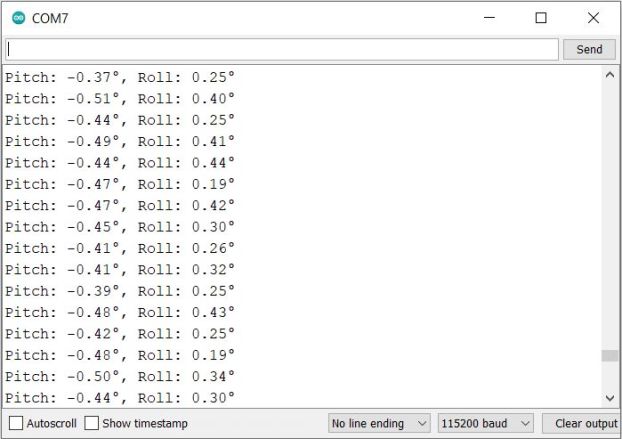
When the sensor is stationary or not tilted, the pitch and roll angles will be close to zero.
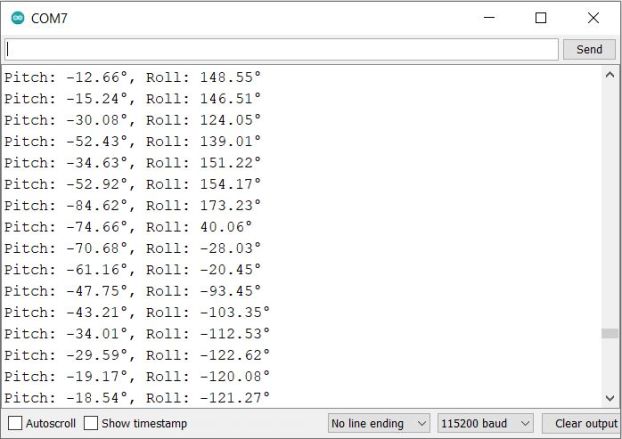
Shake or tilt the BMI160 module, and you will observe significant changes in the pitch and roll angles.
The values printed range from -180° to +180°.
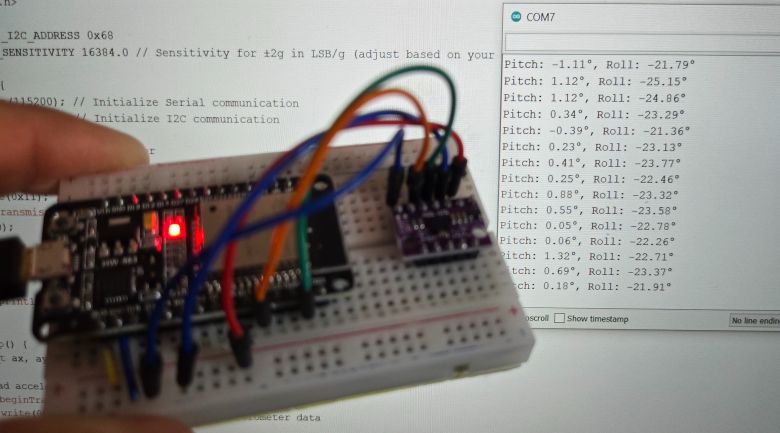
This is how you can use the BMI160 Accelerometer Gyroscope Module with ESP32 to measure tilt angles such as pitch and roll.
Video Tutorial & Guide






