


Overview
Recently, strong efforts have been carried out to develop intelligent and natural interfaces between users and computer-based systems based on human gestures. Gestures provide an intuitive interface to both humans and computers. Thus, such gesture-based interfaces can not only substitute the common interface devices but can also be exploited to extend their functionality. A robot is usually an electro-mechanical machine that can perform tasks automatically. Some robots require some degree of guidance, which may be done using a remote control or with a computer interface. Robots have evolved so much and are capable of mimicking humans that they seem to have a mind of their own. An important aspect of a successful robotic system is Human-Machine interaction. In the early years, the only way to communicate with a robot was to program which required extensive hard work. With the development in science and robotics, Gesture Recognition came into life.
What is Gesture & Gesture Recognition?
Gestures originate from any bodily motion or state but commonly originate from the face or hand. Gesture Recognition can be considered as a way for a computer to understand human body language. This has minimized the need for text interfaces and GUIs (Graphical User Interface). A gesture is an action that has to be seen by someone else and has to convey some piece of information. The gesture is usually considered as a movement of part of the body, esp. a hand or the head, to express an idea or meaning. Gesture recognition technologies are much younger in the world of today.
At this time there is much active research in the field and little in the way of publicly available implementations. Several approaches have been developed for sensing gestures and controlling robots. Glove based technique is a well-known means of recognizing hand gestures. It utilizes a sensor attached to a glove that directly measures hand movements.
Gestures are useful for computer interaction since they are the most primary and expressive forms of human communication. Gesture interfaces for gaming based on hand/body gesture technology must be designed to achieve social and commercial success. No single method for automatic hand gesture recognition is suitable for every application; each gesture-recognition algorithm depends on user cultural background, application domain, and environment.
Structure of Gesture Technology
In computer interfaces, two types of gestures are distinguished:
1. Offline gestures: Those gestures that are processed after the user interaction with the object. An example is the gesture to activate a menu.
2. Online gestures: Direct manipulation gestures. They are used to scale or rotate a tangible object.

The ability to track a person’s movements and determine what gestures they may be performing can be achieved through various tools. Although there is a large amount of research done in image/video-based gesture recognition, there is some variation within the tools and environments used between implementations. Some of the tools may include wired gloves, Depth-aware cameras, Stereo cameras, Gesture-based controllers, and also Radar. These controllers act as an extension of the body so that when gestures are performed, some of their motion can be conveniently captured by the software. An example of emerging gesture-based motion capture is skeletal hand tracking, which is being developed for virtual reality and augmented reality applications.
Depending on the type of input data, the approach for interpreting a gesture could be done in different ways. However, most of the techniques rely on key pointers represented in a 3D coordinate system. Based on the relative motion of these, the gesture can be detected with high accuracy, depending on the quality of the input and the algorithm’s approach.
In order to interpret movements of the body, one has to classify them according to common properties and the message the movements may express. For example, in sign language, each gesture represents a word or phrase. The taxonomy that seems very appropriate for Human-Computer Interaction has been proposed by Quek in “Toward a Vision-Based Hand Gesture Interface”. He presents several interactive gesture systems in order to capture the whole space of the gestures: Manipulative, Semaphoric, and Conversational. Some literature differentiates 2 different approaches in gesture recognition: a 3D model-based and an appearance-based. The foremost method makes use of 3D information of key elements of the body parts in order to obtain several important parameters, like palm position or joint angles. On the other hand, Appearance-based systems use images or videos for direct interpretation.
They include:
1. Data Acquisition Or Gesture Image Collection Stage
This is the stage for input data collection where hand, body or face gestures are recorded and classified.
2. Gesture Image Preprocessing Stage
This step uses techniques such as edge detection, filtering, and normalization in order to capture the main gesture characteristics. It fits the input gesture into the model used for gesture recognition.
3. Image Tracking Stage
Image tracking follows gesture image pre-processing where the sensors capture the orientation as well as the position of the object performing the gestures. This may be achieved with the help of either one or multiple trackers such as magnetic, optical, acoustic, inertial or mechanic.
4. The Recognition Stage
Last but not least, there comes the recognition stage which is oft considered the final phase of gesture control in VR systems. After a successful feature extraction following the image tracking where the identified features of a gesture are stored in a system using complex neural networks, or decision trees, the command or the meaning of the gesture is declared. The gesture is officially recognized, and the classifier can attach every input of a test movement to its gesture class.
Applications of Gesture Recognition System
1. Talking to computer

Imagine a world in which a person putting together a presentation can add a quote or move an image with a flick of the wrist instead of a click of a mouse. A future in which we can easily interact in virtual reality much as we do in actual reality, using our hands for small, sophisticated movements like picking up a tool, pushing a button or squeezing a soft object in front of us. This kind of technology is still evolving. But the computer scientists and engineers who are working on these projects say they believe they are on the cusp of making hand and gesture recognition tools practical enough for mainstream use, much like many people now use speech recognition to dictate texts or computer vision to recognize faces in photos.
2. Medical Operation
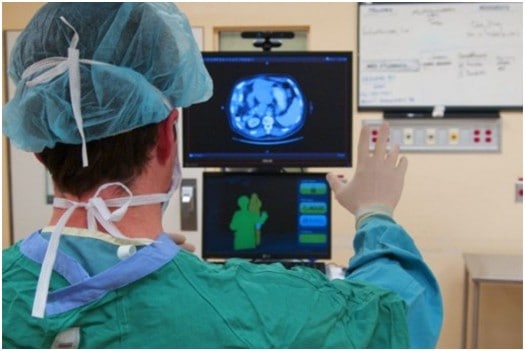
Gestures can be used to control the distribution of resources in hospitals, interact with medical instrumentation, control visualization displays, and help handicapped users as part of their rehabilitation therapy. Some of these concepts have been exploited to improve medical procedures and systems; for example, a technology which satisfied the “come as you are” requirement, where surgeons control the motion of a laparoscope by making appropriate facial gestures without hand or foot switches or voice input. Simply hand gestures into doctor-computer interfaces, describing a computer-vision system that enables surgeons to perform standard mouse functions, including pointer movement and button presses, with hand gestures that satisfy the “intuitiveness” requirement.
3. Gesture-based Gaming control

Computer games are a particularly technologically promising and commercially rewarding arena for innovative interfaces due to the entertaining nature of the interaction. Users are eager to try new interface paradigms since they are likely immersed in a challenging game-like environment. In a multi-touch device, control is delivered through the user’s fingertips. Which finger touches the screen is irrelevant; most important is where the touch is made and the number of fingers used. In computer-vision-based, hand-gesture-controlled games, the system must respond quickly to user gestures, the “fast-response” requirement. In games, computer-vision algorithms must be robust and efficient, as opposed to applications (such as inspection systems) with no real-time requirement, and where recognition performance is the highest priority. Research efforts should thus focus on tracking and gesture/posture recognition with high-frame-rate image processing.
4. Hand gesture to control the home appliances like MP3 player, TV etc.

Hand gesture-based electronic device control is gaining more importance nowadays. Most electronic devices focus on the hand gesture recognition algorithm and the corresponding user interface. Hand Gesture Based Remote is a device to replace all other remotes used in households and perform all their functions. Normally in homes, remotes are used for appliances like TV, CD player, Air Conditioner, DVD Player and Music System. Remotes are also used for lights ON/OFF control, Door Opener, etc. All these devices can be controlled by one Universal Remote. Though the technology is synchronized for all remotes (Infrared Transmission and ON/OFF modulation in the range of 32-36 kHz), there is no agreed convention on code format for data transmission. Communication between remote and appliances is established by following a predefined code.
5. Gesture control car Driving
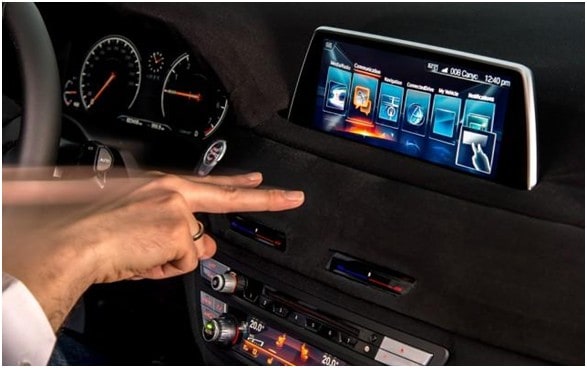
It’s as simple as it sounds: you use your hands to control the functions in your car and no longer have to look away from the road. Though, of course, there are some nifty technologies working behind the scenes to achieve this feat. One of them is state-of-the-art eye-tracking cameras that monitor where the driver’s eyes focus, and the second is 3D hand gesture recognition sensors that read the movement of their hand. So a driver could look with their eyes to choose the radio and then use a movement of their hand to change the station, without taking their eyes off the road. Hand movements used to control the system are ones we already use naturally on a daily basis; for example, raising or lowering the hand, pointing, swiping left or right, rotating clockwise or anti-clockwise, and pinching or spreading. This would enable you to perform actions such as scrolling through a phone contact list, changing the destination on your Sat-Nav, returning to a previous song or increasing the temperature in the vehicle.
6. Communication
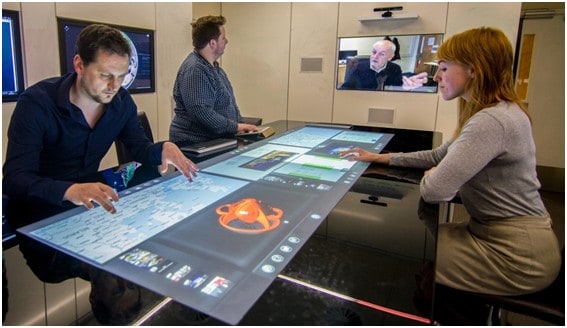
Virtual reality and immersive reality systems are computer-generated environments that replicate a scenario or situation, either inspired by reality or created out of imagination. These reality systems, often called hybrid realities to allow the stimulation of the user’s physical presence via user interaction and movement to create an all-encompassing sensory experience. This may include the senses of sight, hearing, touch and even smell. The interaction of a user with a VR environment is limited to the use of various devices or VR head-mounted displays which often require the use of pointing devices. However, for virtual reality, commanding devices which can be manipulated unseen are much preferred for example voice commands, lip-reading, interpretation of facial expression and recognition of hand gestures.
Conclusion
Gesture recognition technology is the turning point in the world of VR/AR development. It can allow seamless non-touchable control of computerized devices to create a highly interactive, yet fully immersive and flexible hybrid reality.
The inclusion of this technology in multiple applications across various sectors is further revolutionizing human-computer communication. That said, gesture recognition is no novice’s game.
It’s a fully integrated, highly advanced technology that requires specialized skills of individuals with relevant experience that can guarantee favorable results. AppReal is a development company with the resources, talents, and expertise of over 200 extremely proficient and dedicated professionals who can recognize and understand your requirements and successfully deliver to your expectations. AppReal can help you realize your VR goals and make them a reality.
Check some of the application project designed using Gesture-Based Technology:
1. Wireless Gesture Controlled Robot
2. Gesture Controlled Virtual Mouse



1 Comment
Sure! It going to shake the development Industry, Thanks for sharing this interesting article with us.