Close Menu
  • Articles
    • Learn Electronics
    • Product Review
    • Tech Articles
  • Electronics Circuits
    • 555 Timer Projects
    • Op-Amp Circuits
    • Power Electronics
  • Microcontrollers
    • Arduino Projects
    • STM32 Projects
    • AMB82-Mini IoT AI Camera
    • BLE Projects
  • IoT Projects
    • ESP8266 Projects
    • ESP32 Projects
    • ESP32 MicroPython
    • ESP32-CAM Projects
    • LoRa/LoRaWAN Projects
  • Raspberry Pi
    • Raspberry Pi Projects
    • Raspberry Pi Pico Projects
    • Raspberry Pi Pico W Projects
  • Electronics Calculator
Facebook X (Twitter) Instagram
  • About Us
  • Disclaimer
  • Privacy Policy
  • Contact Us
  • Advertise With Us
Facebook X (Twitter) Instagram Pinterest YouTube LinkedIn
How To Electronics
  • Articles
    • Learn Electronics
    • Product Review
    • Tech Articles
  • Electronics Circuits
    • 555 Timer Projects
    • Op-Amp Circuits
    • Power Electronics
  • Microcontrollers
    • Arduino Projects
    • STM32 Projects
    • AMB82-Mini IoT AI Camera
    • BLE Projects
  • IoT Projects
    • ESP8266 Projects
    • ESP32 Projects
    • ESP32 MicroPython
    • ESP32-CAM Projects
    • LoRa/LoRaWAN Projects
  • Raspberry Pi
    • Raspberry Pi Projects
    • Raspberry Pi Pico Projects
    • Raspberry Pi Pico W Projects
  • Electronics Calculator
How To Electronics
Home » Controlling Stepper Motor with Joystick and Arduino
Arduino Projects

Controlling Stepper Motor with Joystick and Arduino

Mamtaz AlamBy Mamtaz AlamUpdated:August 22, 20221 Comment3 Mins Read
Share Facebook Twitter LinkedIn Telegram Reddit WhatsApp
Controlling Stepper Motor with Joystick and Arduino
Share
Facebook Twitter LinkedIn Pinterest Email Reddit Telegram WhatsApp

Controlling Stepper Motor with Joystick and Arduino:

In this post, we will learn about Controlling Stepper Motor with Joystick and Arduino. Here we will control stepper motor speed and direction of rotation using Arduino UNO board and PS2 joystick.

We will be using 28BYJ-48 unipolar 5V DC Stepper Motor which comes with an internal driver. So there is no need for any Easy Step Driver. Rather we will use ULN2003A Darlington Pair Motor Driver IC. The PS2 Joystick consists of two potentiometers of 10k ohm, i.e one for the X-axis and the other for the Y-axis. It also consists a push-button. But we will use only the X-axis to control the stepper motor movement.


Components Required:

1. Arduino UNO Board
2. 28BYJ-48 5V DC Stepper Motor
3. ULN2003 Motor Diver IC
4. PS2 Joystick
5. 5V DC Supply


What is Stepper Motor?

A stepper motor or step motor or stepping motor is a brushless DC electric motor that divides a full rotation into a number of equal steps. The motor’s position can then be commanded to move and hold at one of these steps without any position sensor for feedback (an open-loop controller), as long as the motor is carefully sized to the application with respect to torque and speed.


Stepper Motor 28-BYJ48 Connection:

Stepper Motor 28-BYJ48 is a Unipolar motor with a 5-lead coil arrangement. There are four coils that have to be energized in a particular sequence. The Red wires will be supplied with +5V and the remaining four wires will be pulled to the ground for triggering the respective coil. We used the Arduino board to energize these coils in a particular sequence and make the motor perform the required number of steps.
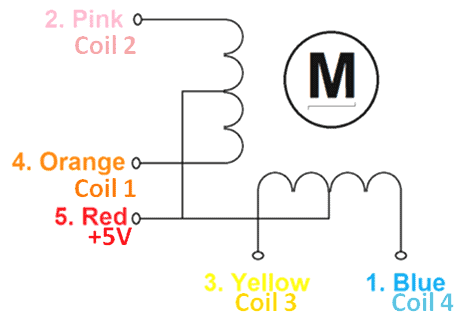


Need of ULN2003 as Driver:

Stepper Motors operates with the help of the driver IC. The reason is the controller requires high current for operation but the stepper motor alone will not be able to provide enough current from its I/O pins for the motor to operate. So with the application of ULN2003 as a driver module current is amplified.


Circuit Diagram & Connection:

For Controlling Stepper Motor with Joystick and Arduino, assemble the circuit as shown in the figure below.

Controlling Stepper Motor with Joystick and Arduino


Steps Calculations:

There is a need for calculations of steps before uploading code to Arduino board for Stepper motor Control with Potentiometer and Arduino

In Arduino, we will be operating the motor in a 4-step sequence so the stride angle calculation is necessary.

C++
1
2
3
4
Stride Angle = 5.625°
Arduino Step Sequence = 4
Required Step Sequence = 8
Steps per Revolution = 5.625*2 = 11.25

Steps per revolution = 360/step angle= 360/11.25 = 32 steps per revolution.


Source Code/Program:

1
2
3
4
5
6
7
8
9
10
11
12
13
14
15
16
17
18
19
20
21
22
23
24
25
26
27
28
29
30
31
32
33
34
35
36
37
38
39
40
41
42
43
44
45
46
47
48
49
50
51
52
53
54
55
56
57
58
59
60
61
62
63
64
65
66
67
68
#include <Stepper.h>
 
#define STEPS 32
 
// define stepper motor control pins
#define IN1 7
#define IN2 6
#define IN3 5
#define IN4 4
 
// initialize stepper library
Stepper stepper(STEPS, IN4, IN2, IN3, IN1);
 
// joystick pot output is connected to Arduino A0
#define joystick A0
 
void setup()
{
 
}
 
void loop()
{
// read analog value from the potentiometer
int val = analogRead(joystick);
 
// if the joystic is in the middle ===> stop the motor
if( (val > 500) && (val < 523) )
{
digitalWrite(IN1, LOW);
digitalWrite(IN2, LOW);
digitalWrite(IN3, LOW);
digitalWrite(IN4, LOW);
}
 
else
{
// move the motor in the first direction
while (val >= 523)
{
// map the speed between 5 and 500 rpm
int speed_ = map(val, 523, 1023, 5, 500);
// set motor speed
stepper.setSpeed(speed_);
 
// move the motor (1 step)
stepper.step(1);
 
val = analogRead(joystick);
}
 
// move the motor in the other direction
while (val <= 500)
{
// map the speed between 5 and 500 rpm
int speed_ = map(val, 500, 0, 5, 500);
// set motor speed
stepper.setSpeed(speed_);
 
// move the motor (1 step)
stepper.step(-1);
 
val = analogRead(joystick);
}
 
}
 
}


Video Tutorial:

Stepper Motor Control with Joystick and Arduino
Watch this video on YouTube.

Share. Facebook Twitter Pinterest LinkedIn Tumblr Email Reddit Telegram WhatsApp
Previous ArticleSimple Phone: Call & SMS using GSM Module & Arduino
Next Article Arduino Based Solar Tracker Using LDR & Servo Motor

Related Posts

DC Energy Meter using Arduino

Build a DC Energy Meter using Arduino – 32V/5A

Updated:August 26, 20252K
Interfacing ADXL375 Accelerometer with Arduino

Interfacing ADXL375 Accelerometer with Arduino (±200g)

Updated:June 28, 2025
PZEM-004T Arduino Energy Meter

DIY AC Energy Meter using PZEM-004T & Arduino

Updated:March 6, 20258K
Interfacing BMI160 Accelerometer & Gyroscope with Arduino

Interfacing BMI160 Accelerometer & Gyroscope with Arduino

Updated:February 2, 20259K
Password Based Door Lock Security System Using Arduino & Keypad

Password Based Door Lock Security System Using Arduino & Keypad

Updated:February 2, 20252436K
Earthquake Detector Alarm with with Accelerometer & Arduino

Earthquake Detector Alarm with Accelerometer & Arduino

Updated:February 2, 2025661K
View 1 Comment

1 Comment

  1. Magdelia on June 21, 2019 3:29 PM

    hello, im so interested with that project, but i have a question. How can i used x and y axis on joystick to control the stepper ? I have tried to control the stepper using x and y axis but it’s getting error :'(

    Reply

CommentsCancel reply

Latest Posts
IoT Based PM & Air Quality Monitoring System using ESP32

IoT Based PM & Air Quality Monitoring System using ESP32

May 31, 2026
DIY ESP32 MLX90640 IR Thermal Camera with Live Web Display

DIY ESP32 MLX90640 IR Thermal Camera with Live Web Display

May 10, 2026
IoT Activity Tracker with ESP32 & Accelerometer Gyroscope

IoT Activity Tracker with ESP32 & Accelerometer/Gyroscope

May 2, 2026
A Guide to Sourcing Obsolete ICs for Vintage Projects

Beyond AliExpress: A Guide to Sourcing Obsolete ICs for Vintage Projects

April 21, 2026

ESP32 IoT Vehicle Motion Analyzer with MPU6050 & LIS3MDL

April 27, 2026
Building a Smart Sensor Node with a BLE Microcontroller

Building a Smart Sensor Node with a BLE Microcontroller

February 26, 2026
High-Accuracy Pitch, Roll, Yaw with ESP32 & BNO08x IMU

High-Accuracy Pitch, Roll, Yaw with ESP32 & BNO08x IMU

April 27, 2026
DIY Colorimeter using AS7265x Spectroscopy Sensor & ESP32

DIY Colorimeter using AS7265x Spectroscopy Sensor & ESP32

February 1, 2026
Top Posts & Pages
  • 12V DC to 220V AC Inverter Circuit & PCB
    12V DC to 220V AC Inverter Circuit & PCB
  • IoT AC Energy Meter with PZEM-004T & ESP32 WebServer
    IoT AC Energy Meter with PZEM-004T & ESP32 WebServer
  • Designing of MPPT Solar Charge Controller using Arduino
    Designing of MPPT Solar Charge Controller using Arduino
  • How to use INA226 DC Current Sensor with Arduino
    How to use INA226 DC Current Sensor with Arduino
  • Buck Converter: Basics, Working, Design & Application
    Buck Converter: Basics, Working, Design & Application
  • DIY Turbidity Meter using Turbidity Sensor & Arduino
    DIY Turbidity Meter using Turbidity Sensor & Arduino
  • Interfacing PMS5003 PM2.5 Air Quality Sensor with Arduino
    Interfacing PMS5003 PM2.5 Air Quality Sensor with Arduino
  • ECG Graph Monitoring with AD8232 ECG Sensor & Arduino
    ECG Graph Monitoring with AD8232 ECG Sensor & Arduino
Categories
  • Arduino Projects (197)
  • Articles (60)
    • Learn Electronics (19)
    • Product Review (15)
    • Tech Articles (28)
  • Electronics Circuits (46)
    • 555 Timer Projects (21)
    • Op-Amp Circuits (7)
    • Power Electronics (13)
  • IoT Projects (204)
    • ESP32 MicroPython (7)
    • ESP32 Projects (81)
    • ESP32-CAM Projects (15)
    • ESP8266 Projects (76)
    • LoRa/LoRaWAN Projects (22)
  • Microcontrollers (38)
    • AMB82-Mini IoT AI Camera (4)
    • BLE Projects (18)
    • STM32 Projects (19)
  • Raspberry Pi (93)
    • Raspberry Pi Pico Projects (57)
    • Raspberry Pi Pico W Projects (12)
    • Raspberry Pi Projects (24)
Follow Us
  • Facebook
  • Twitter
  • Pinterest
  • Instagram
  • YouTube
About Us

“‘How to Electronics’ is a vibrant community for electronics enthusiasts and professionals. We deliver latest insights in areas such as Embedded Systems, Power Electronics, AI, IoT, and Robotics. Our goal is to stimulate innovation and provide practical solutions for students, organizations, and industries. Join us to transform learning into a joyful journey of discovery and innovation.

Copyright © How To Electronics. All rights reserved.
  • About Us
  • Disclaimer
  • Privacy Policy
  • Contact Us
  • Advertise With Us

Type above and press Enter to search. Press Esc to cancel.

Ad Blocker Enabled!
Ad Blocker Enabled!
Looks like you're using an ad blocker. Please allow ads on our site. We rely on advertising to help fund our site.