


Overview
In this project IoT Biometric Project, we will learn how to build IoT based Biometric Fingerprint Attendance System using NodeMCU ESP8266 12E, 0.96” OLED Display & R305 Fingerprint Sensor. The ESP8266 Wi-Fi Module will collect the fingerprint data from multiple users and sends it over the internet to a website. The Enrolment of fingerprints is done on the Server using R305 or R307 or any other compatible Fingerprint Sensor and verification is done on the client with the transmission of fingerprint templates over the network.
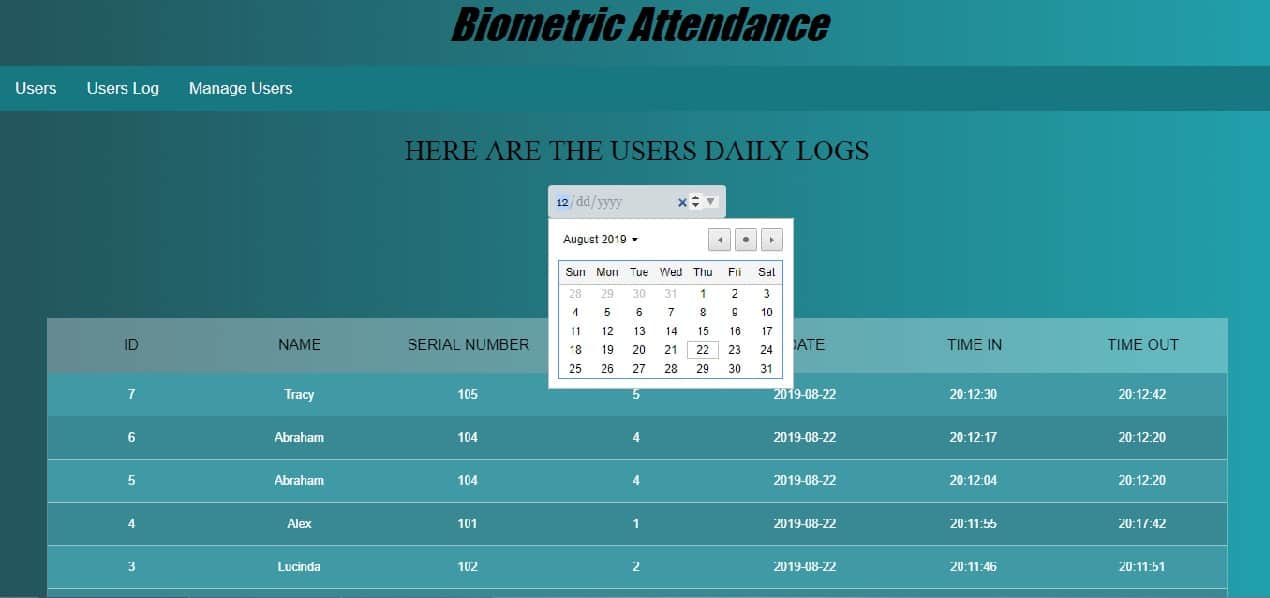
The website that is coded in PHP has a database and records of attendance. By logging into the website, you can collect all the attendance records of each user including personal details as well as incoming & outgoing timing. The data can also be downloaded and exported to an excel sheet.

Conventional authentication technologies like RFID tags and authentication cards have a lot of weaknesses, the biometric method of authentication is a prompt replacement for this. Biometrics such as fingerprints, voices and ECG signals are unique human characters that cannot be tampered or replicated. This facilitates real-time system implementations. Biometric Attendance systems are commonly used systems to mark the presence in offices and schools as well as in Biometric Security Lock. This project has a wide application in schools, colleges, business organizations, offices where marking of attendance is required accurately with time. Thus, by using the fingerprint sensor, the system will become more secure for the users.
You can follow the basic level of the same project here: Arduino Fingerprint Attendance System. In case if you want a better fingerprint sensor with small and light weight, you can use GT511C3 fingerprint sensor.
Bill of Materials
The following are the components required to make IoT Based Biometric Fingerprint Attendance System. All the components can be purchased from Amazon. The purchase links are given below.
| S.N. | Components | Quantity | Purchase Links |
|---|---|---|---|
| 1 | NodeMCU ESP8266 Board | 1 | Amazon | AliExpress |
| 2 | R305/R307 Fingerprint Sensor | 1 | Amazon | AliExpress |
| 3 | 0.96" I2C OLED Display | 1 | Amazon | AliExpress |
| 4 | Connecting Wires | 10 | Amazon | AliExpress |
| 5 | Breadboard | 1 | Amazon | AliExpress |
R305 Fingerprint Scanner Sensor Module
Introduction
This is a finger print sensor module with TTL UART interface for direct connections to microcontroller UART or to PC through MAX232 / USB-Serial adapter. The user can store the finger print data in the module and can configure it in 1:1 or 1: N mode for identifying the person.

The Fingerprint module can be directly interfaced with any microcontroller as well as Arduino Board. This optical biometric fingerprint reader with great features and can be embedded into a variety of end products like access control systems, attendance systems, safety deposit boxes, car door locking systems.
Features
1. Integrated image collecting and algorithm chip together, ALL-in-One
2. The fingerprint reader can conduct secondary development, can be embedded into a variety of end products
3. Low power consumption, low cost, small size, excellent performance
4. Professional optical technology, precise module manufacturing techniques
5. Good image processing capabilities can successfully capture image up to resolution 500 dpi
Specifications
1. Fingerprint sensor type: Optical
2. Sensor Life: 100 million times
3. Static indicators: 15KVBacklight: bright green
4. Interface: USB1.1/UART(TTL logical level)
5. RS232 communication baud rate: 4800BPS~115200BPS changeable
6. Dimension: 553221.5mm
7. Image Capture Surface 15—18(mm)
8. Verification Speed: 0.3 sec
9. Scanning Speed: 0.5 sec
10. Character file size: 256 bytes
11. Template size: 512 bytes
12. Storage capacity: 250
13. Security level: 5 (1,2,3,4,5(highest))
14. False Acceptance Rate (FAR) :0.0001%
15. False Rejection Rate (FRR): 0.1%
16. Resolution 500 DPI
17. Voltage :3.6-6.0 VDC
18. Working current: Typical 90 mA, Peak 150mA
19. Matching Method: 1: N
20. Operating Environment Temperature: -20 to 45° centigrades
0.96″ I2C OLED Display
This is a 0.96 inch blue OLED display module. The display module can be interfaced with any microcontroller using SPI/IIC protocols. It is having a resolution of 128×64. The package includes display board, display,4 pin male header pre-soldered to board.

OLED (Organic Light-Emitting Diode) is a self light-emitting technology composed of a thin, multi-layered organic film placed between an anode and cathode. In contrast to LCD technology, OLED does not require a backlight. OLED possesses high application potential for virtually all types of displays and is regarded as the ultimate technology for the next generation of flat-panel displays.
Circuit Diagram: IOT Based Biometric Fingerprint Attendance System

The above circuit diagram shows how an OLED Display & Fingerprint Sensor is interfaced with NodeMCU ESP8266 12E Board. The I2C pins of OLED Display, i.e SDA & SCL are connected to NodeMCU D2 & D1 pins respectively. Similarly, the fingerprint sensor is connected to UART pins D5 & D6. The fingerprint sensor Tx and Rx wire’s color may vary. In my case, the color is yellow and blue where yellow is Tx and Blue is Rx. So connect it by finding appropriate color wires else the module won’t be detected by NodeMCU.
The R305 fingerprint sensor is supplied with 5V through Vin pins of NodeMCU. In my case, the sensor didn’t work at 3.3V. Similarly, connect OLED Vcc pin to 3.3V of NodeMCU.
Setting Up the Website
Here we can set up a website if you have a website and a server. In case you don’t wanna spend money on website management, then you can use your computer IP as a server to store the data locally in localhost.
First Download and install Xampp from the link here: Download XAMPP
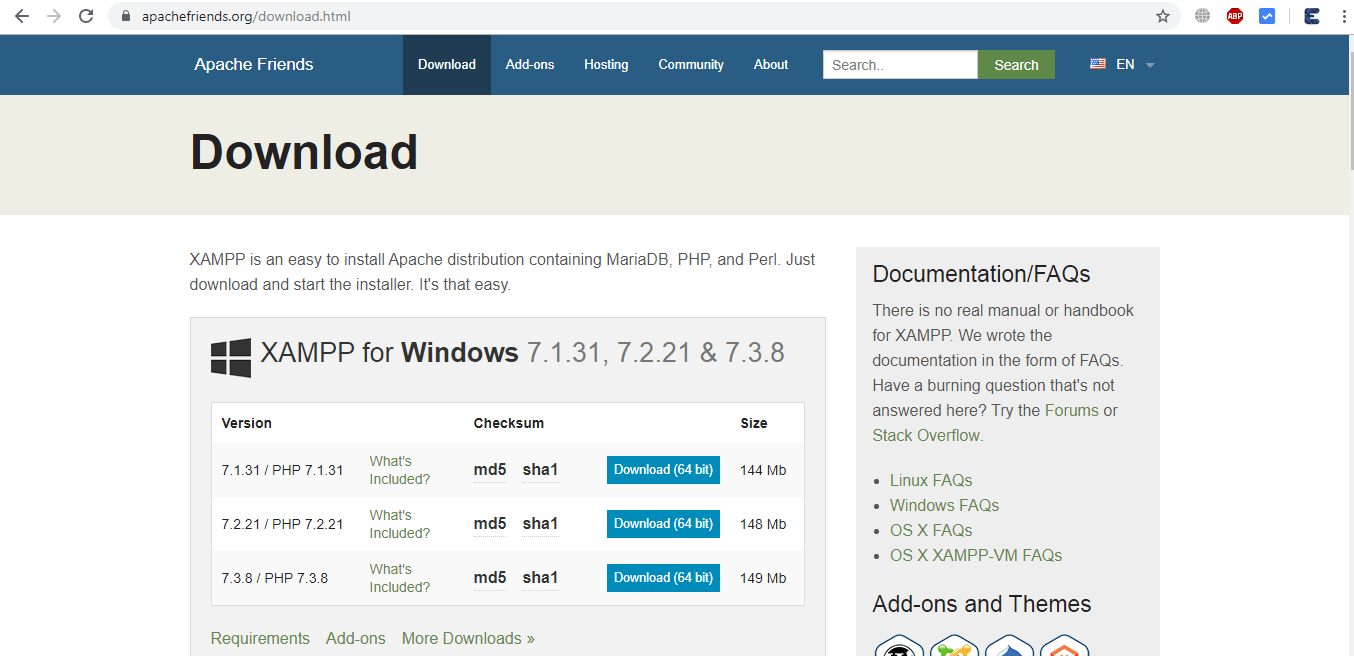
Once the download and installation is completed copy the following folder:Biometricattendance Folder to C:\xampp\htdocs. This is the location of the website in your C drive.
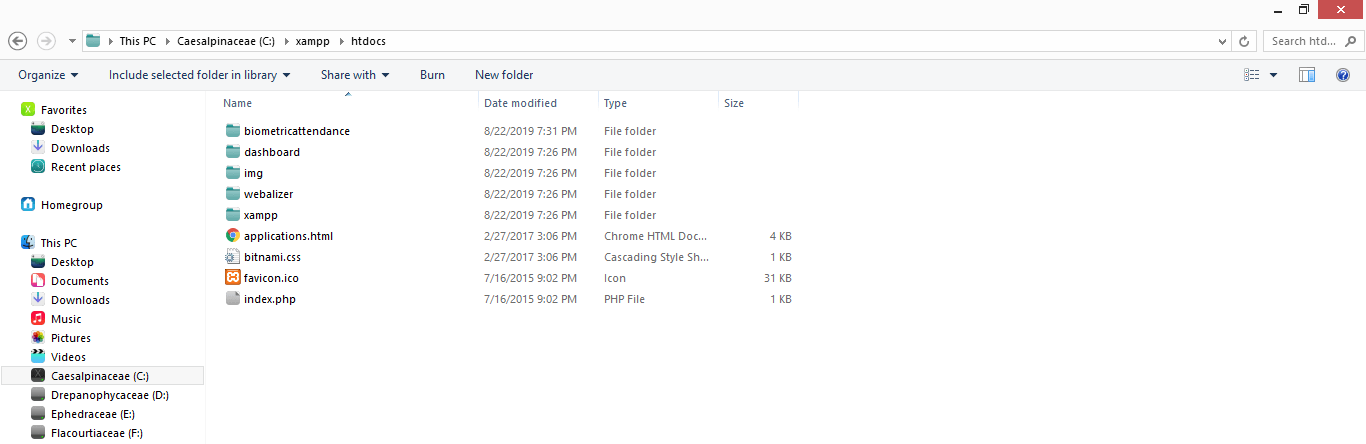
The website setting process is a little long which is explained in the video below: You can follow the video to completely set up the website.
Source Code/Program
Below is the source code for IoT Based Biometric Fingerprint Attendance System. The code credit goes to original author of the code: Electronics Tech YouTube Channel
Make Sure to change the wifi username and password from this line below:
|
1 2 3 |
/* Set these to your desired credentials. */ const char *ssid = "SSID"; //ENTER YOUR WIFI SETTINGS const char *password = "password"; |
Also, change the IP Address if you are using Xampp or change the website server if you are on real website from the line below:
|
1 |
String link = "http://YourComputerIP/biometricattendance/getdata.php"; //computer IP or the server domain |
Add the following libraries via library manager or simply by adding the following zip files:
1. OLED GFX Library: Download
2. SSD1306 Library: Download
3. Adafruit Fingerprint Sensor Library: Download
|
1 2 3 4 5 6 7 8 9 10 11 12 13 14 15 16 17 18 19 20 21 22 23 24 25 26 27 28 29 30 31 32 33 34 35 36 37 38 39 40 41 42 43 44 45 46 47 48 49 50 51 52 53 54 55 56 57 58 59 60 61 62 63 64 65 66 67 68 69 70 71 72 73 74 75 76 77 78 79 80 81 82 83 84 85 86 87 88 89 90 91 92 93 94 95 96 97 98 99 100 101 102 103 104 105 106 107 108 109 110 111 112 113 114 115 116 117 118 119 120 121 122 123 124 125 126 127 128 129 130 131 132 133 134 135 136 137 138 139 140 141 142 143 144 145 146 147 148 149 150 151 152 153 154 155 156 157 158 159 160 161 162 163 164 165 166 167 168 169 170 171 172 173 174 175 176 177 178 179 180 181 182 183 184 185 186 187 188 189 190 191 192 193 194 195 196 197 198 199 200 201 202 203 204 205 206 207 208 209 210 211 212 213 214 215 216 217 218 219 220 221 222 223 224 225 226 227 228 229 230 231 232 233 234 235 236 237 238 239 240 241 242 243 244 245 246 247 248 249 250 251 252 253 254 255 256 257 258 259 260 261 262 263 264 265 266 267 268 269 270 271 272 273 274 275 276 277 278 279 280 281 282 283 284 285 286 287 288 289 290 291 292 293 294 295 296 297 298 299 300 301 302 303 304 305 306 307 308 309 310 311 312 313 314 315 316 317 318 319 320 321 322 323 324 325 326 327 328 329 330 331 332 333 334 335 336 337 338 339 340 341 342 343 344 345 346 347 348 349 350 351 352 353 354 355 356 357 358 359 360 361 362 363 364 365 366 367 368 369 370 371 372 373 374 375 376 377 378 379 380 381 382 383 384 385 386 387 388 389 390 391 392 393 394 395 396 397 398 399 400 401 402 403 404 405 406 407 408 409 410 411 412 413 414 415 416 417 418 419 420 421 422 423 424 425 426 427 428 429 430 431 432 433 434 435 436 437 438 439 440 441 442 443 444 445 446 447 448 449 450 451 452 453 454 455 456 457 458 459 460 461 462 463 464 465 466 467 468 469 470 471 472 473 474 475 476 477 478 479 480 481 482 483 484 485 486 487 488 489 490 491 492 493 494 495 496 497 498 499 500 501 502 503 504 505 506 507 508 509 510 511 512 513 514 515 516 517 518 519 520 521 522 523 524 525 526 527 528 529 530 531 532 533 534 535 536 537 538 539 540 541 542 543 544 545 546 547 548 549 550 551 552 553 554 555 556 557 558 559 560 561 562 563 564 565 566 567 568 569 570 571 572 573 574 575 576 577 578 579 580 581 582 583 584 585 586 587 588 589 590 591 592 593 594 595 596 597 598 599 600 601 602 603 604 605 606 607 608 609 610 611 612 613 614 615 616 617 618 619 620 621 622 623 624 625 626 627 628 629 630 631 632 633 634 635 636 637 638 639 640 641 642 643 644 645 646 647 648 649 650 651 652 653 654 655 656 657 658 659 660 661 662 663 664 665 666 667 668 669 670 671 672 673 674 675 676 677 678 679 680 681 682 683 684 685 686 687 688 689 690 691 692 693 694 695 696 697 698 699 700 701 702 703 704 705 706 707 708 709 710 711 712 713 714 715 716 717 718 719 720 721 722 723 724 725 726 727 728 729 730 731 732 733 734 735 736 737 738 739 740 741 742 743 744 745 746 747 748 749 750 751 752 753 754 755 756 757 758 759 760 761 762 763 764 765 766 767 768 769 770 771 772 773 774 775 776 777 778 779 780 781 782 783 784 785 786 787 788 789 790 791 792 793 794 795 796 797 798 799 800 801 802 803 804 805 806 807 808 809 810 811 812 813 814 815 816 817 818 819 820 821 822 823 824 825 826 827 828 829 830 831 832 833 834 835 836 837 838 839 840 841 842 843 844 845 846 847 848 849 850 851 852 853 854 855 856 857 858 859 860 861 862 863 864 865 866 867 868 869 870 871 872 873 874 875 876 877 878 879 880 881 882 883 884 885 886 887 888 889 890 891 892 893 894 895 896 897 898 899 900 901 902 903 904 905 906 907 908 909 910 911 912 913 914 915 916 917 918 919 920 921 922 923 924 925 926 927 928 929 930 931 932 933 934 935 936 937 938 939 940 941 942 943 944 945 946 947 948 949 950 951 952 953 954 955 956 957 958 959 960 961 962 963 964 965 966 967 968 969 970 971 972 973 974 975 976 977 978 979 980 981 982 983 984 985 986 987 988 989 990 991 992 993 994 995 996 997 998 999 1000 1001 1002 1003 1004 1005 1006 1007 1008 1009 1010 1011 1012 1013 1014 1015 1016 1017 1018 1019 1020 1021 1022 1023 1024 1025 1026 1027 1028 1029 1030 1031 1032 1033 1034 1035 1036 1037 1038 1039 1040 1041 1042 1043 1044 1045 1046 1047 1048 1049 1050 |
//Code Credit to orginal Author: https://www.youtube.com/ElectronicsTechHaIs //This code created by Electronics Tech channel //*******************************libraries******************************** #include <SPI.h> #include <Wire.h> #include <WiFiClient.h> #include <ESP8266WiFi.h> #include <SoftwareSerial.h> #include <ESP8266WebServer.h> #include <ESP8266HTTPClient.h> #include <Adafruit_GFX.h> //https://github.com/adafruit/Adafruit-GFX-Library #include <Adafruit_SSD1306.h> //https://github.com/adafruit/Adafruit_SSD1306 #include <Adafruit_Fingerprint.h> //https://github.com/adafruit/Adafruit-Fingerprint-Sensor-Library //************************************************************************ //Fingerprint scanner Pins #define Finger_Rx 14 //D5 #define Finger_Tx 12 //D6 // Declaration for SSD1306 display connected using software I2C #define SCREEN_WIDTH 128 // OLED display width, in pixels #define SCREEN_HEIGHT 64 // OLED display height, in pixels #define OLED_RESET 0 // Reset pin # (or -1 if sharing Arduino reset pin) Adafruit_SSD1306 display(SCREEN_WIDTH, SCREEN_HEIGHT, &Wire, OLED_RESET); //************************************************************************ SoftwareSerial mySerial(Finger_Rx, Finger_Tx); Adafruit_Fingerprint finger = Adafruit_Fingerprint(&mySerial); //************************************************************************ /* Set these to your desired credentials. */ const char *ssid = "SSID"; //ENTER YOUR WIFI SETTINGS const char *password = "password"; //************************************************************************ String postData ; // post array that will be send to the website String link = "http://YourComputerIP/biometricattendance/getdata.php"; //computer IP or the server domain int FingerID = 0; // The Fingerprint ID from the scanner uint8_t id; //*************************Biometric Icons********************************* #define Wifi_start_width 54 #define Wifi_start_height 49 const uint8_t PROGMEM Wifi_start_bits[] = { 0x00,0x00,0x00,0x00,0x00,0x00,0x00 ,0x00,0x00,0x00,0x00,0x00,0x00,0x00 ,0x00,0x00,0x00,0x00,0x00,0x00,0x00 ,0x00,0x00,0x00,0x00,0x00,0x00,0x00 ,0x00,0x00,0x00,0x00,0x00,0x00,0x00 ,0x00,0x00,0x1f,0xf0,0x00,0x00,0x00 ,0x00,0x03,0xff,0xff,0x80,0x00,0x00 ,0x00,0x1f,0xf0,0x1f,0xf0,0x00,0x00 ,0x00,0x7e,0x00,0x00,0xfc,0x00,0x00 ,0x01,0xf0,0x00,0x00,0x1f,0x00,0x00 ,0x03,0xc0,0x00,0x00,0x07,0xc0,0x00 ,0x0f,0x00,0x00,0x00,0x01,0xe0,0x00 ,0x1c,0x00,0x00,0x00,0x00,0x70,0x00 ,0x38,0x00,0x07,0xc0,0x00,0x38,0x00 ,0x70,0x00,0xff,0xfe,0x00,0x1e,0x00 ,0xe0,0x03,0xfc,0x7f,0xc0,0x0e,0x00 ,0x00,0x1f,0x80,0x03,0xf0,0x00,0x00 ,0x00,0x3c,0x00,0x00,0x78,0x00,0x00 ,0x00,0xf0,0x00,0x00,0x1c,0x00,0x00 ,0x01,0xe0,0x00,0x00,0x0c,0x00,0x00 ,0x03,0x80,0x00,0x00,0x00,0x00,0x00 ,0x03,0x00,0x00,0x00,0x00,0x00,0x00 ,0x00,0x00,0x3f,0xf8,0x07,0x1e,0x00 ,0x00,0x00,0xff,0xfe,0x1f,0xbf,0x80 ,0x00,0x03,0xe0,0x04,0x7f,0xff,0xc0 ,0x00,0x07,0x80,0x00,0xff,0xff,0xe0 ,0x00,0x0e,0x00,0x00,0xff,0xff,0xe0 ,0x00,0x0c,0x00,0x00,0x7f,0xff,0xc0 ,0x00,0x00,0x00,0x00,0xfe,0x07,0xe0 ,0x00,0x00,0x00,0x03,0xf8,0x03,0xf8 ,0x00,0x00,0x07,0xe7,0xf9,0xf1,0xfc ,0x00,0x00,0x1f,0xe7,0xf1,0xf9,0xfc ,0x00,0x00,0x1f,0xe7,0xf3,0xf9,0xfc ,0x00,0x00,0x3f,0xe7,0xf3,0xf9,0xfc ,0x00,0x00,0x3f,0xe7,0xf1,0xf1,0xfc ,0x00,0x00,0x3f,0xe3,0xf8,0xe3,0xfc ,0x00,0x00,0x3f,0xf3,0xfc,0x07,0xf8 ,0x00,0x00,0x1f,0xf0,0x7f,0x0f,0xc0 ,0x00,0x00,0x0f,0xe0,0x7f,0xff,0xe0 ,0x00,0x00,0x07,0xc0,0xff,0xff,0xe0 ,0x00,0x00,0x00,0x00,0x7f,0xff,0xe0 ,0x00,0x00,0x00,0x00,0x3f,0xff,0x80 ,0x00,0x00,0x00,0x00,0x1f,0xbf,0x00 ,0x00,0x00,0x00,0x00,0x03,0x18,0x00 ,0x00,0x00,0x00,0x00,0x00,0x00,0x00 ,0x00,0x00,0x00,0x00,0x00,0x00,0x00 ,0x00,0x00,0x00,0x00,0x00,0x00,0x00 ,0x00,0x00,0x00,0x00,0x00,0x00,0x00 ,0x00,0x00,0x00,0x00,0x00,0x00,0x00 }; #define Wifi_connected_width 63 #define Wifi_connected_height 49 const uint8_t PROGMEM Wifi_connected_bits[] = { 0x00,0x00,0x00,0x00,0x00,0x00,0x00,0x00 ,0x00,0x00,0x00,0x00,0x00,0x00,0x00,0x00 ,0x00,0x00,0x00,0x00,0x00,0x00,0x00,0x00 ,0x00,0x00,0x00,0x00,0x00,0x00,0x00,0x00 ,0x00,0x00,0x00,0x00,0x00,0x00,0x00,0x00 ,0x00,0x00,0x00,0x00,0x00,0x00,0x00,0x00 ,0x00,0x00,0x00,0x00,0x00,0x00,0x00,0x00 ,0x00,0x00,0x03,0xff,0xff,0x80,0x00,0x00 ,0x00,0x00,0x3f,0xff,0xff,0xf8,0x00,0x00 ,0x00,0x01,0xff,0xff,0xff,0xff,0x00,0x00 ,0x00,0x0f,0xff,0xff,0xff,0xff,0xe0,0x00 ,0x00,0x3f,0xff,0xc0,0x07,0xff,0xf8,0x00 ,0x00,0xff,0xf8,0x00,0x00,0x3f,0xfe,0x00 ,0x03,0xff,0x80,0x00,0x00,0x03,0xff,0x80 ,0x07,0xfe,0x00,0x00,0x00,0x00,0xff,0xc0 ,0x1f,0xf8,0x00,0x00,0x00,0x00,0x3f,0xf0 ,0x3f,0xe0,0x01,0xff,0xff,0x00,0x0f,0xf8 ,0x7f,0x80,0x0f,0xff,0xff,0xe0,0x03,0xfc ,0xff,0x00,0x7f,0xff,0xff,0xfc,0x01,0xfe ,0xfc,0x01,0xff,0xff,0xff,0xff,0x00,0x7e ,0x78,0x07,0xff,0xc0,0x07,0xff,0xc0,0x3c ,0x00,0x0f,0xfc,0x00,0x00,0x7f,0xe0,0x00 ,0x00,0x1f,0xf0,0x00,0x00,0x1f,0xf0,0x00 ,0x00,0x3f,0xc0,0x00,0x00,0x07,0xf8,0x00 ,0x00,0x7f,0x00,0x01,0x00,0x01,0xfc,0x00 ,0x00,0x7e,0x00,0x7f,0xfc,0x00,0xfc,0x00 ,0x00,0x3c,0x03,0xff,0xff,0x80,0x78,0x00 ,0x00,0x00,0x07,0xff,0xff,0xc0,0x00,0x00 ,0x00,0x00,0x1f,0xff,0xff,0xf0,0x00,0x00 ,0x00,0x00,0x3f,0xf0,0x1f,0xf8,0x00,0x00 ,0x00,0x00,0x3f,0x80,0x03,0xf8,0x00,0x00 ,0x00,0x00,0x3f,0x00,0x01,0xf8,0x00,0x00 ,0x00,0x00,0x1c,0x00,0x00,0x70,0x00,0x00 ,0x00,0x00,0x00,0x01,0x00,0x00,0x00,0x00 ,0x00,0x00,0x00,0x0f,0xe0,0x00,0x00,0x00 ,0x00,0x00,0x00,0x1f,0xf0,0x00,0x00,0x00 ,0x00,0x00,0x00,0x3f,0xf8,0x00,0x00,0x00 ,0x00,0x00,0x00,0x3f,0xf8,0x00,0x00,0x00 ,0x00,0x00,0x00,0x3f,0xf8,0x00,0x00,0x00 ,0x00,0x00,0x00,0x3f,0xf8,0x00,0x00,0x00 ,0x00,0x00,0x00,0x1f,0xf0,0x00,0x00,0x00 ,0x00,0x00,0x00,0x0f,0xe0,0x00,0x00,0x00 ,0x00,0x00,0x00,0x00,0x00,0x00,0x00,0x00 ,0x00,0x00,0x00,0x00,0x00,0x00,0x00,0x00 ,0x00,0x00,0x00,0x00,0x00,0x00,0x00,0x00 ,0x00,0x00,0x00,0x00,0x00,0x00,0x00,0x00 ,0x00,0x00,0x00,0x00,0x00,0x00,0x00,0x00 ,0x00,0x00,0x00,0x00,0x00,0x00,0x00,0x00 ,0x00,0x00,0x00,0x00,0x00,0x00,0x00,0x00 }; #define FinPr_start_width 64 #define FinPr_start_height 64 const uint8_t PROGMEM FinPr_start_bits[] = { 0x00,0x00,0x00,0x1f,0xe0,0x00,0x00,0x00 ,0x00,0x00,0x01,0xff,0xfe,0x00,0x00,0x00 ,0x00,0x00,0x03,0xff,0xff,0x80,0x00,0x00 ,0x00,0x00,0x0f,0xc0,0x0f,0xe0,0x00,0x00 ,0x00,0x00,0x1f,0x00,0x01,0xf8,0x00,0x00 ,0x00,0x00,0x3c,0x00,0x00,0x7c,0x00,0x00 ,0x00,0x00,0x78,0x00,0x00,0x3e,0x00,0x00 ,0x00,0x00,0xf0,0x3f,0xf8,0x0f,0x00,0x00 ,0x00,0x01,0xe0,0xff,0xfe,0x07,0x80,0x00 ,0x00,0x03,0xc3,0xff,0xff,0x03,0x80,0x00 ,0x00,0x03,0x87,0xc0,0x07,0xc3,0xc0,0x00 ,0x00,0x07,0x0f,0x00,0x03,0xe1,0xc0,0x00 ,0x00,0x0f,0x0e,0x00,0x00,0xe0,0xe0,0x00 ,0x00,0x0e,0x1c,0x00,0x00,0xf0,0xe0,0x00 ,0x00,0x0c,0x3c,0x1f,0xe0,0x70,0xe0,0x00 ,0x00,0x00,0x38,0x3f,0xf0,0x38,0x70,0x00 ,0x00,0x00,0x78,0x78,0xf8,0x38,0x70,0x00 ,0x00,0x00,0x70,0x70,0x3c,0x18,0x70,0x00 ,0x00,0x00,0xe0,0xe0,0x1e,0x1c,0x70,0x00 ,0x00,0x03,0xe1,0xe0,0x0e,0x1c,0x70,0x00 ,0x00,0x0f,0xc1,0xc3,0x0e,0x1c,0x70,0x00 ,0x00,0x3f,0x03,0xc3,0x8e,0x1c,0x70,0x00 ,0x00,0x3e,0x03,0x87,0x0e,0x1c,0x70,0x00 ,0x00,0x30,0x07,0x07,0x0e,0x18,0xe0,0x00 ,0x00,0x00,0x0e,0x0e,0x0e,0x38,0xe0,0x00 ,0x00,0x00,0x3e,0x1e,0x1e,0x38,0xe0,0x00 ,0x00,0x00,0xf8,0x1c,0x1c,0x38,0xe0,0x00 ,0x00,0x03,0xf0,0x38,0x3c,0x38,0xe0,0x00 ,0x00,0x3f,0xc0,0xf8,0x78,0x38,0xe0,0x00 ,0x00,0x7f,0x01,0xf0,0x70,0x38,0xf0,0x00 ,0x00,0x78,0x03,0xe0,0xe0,0x38,0x70,0x00 ,0x00,0x00,0x0f,0x81,0xe0,0x38,0x7c,0x00 ,0x00,0x00,0x3f,0x03,0xc0,0x38,0x3e,0x00 ,0x00,0x00,0xfc,0x0f,0x80,0x38,0x1e,0x00 ,0x00,0x07,0xf0,0x1f,0x1c,0x1c,0x04,0x00 ,0x00,0x3f,0xc0,0x3e,0x3f,0x1e,0x00,0x00 ,0x00,0x7f,0x00,0xf8,0x7f,0x0f,0x00,0x00 ,0x00,0x38,0x01,0xf0,0xf7,0x07,0xc0,0x00 ,0x00,0x00,0x07,0xe1,0xe3,0x83,0xf8,0x00 ,0x00,0x00,0x3f,0x87,0xc3,0xc0,0xfc,0x00 ,0x00,0x01,0xfe,0x0f,0x81,0xe0,0x3c,0x00 ,0x00,0x0f,0xf8,0x1f,0x00,0xf0,0x00,0x00 ,0x00,0x1f,0xc0,0x7c,0x00,0x7c,0x00,0x00 ,0x00,0x1e,0x01,0xf8,0x00,0x3f,0x00,0x00 ,0x00,0x00,0x07,0xe0,0x78,0x0f,0xc0,0x00 ,0x00,0x00,0x3f,0x81,0xfe,0x07,0xf0,0x00 ,0x00,0x01,0xfe,0x07,0xff,0x01,0xf0,0x00 ,0x00,0x07,0xf8,0x0f,0x87,0x80,0x30,0x00 ,0x00,0x07,0xc0,0x3f,0x03,0xe0,0x00,0x00 ,0x00,0x06,0x00,0xfc,0x01,0xf8,0x00,0x00 ,0x00,0x00,0x03,0xf0,0x00,0x7e,0x00,0x00 ,0x00,0x00,0x0f,0xc0,0x00,0x3f,0x80,0x00 ,0x00,0x00,0x7f,0x00,0xf8,0x0f,0x80,0x00 ,0x00,0x00,0xfc,0x03,0xfe,0x01,0x80,0x00 ,0x00,0x00,0xf0,0x1f,0xff,0x80,0x00,0x00 ,0x00,0x00,0x00,0x7f,0x07,0xe0,0x00,0x00 ,0x00,0x00,0x00,0xfc,0x03,0xf8,0x00,0x00 ,0x00,0x00,0x03,0xf0,0x00,0x78,0x00,0x00 ,0x00,0x00,0x0f,0xc0,0x00,0x18,0x00,0x00 ,0x00,0x00,0x0f,0x01,0xf8,0x00,0x00,0x00 ,0x00,0x00,0x00,0x07,0xfe,0x00,0x00,0x00 ,0x00,0x00,0x00,0x1f,0xfe,0x00,0x00,0x00 ,0x00,0x00,0x00,0x1e,0x0e,0x00,0x00,0x00 ,0x00,0x00,0x00,0x18,0x00,0x00,0x00,0x00 }; //--------------------------------------------------------------- #define FinPr_valid_width 64 #define FinPr_valid_height 64 const uint8_t PROGMEM FinPr_valid_bits[] = { 0x00,0x00,0x03,0xfe,0x00,0x00,0x00,0x00 ,0x00,0x00,0x1f,0xff,0xe0,0x00,0x00,0x00 ,0x00,0x00,0x7f,0xff,0xf8,0x00,0x00,0x00 ,0x00,0x00,0xfc,0x00,0xfe,0x00,0x00,0x00 ,0x00,0x03,0xe0,0x00,0x1f,0x00,0x00,0x00 ,0x00,0x07,0xc0,0x00,0x07,0x80,0x00,0x00 ,0x00,0x0f,0x80,0x00,0x03,0xe0,0x00,0x00 ,0x00,0x0e,0x03,0xff,0x01,0xe0,0x00,0x00 ,0x00,0x1c,0x1f,0xff,0xe0,0xf0,0x00,0x00 ,0x00,0x3c,0x3f,0xff,0xf0,0x78,0x00,0x00 ,0x00,0x78,0x7c,0x00,0xf8,0x3c,0x00,0x00 ,0x00,0x70,0xf0,0x00,0x3c,0x1c,0x00,0x00 ,0x00,0xe1,0xe0,0x00,0x1e,0x1c,0x00,0x00 ,0x00,0xe1,0xc0,0x00,0x0f,0x0e,0x00,0x00 ,0x00,0xc3,0x81,0xfc,0x07,0x0e,0x00,0x00 ,0x00,0x03,0x83,0xff,0x07,0x8e,0x00,0x00 ,0x00,0x07,0x07,0x8f,0x83,0x87,0x00,0x00 ,0x00,0x0f,0x0f,0x03,0xc3,0x87,0x00,0x00 ,0x00,0x1e,0x0e,0x01,0xc3,0x87,0x00,0x00 ,0x00,0x3c,0x1c,0x00,0xe1,0x87,0x00,0x00 ,0x00,0xf8,0x1c,0x30,0xe1,0x87,0x00,0x00 ,0x07,0xf0,0x38,0x70,0xe1,0x86,0x00,0x00 ,0x07,0xc0,0x78,0x70,0xe3,0x8e,0x00,0x00 ,0x02,0x00,0xf0,0xf0,0xe3,0x8e,0x00,0x00 ,0x00,0x01,0xe0,0xe0,0xe3,0x8e,0x00,0x00 ,0x00,0x03,0xc1,0xe1,0xc3,0x8e,0x00,0x00 ,0x00,0x0f,0x83,0xc3,0xc3,0x8e,0x00,0x00 ,0x00,0x7f,0x07,0x83,0x83,0x0e,0x00,0x00 ,0x07,0xfc,0x0f,0x07,0x83,0x0e,0x00,0x00 ,0x07,0xf0,0x1e,0x0f,0x03,0x0e,0x00,0x00 ,0x07,0x80,0x7c,0x1e,0x03,0x07,0x00,0x00 ,0x00,0x00,0xf8,0x3c,0x03,0x87,0x80,0x00 ,0x00,0x03,0xf0,0x78,0x03,0x83,0xc0,0x00 ,0x00,0x1f,0xc0,0xf0,0x02,0x00,0x00,0x00 ,0x00,0xff,0x01,0xe1,0xc0,0x0c,0x00,0x00 ,0x07,0xfc,0x03,0xc3,0xe1,0xff,0xc0,0x00 ,0x07,0xe0,0x0f,0x87,0xc7,0xff,0xf0,0x00 ,0x07,0x00,0x3f,0x0f,0x0f,0xff,0xfc,0x00 ,0x00,0x00,0x7c,0x3e,0x3f,0xff,0xfe,0x00 ,0x00,0x03,0xf8,0x7c,0x3f,0xff,0xff,0x00 ,0x00,0x1f,0xe0,0xf0,0x7f,0xff,0xff,0x80 ,0x00,0xff,0x83,0xe0,0xff,0xff,0xff,0x80 ,0x01,0xfc,0x07,0xc1,0xff,0xff,0xe3,0xc0 ,0x01,0xe0,0x1f,0x01,0xff,0xff,0xc3,0xc0 ,0x00,0x00,0xfe,0x01,0xff,0xff,0x87,0xe0 ,0x00,0x03,0xf8,0x13,0xff,0xff,0x0f,0xe0 ,0x00,0x1f,0xe0,0x73,0xff,0xfe,0x1f,0xe0 ,0x00,0x7f,0x81,0xf3,0xff,0xfc,0x1f,0xe0 ,0x00,0xfc,0x03,0xe3,0xef,0xf8,0x3f,0xe0 ,0x00,0x60,0x0f,0xc3,0xc7,0xf0,0x7f,0xe0 ,0x00,0x00,0x3f,0x03,0xc3,0xe0,0xff,0xe0 ,0x00,0x00,0xfc,0x03,0xc1,0xc1,0xff,0xe0 ,0x00,0x07,0xf0,0x13,0xe0,0x83,0xff,0xe0 ,0x00,0x0f,0xc0,0x7b,0xf8,0x07,0xff,0xe0 ,0x00,0x0f,0x01,0xf9,0xfc,0x0f,0xff,0xc0 ,0x00,0x00,0x07,0xf1,0xfe,0x1f,0xff,0xc0 ,0x00,0x00,0x1f,0xc0,0xff,0x3f,0xff,0x80 ,0x00,0x00,0x7e,0x00,0xff,0xff,0xff,0x80 ,0x00,0x00,0xfc,0x00,0x7f,0xff,0xff,0x00 ,0x00,0x00,0xf0,0x1f,0x3f,0xff,0xfe,0x00 ,0x00,0x00,0x00,0x7f,0x1f,0xff,0xfc,0x00 ,0x00,0x00,0x01,0xff,0x8f,0xff,0xf8,0x00 ,0x00,0x00,0x03,0xe0,0xe3,0xff,0xe0,0x00 ,0x00,0x00,0x01,0x80,0x00,0x7f,0x00,0x00 }; //--------------------------------------------------------------- #define FinPr_invalid_width 64 #define FinPr_invalid_height 64 const uint8_t PROGMEM FinPr_invalid_bits[] = { 0x00,0x00,0x03,0xfe,0x00,0x00,0x00,0x00 ,0x00,0x00,0x1f,0xff,0xe0,0x00,0x00,0x00 ,0x00,0x00,0x7f,0xff,0xf8,0x00,0x00,0x00 ,0x00,0x00,0xfc,0x00,0xfe,0x00,0x00,0x00 ,0x00,0x03,0xe0,0x00,0x1f,0x00,0x00,0x00 ,0x00,0x07,0xc0,0x00,0x07,0x80,0x00,0x00 ,0x00,0x0f,0x80,0x00,0x03,0xe0,0x00,0x00 ,0x00,0x0e,0x03,0xff,0x01,0xe0,0x00,0x00 ,0x00,0x1c,0x1f,0xff,0xe0,0xf0,0x00,0x00 ,0x00,0x3c,0x3f,0xff,0xf0,0x78,0x00,0x00 ,0x00,0x78,0x7c,0x00,0xf8,0x3c,0x00,0x00 ,0x00,0x70,0xf0,0x00,0x3c,0x1c,0x00,0x00 ,0x00,0xe1,0xe0,0x00,0x1e,0x1c,0x00,0x00 ,0x00,0xe1,0xc0,0x00,0x0f,0x0e,0x00,0x00 ,0x00,0xc3,0x81,0xfc,0x07,0x0e,0x00,0x00 ,0x00,0x03,0x83,0xff,0x07,0x8e,0x00,0x00 ,0x00,0x07,0x07,0x8f,0x83,0x87,0x00,0x00 ,0x00,0x0f,0x0f,0x03,0xc3,0x87,0x00,0x00 ,0x00,0x1e,0x0e,0x01,0xc3,0x87,0x00,0x00 ,0x00,0x3c,0x1c,0x00,0xe1,0x87,0x00,0x00 ,0x00,0xf8,0x1c,0x30,0xe1,0x87,0x00,0x00 ,0x07,0xf0,0x38,0x70,0xe1,0x86,0x00,0x00 ,0x07,0xc0,0x78,0x70,0xe3,0x8e,0x00,0x00 ,0x02,0x00,0xf0,0xf0,0xe3,0x8e,0x00,0x00 ,0x00,0x01,0xe0,0xe0,0xe3,0x8e,0x00,0x00 ,0x00,0x03,0xc1,0xe1,0xc3,0x8e,0x00,0x00 ,0x00,0x0f,0x83,0xc3,0xc3,0x8e,0x00,0x00 ,0x00,0x7f,0x07,0x83,0x83,0x0e,0x00,0x00 ,0x07,0xfc,0x0f,0x07,0x83,0x0e,0x00,0x00 ,0x07,0xf0,0x1e,0x0f,0x03,0x0e,0x00,0x00 ,0x07,0x80,0x7c,0x1e,0x03,0x07,0x00,0x00 ,0x00,0x00,0xf8,0x3c,0x03,0x87,0x80,0x00 ,0x00,0x03,0xf0,0x78,0x03,0x83,0xc0,0x00 ,0x00,0x1f,0xc0,0xf0,0x02,0x00,0x00,0x00 ,0x00,0xff,0x01,0xe1,0xc0,0x00,0x00,0x00 ,0x07,0xfc,0x03,0xc3,0xe1,0xff,0xc0,0x00 ,0x07,0xe0,0x0f,0x87,0xc7,0xff,0xf0,0x00 ,0x07,0x00,0x3f,0x0f,0x0f,0xff,0xf8,0x00 ,0x00,0x00,0x7c,0x3e,0x1f,0xff,0xfe,0x00 ,0x00,0x03,0xf8,0x7c,0x3f,0xff,0xff,0x00 ,0x00,0x1f,0xe0,0xf0,0x7f,0xff,0xff,0x00 ,0x00,0xff,0x83,0xe0,0xfe,0xff,0xbf,0x80 ,0x01,0xfc,0x07,0xc0,0xfc,0x7f,0x1f,0xc0 ,0x01,0xe0,0x1f,0x01,0xf8,0x3e,0x0f,0xc0 ,0x00,0x00,0xfe,0x01,0xf8,0x1c,0x07,0xe0 ,0x00,0x03,0xf8,0x13,0xf8,0x00,0x0f,0xe0 ,0x00,0x1f,0xe0,0x73,0xfc,0x00,0x1f,0xe0 ,0x00,0x7f,0x81,0xf3,0xfe,0x00,0x3f,0xe0 ,0x00,0xfc,0x03,0xe3,0xff,0x00,0x7f,0xe0 ,0x00,0x60,0x0f,0xc3,0xff,0x80,0xff,0xe0 ,0x00,0x00,0x3f,0x03,0xff,0x00,0x7f,0xe0 ,0x00,0x00,0xfc,0x03,0xfe,0x00,0x3f,0xe0 ,0x00,0x07,0xf0,0x13,0xfc,0x00,0x1f,0xe0 ,0x00,0x0f,0xc0,0x79,0xf8,0x08,0x0f,0xe0 ,0x00,0x0f,0x01,0xf9,0xf8,0x1c,0x0f,0xc0 ,0x00,0x00,0x07,0xf1,0xfc,0x3e,0x1f,0xc0 ,0x00,0x00,0x1f,0xc0,0xfe,0x7f,0x3f,0x80 ,0x00,0x00,0x7e,0x00,0xff,0xff,0xff,0x80 ,0x00,0x00,0xfc,0x00,0x7f,0xff,0xff,0x00 ,0x00,0x00,0xf0,0x1f,0x3f,0xff,0xfe,0x00 ,0x00,0x00,0x00,0x7f,0x1f,0xff,0xfc,0x00 ,0x00,0x00,0x01,0xff,0x8f,0xff,0xf8,0x00 ,0x00,0x00,0x03,0xe0,0xe3,0xff,0xe0,0x00 ,0x00,0x00,0x01,0x80,0x00,0x7f,0x00,0x00 }; //--------------------------------------------------------------- #define FinPr_failed_width 64 #define FinPr_failed_height 64 const uint8_t PROGMEM FinPr_failed_bits[] = { 0x00,0x00,0x3f,0xe0,0x00,0x00,0x00,0x00 ,0x00,0x01,0xff,0xfe,0x00,0x00,0x00,0x00 ,0x00,0x0f,0xc0,0x1f,0x80,0x00,0x00,0x00 ,0x00,0x1e,0x00,0x03,0xc0,0x00,0x00,0x00 ,0x00,0x78,0x00,0x00,0xf0,0x00,0x00,0x00 ,0x00,0xe0,0x00,0x00,0x38,0x00,0x00,0x00 ,0x01,0xc0,0x00,0x00,0x1c,0x00,0x00,0x00 ,0x03,0x80,0x00,0x00,0x0e,0x00,0x00,0x00 ,0x07,0x00,0x7f,0xe0,0x07,0x00,0x00,0x00 ,0x06,0x01,0xff,0xf8,0x03,0x00,0x00,0x00 ,0x0c,0x03,0xc0,0x3c,0x03,0x80,0x00,0x00 ,0x1c,0x0f,0x00,0x0e,0x01,0x80,0x00,0x00 ,0x18,0x0c,0x00,0x03,0x00,0xc0,0x00,0x00 ,0x18,0x18,0x00,0x01,0x80,0xc0,0x00,0x00 ,0x30,0x38,0x00,0x01,0xc0,0xe0,0x00,0x00 ,0x30,0x30,0x0f,0x00,0xc0,0x60,0x00,0x00 ,0x30,0x30,0x3f,0xc0,0xe0,0x60,0x00,0x00 ,0x70,0x60,0x78,0xe0,0x60,0x60,0x00,0x00 ,0x60,0x60,0x60,0x60,0x60,0x70,0x00,0x00 ,0x60,0x60,0x60,0x60,0x60,0x30,0x00,0x00 ,0x60,0x60,0x60,0x60,0x30,0x30,0x00,0x00 ,0x60,0x60,0x60,0x30,0x30,0x20,0x00,0x00 ,0x60,0x60,0x60,0x30,0x30,0x01,0xe0,0x00 ,0x60,0x60,0x60,0x30,0x30,0x0f,0xfc,0x00 ,0x60,0x60,0x60,0x30,0x30,0x3f,0xff,0x00 ,0x60,0x60,0x60,0x30,0x18,0x78,0x03,0x80 ,0x60,0x60,0x60,0x30,0x1c,0x60,0x01,0x80 ,0x60,0x60,0x30,0x38,0x0c,0xc0,0x00,0xc0 ,0x00,0x60,0x30,0x18,0x00,0xc0,0x00,0xc0 ,0x00,0x60,0x30,0x18,0x00,0xc0,0x00,0xc0 ,0x00,0xe0,0x30,0x0c,0x01,0xc0,0x00,0xe0 ,0x00,0xc0,0x18,0x0e,0x01,0xc0,0x00,0xe0 ,0x60,0xc0,0x18,0x07,0x01,0xc0,0x00,0xe0 ,0x01,0xc0,0x1c,0x03,0x81,0xc0,0x00,0xe0 ,0x01,0x80,0x0c,0x01,0xc1,0xc0,0x00,0xe0 ,0x03,0x80,0x0e,0x00,0xf1,0xc0,0x00,0xe0 ,0x0f,0x00,0x06,0x00,0x01,0xc0,0x00,0xe0 ,0x3e,0x01,0x03,0x00,0x01,0xc0,0x00,0xe0 ,0x30,0x03,0x83,0x80,0x1f,0xff,0xff,0xfe ,0x00,0x03,0x81,0xc0,0x3f,0xff,0xff,0xff ,0x00,0x07,0xc0,0xe0,0x30,0x00,0x00,0x03 ,0x00,0x0e,0xc0,0x78,0x30,0x00,0x00,0x03 ,0x00,0x3c,0x60,0x1e,0x30,0x00,0x00,0x03 ,0x00,0x78,0x70,0x0f,0x30,0x00,0x00,0x03 ,0x03,0xe0,0x38,0x03,0x30,0x00,0x00,0x03 ,0x07,0x80,0x1c,0x00,0x30,0x00,0x00,0x03 ,0xc0,0x00,0x0f,0x00,0x30,0x00,0x00,0x03 ,0xc0,0x00,0x03,0x80,0x30,0x01,0xe0,0x03 ,0x00,0x18,0x01,0xe0,0x30,0x03,0xf0,0x03 ,0x00,0x18,0x00,0x7c,0x30,0x07,0x38,0x03 ,0x00,0x0c,0x00,0x1f,0x30,0x06,0x18,0x03 ,0x18,0x0e,0x00,0x07,0x30,0x06,0x18,0x03 ,0x0c,0x07,0x80,0x00,0x30,0x07,0x38,0x03 ,0x0e,0x03,0xc0,0x00,0x30,0x03,0x30,0x03 ,0x07,0x00,0xf0,0x00,0x30,0x03,0x30,0x03 ,0x03,0x00,0x7e,0x00,0x30,0x03,0x30,0x03 ,0x01,0x80,0x1f,0xc0,0x30,0x03,0x30,0x03 ,0x01,0xc0,0x03,0xe1,0x30,0x07,0xf8,0x03 ,0x00,0xf0,0x00,0x01,0x30,0x03,0xf0,0x03 ,0x00,0x38,0x00,0x00,0x30,0x00,0x00,0x03 ,0x00,0x1e,0x00,0x00,0x30,0x00,0x00,0x03 ,0x00,0x07,0xc0,0x00,0x30,0x00,0x00,0x03 ,0x00,0x01,0xff,0x80,0x3f,0xff,0xff,0xff ,0x00,0x00,0x3f,0x80,0x1f,0xff,0xff,0xfe }; //--------------------------------------------------------------- #define FinPr_scan_width 64 #define FinPr_scan_height 64 const uint8_t PROGMEM FinPr_scan_bits[] = { 0x00,0x00,0x00,0x00,0x00,0x00,0x00,0x00 ,0x00,0x00,0x00,0x00,0x00,0x00,0x00,0x00 ,0x00,0x00,0x00,0x00,0x00,0x00,0x00,0x00 ,0x00,0x00,0x00,0x00,0x00,0x00,0x00,0x00 ,0x00,0x00,0x00,0x00,0x00,0x00,0x00,0x00 ,0x00,0x00,0x00,0x1f,0xf8,0x00,0x00,0x00 ,0x00,0x00,0x00,0x7f,0xff,0x00,0x00,0x00 ,0x00,0x00,0x01,0xfc,0x7f,0xc0,0x00,0x00 ,0x00,0x00,0x03,0xc0,0x03,0xe0,0x00,0x00 ,0x00,0x00,0x07,0x80,0x00,0xf0,0x00,0x00 ,0x00,0x00,0x0e,0x00,0x00,0x3c,0x00,0x00 ,0x00,0x00,0x1c,0x1f,0xfc,0x1c,0x00,0x00 ,0x00,0x00,0x38,0x7f,0xfe,0x0e,0x00,0x00 ,0x00,0x00,0x78,0xf8,0x0f,0x87,0x00,0x00 ,0x00,0x00,0x71,0xe0,0x03,0xc7,0x00,0x00 ,0x00,0x00,0xe3,0x80,0x01,0xc3,0x80,0x00 ,0x00,0x00,0xc3,0x83,0xc0,0xe3,0x80,0x00 ,0x00,0x00,0xc7,0x0f,0xf0,0x71,0x80,0x00 ,0x00,0x00,0x06,0x1f,0xf8,0x71,0xc0,0x00 ,0x00,0x00,0x0e,0x1c,0x3c,0x31,0xc0,0x00 ,0x00,0x00,0x1c,0x38,0x1c,0x31,0xc0,0x00 ,0x00,0x00,0x38,0x70,0x0e,0x39,0xc0,0x00 ,0x00,0x01,0xf0,0x71,0x8e,0x39,0xc0,0x00 ,0x00,0x03,0xe0,0xe1,0x86,0x31,0xc0,0x00 ,0x00,0x03,0x81,0xe3,0x8e,0x31,0x80,0x00 ,0x00,0x00,0x03,0xc3,0x8e,0x33,0x80,0x00 ,0x00,0x00,0x07,0x87,0x0c,0x73,0x80,0x00 ,0x00,0x00,0x1f,0x0e,0x1c,0x73,0x80,0x00 ,0x7f,0xff,0xff,0xff,0xff,0xff,0xff,0xfe ,0xff,0xff,0xff,0xff,0xff,0xff,0xff,0xff ,0xff,0xff,0xff,0xff,0xff,0xff,0xff,0xff ,0x7f,0xff,0xff,0xff,0xff,0xff,0xff,0xfe ,0x00,0x00,0x00,0x00,0x00,0x00,0x00,0x00 ,0x00,0x00,0x00,0x00,0x00,0x00,0x00,0x00 ,0x00,0x00,0x00,0x00,0x00,0x00,0x00,0x00 ,0x00,0x03,0xf0,0x1e,0x3e,0x1c,0x00,0x00 ,0x00,0x03,0x80,0x7c,0x77,0x0f,0x00,0x00 ,0x00,0x00,0x01,0xf0,0xe3,0x07,0xc0,0x00 ,0x00,0x00,0x07,0xe3,0xc3,0x81,0xf0,0x00 ,0x00,0x00,0x3f,0x87,0x81,0xc0,0x60,0x00 ,0x00,0x01,0xfc,0x1f,0x00,0xf0,0x00,0x00 ,0x00,0x01,0xe0,0x3c,0x00,0x7c,0x00,0x00 ,0x00,0x00,0x00,0xf8,0x78,0x1f,0x00,0x00 ,0x00,0x00,0x07,0xe0,0xfc,0x0f,0xc0,0x00 ,0x00,0x00,0x3f,0x83,0xef,0x03,0xc0,0x00 ,0x00,0x00,0xfc,0x0f,0x87,0x80,0x00,0x00 ,0x00,0x00,0x70,0x1f,0x03,0xe0,0x00,0x00 ,0x00,0x00,0x00,0x7c,0x00,0xf8,0x00,0x00 ,0x00,0x00,0x01,0xf0,0x00,0x3e,0x00,0x00 ,0x00,0x00,0x0f,0xc0,0xf8,0x0f,0x00,0x00 ,0x00,0x00,0x1f,0x03,0xfe,0x02,0x00,0x00 ,0x00,0x00,0x0c,0x0f,0x8f,0x80,0x00,0x00 ,0x00,0x00,0x00,0x3f,0x03,0xe0,0x00,0x00 ,0x00,0x00,0x00,0xf8,0x00,0xf0,0x00,0x00 ,0x00,0x00,0x01,0xe0,0x00,0x30,0x00,0x00 ,0x00,0x00,0x01,0xc0,0xf8,0x00,0x00,0x00 ,0x00,0x00,0x00,0x07,0xfe,0x00,0x00,0x00 ,0x00,0x00,0x00,0x0f,0x8e,0x00,0x00,0x00 ,0x00,0x00,0x00,0x06,0x00,0x00,0x00,0x00 ,0x00,0x00,0x00,0x00,0x00,0x00,0x00,0x00 ,0x00,0x00,0x00,0x00,0x00,0x00,0x00,0x00 ,0x00,0x00,0x00,0x00,0x00,0x00,0x00,0x00 ,0x00,0x00,0x00,0x00,0x00,0x00,0x00,0x00 ,0x00,0x00,0x00,0x00,0x00,0x00,0x00,0x00 }; //************************************************************************ void setup() { Serial.begin(115200); //-----------initiate OLED display------------- // SSD1306_SWITCHCAPVCC = generate display voltage from 3.3V internally if(!display.begin(SSD1306_SWITCHCAPVCC, 0x3C)) { // Address 0x3D for 128x64 Serial.println(F("SSD1306 allocation failed")); for(;;); // Don't proceed, loop forever } // Show initial display buffer contents on the screen -- // the library initializes this with an Adafruit splash screen. // you can delet these three lines if you don't want to get the Adfruit logo appear display.display(); delay(2000); // Pause for 2 seconds display.clearDisplay(); //--------------------------------------------- connectToWiFi(); //--------------------------------------------- // set the data rate for the sensor serial port finger.begin(57600); Serial.println("\n\nAdafruit finger detect test"); if (finger.verifyPassword()) { Serial.println("Found fingerprint sensor!"); display.clearDisplay(); display.drawBitmap( 34, 0, FinPr_valid_bits, FinPr_valid_width, FinPr_valid_height, WHITE); display.display(); } else { Serial.println("Did not find fingerprint sensor :("); display.clearDisplay(); display.drawBitmap( 32, 0, FinPr_failed_bits, FinPr_failed_width, FinPr_failed_height, WHITE); display.display(); while (1) { delay(1); } } //--------------------------------------------- finger.getTemplateCount(); Serial.print("Sensor contains "); Serial.print(finger.templateCount); Serial.println(" templates"); Serial.println("Waiting for valid finger..."); //------------*test the connection*------------ //SendFingerprintID( FingerID ); } //************************************************************************ void loop() { //check if there's a connection to WiFi or not if(WiFi.status() != WL_CONNECTED){ connectToWiFi(); } //--------------------------------------------- //If there no fingerprint has been scanned return -1 or -2 if there an error or 0 if there nothing, The ID start form 1 to 127 FingerID = getFingerprintID(); // Get the Fingerprint ID from the Scanner delay(50); //don't need to run this at full speed. //--------------------------------------------- DisplayFingerprintID(); //--------------------------------------------- ChecktoAddID(); //--------------------------------------------- ChecktoDeleteID(); //--------------------------------------------- } //************Display the fingerprint ID state on the OLED************* void DisplayFingerprintID(){ //Fingerprint has been detected if (FingerID > 0){ display.clearDisplay(); display.drawBitmap( 34, 0, FinPr_valid_bits, FinPr_valid_width, FinPr_valid_height, WHITE); display.display(); SendFingerprintID( FingerID ); // Send the Fingerprint ID to the website. } //--------------------------------------------- //No finger detected else if (FingerID == 0){ display.clearDisplay(); display.drawBitmap( 32, 0, FinPr_start_bits, FinPr_start_width, FinPr_start_height, WHITE); display.display(); } //--------------------------------------------- //Didn't find a match else if (FingerID == -1){ display.clearDisplay(); display.drawBitmap( 34, 0, FinPr_invalid_bits, FinPr_invalid_width, FinPr_invalid_height, WHITE); display.display(); } //--------------------------------------------- //Didn't find the scanner or there an error else if (FingerID == -2){ display.clearDisplay(); display.drawBitmap( 32, 0, FinPr_failed_bits, FinPr_failed_width, FinPr_failed_height, WHITE); display.display(); } } //************send the fingerprint ID to the website************* void SendFingerprintID( int finger ){ HTTPClient http; //Declare object of class HTTPClient //Post Data postData = "FingerID=" + String(finger); // Add the Fingerprint ID to the Post array in order to send it // Post methode http.begin(link); //initiate HTTP request, put your Website URL or Your Computer IP http.addHeader("Content-Type", "application/x-www-form-urlencoded"); //Specify content-type header int httpCode = http.POST(postData); //Send the request String payload = http.getString(); //Get the response payload Serial.println(httpCode); //Print HTTP return code Serial.println(payload); //Print request response payload Serial.println(postData); //Post Data Serial.println(finger); //Print fingerprint ID if (payload.substring(0, 5) == "login") { String user_name = payload.substring(5); // Serial.println(user_name); display.clearDisplay(); display.setTextSize(2); // Normal 2:2 pixel scale display.setTextColor(WHITE); // Draw white text display.setCursor(15,0); // Start at top-left corner display.print(F("Welcome")); display.setCursor(0,20); display.print(user_name); display.display(); } else if (payload.substring(0, 6) == "logout") { String user_name = payload.substring(6); // Serial.println(user_name); display.clearDisplay(); display.setTextSize(2); // Normal 2:2 pixel scale display.setTextColor(WHITE); // Draw white text display.setCursor(10,0); // Start at top-left corner display.print(F("Good Bye")); display.setCursor(0,20); display.print(user_name); display.display(); } delay(1000); postData = ""; http.end(); //Close connection } //********************Get the Fingerprint ID****************** int getFingerprintID() { uint8_t p = finger.getImage(); switch (p) { case FINGERPRINT_OK: //Serial.println("Image taken"); break; case FINGERPRINT_NOFINGER: //Serial.println("No finger detected"); return 0; case FINGERPRINT_PACKETRECIEVEERR: //Serial.println("Communication error"); return -2; case FINGERPRINT_IMAGEFAIL: //Serial.println("Imaging error"); return -2; default: //Serial.println("Unknown error"); return -2; } // OK success! p = finger.image2Tz(); switch (p) { case FINGERPRINT_OK: //Serial.println("Image converted"); break; case FINGERPRINT_IMAGEMESS: //Serial.println("Image too messy"); return -1; case FINGERPRINT_PACKETRECIEVEERR: //Serial.println("Communication error"); return -2; case FINGERPRINT_FEATUREFAIL: //Serial.println("Could not find fingerprint features"); return -2; case FINGERPRINT_INVALIDIMAGE: //Serial.println("Could not find fingerprint features"); return -2; default: //Serial.println("Unknown error"); return -2; } // OK converted! p = finger.fingerFastSearch(); if (p == FINGERPRINT_OK) { //Serial.println("Found a print match!"); } else if (p == FINGERPRINT_PACKETRECIEVEERR) { //Serial.println("Communication error"); return -2; } else if (p == FINGERPRINT_NOTFOUND) { //Serial.println("Did not find a match"); return -1; } else { //Serial.println("Unknown error"); return -2; } // found a match! //Serial.print("Found ID #"); Serial.print(finger.fingerID); //Serial.print(" with confidence of "); Serial.println(finger.confidence); return finger.fingerID; } //******************Check if there a Fingerprint ID to delete****************** void ChecktoDeleteID(){ HTTPClient http; //Declare object of class HTTPClient //Post Data postData = "DeleteID=check"; // Add the Fingerprint ID to the Post array in order to send it // Post methode http.begin(link); //initiate HTTP request, put your Website URL or Your Computer IP http.addHeader("Content-Type", "application/x-www-form-urlencoded"); //Specify content-type header int httpCode = http.POST(postData); //Send the request String payload = http.getString(); //Get the response payload if (payload.substring(0, 6) == "del-id") { String del_id = payload.substring(6); Serial.println(del_id); deleteFingerprint( del_id.toInt() ); } http.end(); //Close connection } //******************Delete Finpgerprint ID***************** uint8_t deleteFingerprint( int id) { uint8_t p = -1; p = finger.deleteModel(id); if (p == FINGERPRINT_OK) { //Serial.println("Deleted!"); display.clearDisplay(); display.setTextSize(2); // Normal 2:2 pixel scale display.setTextColor(WHITE); // Draw white text display.setCursor(0,0); // Start at top-left corner display.print(F("Deleted!\n")); display.display(); } else if (p == FINGERPRINT_PACKETRECIEVEERR) { //Serial.println("Communication error"); display.clearDisplay(); display.setTextSize(1); // Normal 1:1 pixel scale display.setTextColor(WHITE); // Draw white text display.setCursor(0,0); // Start at top-left corner display.print(F("Communication error!\n")); display.display(); return p; } else if (p == FINGERPRINT_BADLOCATION) { //Serial.println("Could not delete in that location"); display.clearDisplay(); display.setTextSize(1); // Normal 1:1 pixel scale display.setTextColor(WHITE); // Draw white text display.setCursor(0,0); // Start at top-left corner display.print(F("Could not delete in that location!\n")); display.display(); return p; } else if (p == FINGERPRINT_FLASHERR) { //Serial.println("Error writing to flash"); display.clearDisplay(); display.setTextSize(1); // Normal 1:1 pixel scale display.setTextColor(WHITE); // Draw white text display.setCursor(0,0); // Start at top-left corner display.print(F("Error writing to flash!\n")); display.display(); return p; } else { //Serial.print("Unknown error: 0x"); Serial.println(p, HEX); display.clearDisplay(); display.setTextSize(2); // Normal 2:2 pixel scale display.setTextColor(WHITE); // Draw white text display.setCursor(0,0); // Start at top-left corner display.print(F("Unknown error:\n")); display.display(); return p; } } //******************Check if there a Fingerprint ID to add****************** void ChecktoAddID(){ HTTPClient http; //Declare object of class HTTPClient //Post Data postData = "Get_Fingerid=get_id"; // Add the Fingerprint ID to the Post array in order to send it // Post methode http.begin(link); //initiate HTTP request, put your Website URL or Your Computer IP http.addHeader("Content-Type", "application/x-www-form-urlencoded"); //Specify content-type header int httpCode = http.POST(postData); //Send the request String payload = http.getString(); //Get the response payload if (payload.substring(0, 6) == "add-id") { String add_id = payload.substring(6); Serial.println(add_id); id = add_id.toInt(); getFingerprintEnroll(); } http.end(); //Close connection } //******************Enroll a Finpgerprint ID***************** uint8_t getFingerprintEnroll() { int p = -1; display.clearDisplay(); display.drawBitmap( 34, 0, FinPr_scan_bits, FinPr_scan_width, FinPr_scan_height, WHITE); display.display(); while (p != FINGERPRINT_OK) { p = finger.getImage(); switch (p) { case FINGERPRINT_OK: //Serial.println("Image taken"); display.clearDisplay(); display.drawBitmap( 34, 0, FinPr_valid_bits, FinPr_valid_width, FinPr_valid_height, WHITE); display.display(); break; case FINGERPRINT_NOFINGER: //Serial.println("."); display.setTextSize(1); // Normal 2:2 pixel scale display.setTextColor(WHITE); // Draw white text display.setCursor(0,0); // Start at top-left corner display.print(F("scanning")); display.display(); break; case FINGERPRINT_PACKETRECIEVEERR: display.clearDisplay(); display.drawBitmap( 34, 0, FinPr_invalid_bits, FinPr_invalid_width, FinPr_invalid_height, WHITE); display.display(); break; case FINGERPRINT_IMAGEFAIL: Serial.println("Imaging error"); break; default: Serial.println("Unknown error"); break; } } // OK success! p = finger.image2Tz(1); switch (p) { case FINGERPRINT_OK: display.clearDisplay(); display.drawBitmap( 34, 0, FinPr_valid_bits, FinPr_valid_width, FinPr_valid_height, WHITE); display.display(); break; case FINGERPRINT_IMAGEMESS: display.clearDisplay(); display.drawBitmap( 34, 0, FinPr_invalid_bits, FinPr_invalid_width, FinPr_invalid_height, WHITE); display.display(); return p; case FINGERPRINT_PACKETRECIEVEERR: Serial.println("Communication error"); return p; case FINGERPRINT_FEATUREFAIL: Serial.println("Could not find fingerprint features"); return p; case FINGERPRINT_INVALIDIMAGE: Serial.println("Could not find fingerprint features"); return p; default: Serial.println("Unknown error"); return p; } display.clearDisplay(); display.setTextSize(2); // Normal 2:2 pixel scale display.setTextColor(WHITE); // Draw white text display.setCursor(0,0); // Start at top-left corner display.print(F("Remove")); display.setCursor(0,20); display.print(F("finger")); display.display(); //Serial.println("Remove finger"); delay(2000); p = 0; while (p != FINGERPRINT_NOFINGER) { p = finger.getImage(); } Serial.print("ID "); Serial.println(id); p = -1; display.clearDisplay(); display.drawBitmap( 34, 0, FinPr_scan_bits, FinPr_scan_width, FinPr_scan_height, WHITE); display.display(); while (p != FINGERPRINT_OK) { p = finger.getImage(); switch (p) { case FINGERPRINT_OK: //Serial.println("Image taken"); display.clearDisplay(); display.drawBitmap( 34, 0, FinPr_valid_bits, FinPr_valid_width, FinPr_valid_height, WHITE); display.display(); break; case FINGERPRINT_NOFINGER: //Serial.println("."); display.setTextSize(1); // Normal 2:2 pixel scale display.setTextColor(WHITE); // Draw white text display.setCursor(0,0); // Start at top-left corner display.print(F("scanning")); display.display(); break; case FINGERPRINT_PACKETRECIEVEERR: Serial.println("Communication error"); break; case FINGERPRINT_IMAGEFAIL: Serial.println("Imaging error"); break; default: Serial.println("Unknown error"); break; } } // OK success! p = finger.image2Tz(2); switch (p) { case FINGERPRINT_OK: //Serial.println("Image converted"); display.clearDisplay(); display.drawBitmap( 34, 0, FinPr_valid_bits, FinPr_valid_width, FinPr_valid_height, WHITE); display.display(); break; case FINGERPRINT_IMAGEMESS: Serial.println("Image too messy"); return p; case FINGERPRINT_PACKETRECIEVEERR: Serial.println("Communication error"); return p; case FINGERPRINT_FEATUREFAIL: Serial.println("Could not find fingerprint features"); return p; case FINGERPRINT_INVALIDIMAGE: Serial.println("Could not find fingerprint features"); return p; default: Serial.println("Unknown error"); return p; } // OK converted! Serial.print("Creating model for #"); Serial.println(id); p = finger.createModel(); if (p == FINGERPRINT_OK) { //Serial.println("Prints matched!"); display.clearDisplay(); display.drawBitmap( 34, 0, FinPr_valid_bits, FinPr_valid_width, FinPr_valid_height, WHITE); display.display(); } else if (p == FINGERPRINT_PACKETRECIEVEERR) { Serial.println("Communication error"); return p; } else if (p == FINGERPRINT_ENROLLMISMATCH) { Serial.println("Fingerprints did not match"); return p; } else { Serial.println("Unknown error"); return p; } Serial.print("ID "); Serial.println(id); p = finger.storeModel(id); if (p == FINGERPRINT_OK) { //Serial.println("Stored!"); display.clearDisplay(); display.drawBitmap( 34, 0, FinPr_valid_bits, FinPr_valid_width, FinPr_valid_height, WHITE); display.display(); confirmAdding(); } else if (p == FINGERPRINT_PACKETRECIEVEERR) { Serial.println("Communication error"); return p; } else if (p == FINGERPRINT_BADLOCATION) { Serial.println("Could not store in that location"); return p; } else if (p == FINGERPRINT_FLASHERR) { Serial.println("Error writing to flash"); return p; } else { Serial.println("Unknown error"); return p; } } //******************Check if there a Fingerprint ID to add****************** void confirmAdding(){ HTTPClient http; //Declare object of class HTTPClient //Post Data postData = "confirm_id=" + String(id); // Add the Fingerprint ID to the Post array in order to send it // Post methode http.begin(link); //initiate HTTP request, put your Website URL or Your Computer IP http.addHeader("Content-Type", "application/x-www-form-urlencoded"); //Specify content-type header int httpCode = http.POST(postData); //Send the request String payload = http.getString(); //Get the response payload display.clearDisplay(); display.setTextSize(1.5); // Normal 1:1 pixel scale display.setTextColor(WHITE); // Draw white text display.setCursor(0,0); // Start at top-left corner display.print(payload); display.display(); delay(1000); Serial.println(payload); http.end(); //Close connection } //********************connect to the WiFi****************** void connectToWiFi(){ WiFi.mode(WIFI_OFF); //Prevents reconnection issue (taking too long to connect) delay(1000); WiFi.mode(WIFI_STA); Serial.print("Connecting to "); Serial.println(ssid); WiFi.begin(ssid, password); display.clearDisplay(); display.setTextSize(1); // Normal 1:1 pixel scale display.setTextColor(WHITE); // Draw white text display.setCursor(0, 0); // Start at top-left corner display.print(F("Connecting to \n")); display.setCursor(0, 50); display.setTextSize(2); display.print(ssid); display.drawBitmap( 73, 10, Wifi_start_bits, Wifi_start_width, Wifi_start_height, WHITE); display.display(); while (WiFi.status() != WL_CONNECTED) { delay(500); Serial.print("."); } Serial.println(""); Serial.println("Connected"); display.clearDisplay(); display.setTextSize(2); // Normal 1:1 pixel scale display.setTextColor(WHITE); // Draw white text display.setCursor(8, 0); // Start at top-left corner display.print(F("Connected \n")); display.drawBitmap( 33, 15, Wifi_connected_bits, Wifi_connected_width, Wifi_connected_height, WHITE); display.display(); Serial.print("IP address: "); Serial.println(WiFi.localIP()); //IP address assigned to your ESP } |
Results
Once the Code is uploaded the NodeMCU will boot up with the Adafruit logo. And then it will try the connection to the wifi. Once it gets Connected it will display Connected. This log can be viewed on Serial Monitor as well as in OLED Display
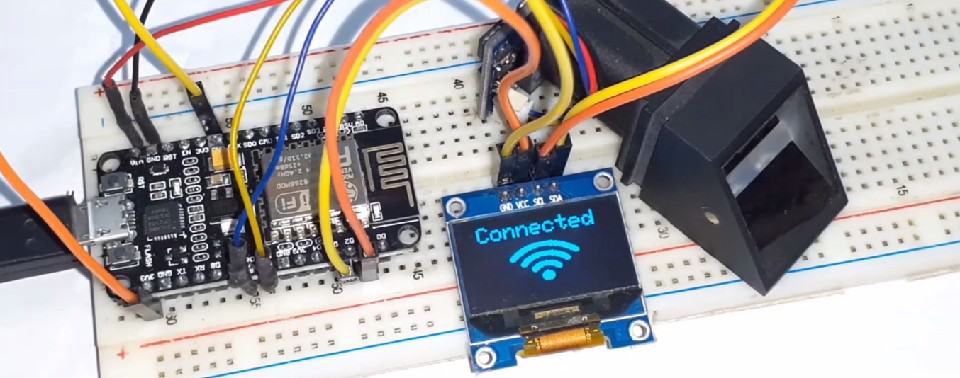
So now you can start registering the user using the website. The whole process of registration is explained in the video below. You can follow the video for the registration process. The user fingerprint is taken twice and stored in the EEPROM of the Fingerprint Sensor. It is to be noted that only 127 fingerprints can be stored in this R305/R307 module.

So once the fingerprint of multiple users is stored, you can start scanning and registering the attendance. In case the fingerprint is not matched it will display an error message as shown in the figure below.

When a registered user scans his finger for the first time it will display the welcome message.
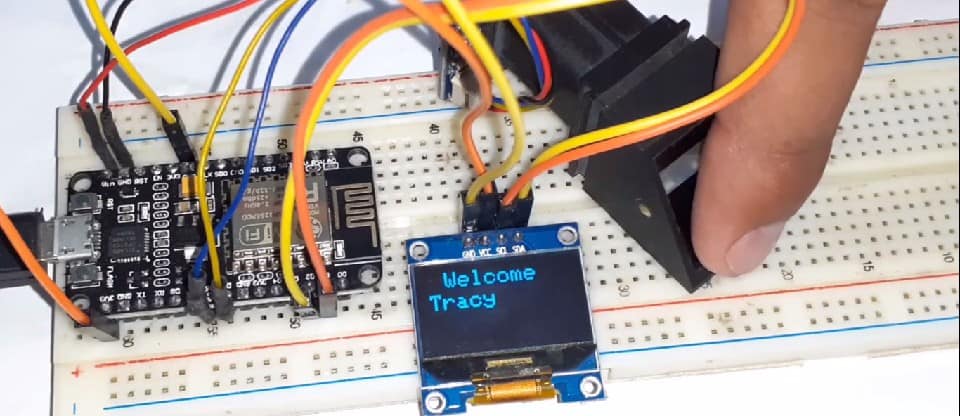
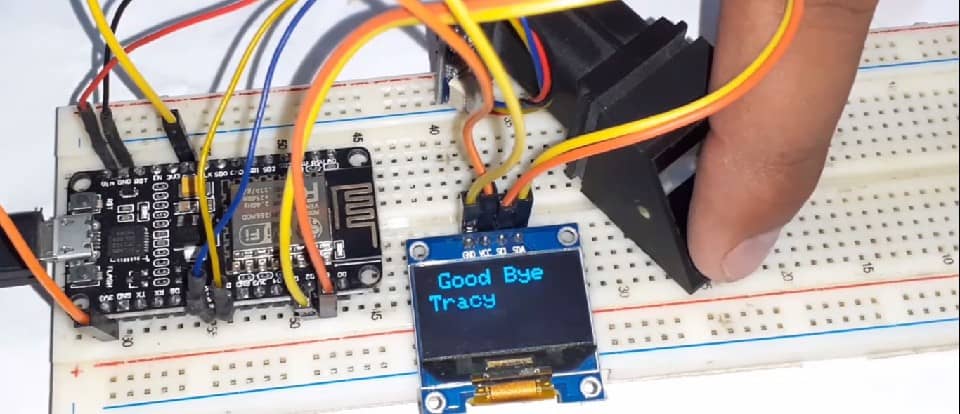
When a registered user scans his finger for the second time it will display the Good-Bye message.
Finally you can see the entire data of the users on the website as shown below:
For understanding the whole process: how to add, update and remove the users from the database follow the video tutorial below.
Video Tutorial & Explanation

You can also follow the advanced version of the Biometric Attendance System project called as Face Recognition Attendance System project designed using ESP32 Camera Module.






96 Comments
is there any alternative fingerprint sensor w/ module you can suggest if the r305 module is hard to find in our country? can you suggest any suitable fingerprint sensor that can replace your requirement?
Use R302, R303, R306, R307, R551 and FPM10A if you are unable to find R305.
hai sir..can you help me on connecting the vcc 5v fingerprint to the nodemcu because i tried connect the vcc to the VIN pin but it still cannot detect the sensor. is there any way to make this work?
This can happen in multiple cases:
1. Check the tx rx connection
2. Fingerprint module requires high power, i.e 5V so try connecting its VCC Pin to external 5V,1A power supply.
I have a few questions, i currently want to store the fingerprint template on a DB on sql on my server, as far as i understand this example works great for that function, right?
Or does this only local store the templates on the sensor memory?
Hi you can change the database name and password to store it on the server. For demonstration purpose, I used localhost computer location.
Help me please,it eror.
PHOTO : https://drive.google.com/file/d/1uLGa_k7xvNzHFVOOwazXqNhdHgVHYDXm/view
You mistyped something wrong inside the code.
Copy the code again and try.
please can I do this offline without using Internet?
Perhaps not.
There is another attendance System Project without internet. You may try that.
https://how2electronics.com/fingerprint-based-biometric-attendance-system-arduino/
Do you mean this, if this the one you were referring to, I want to know if the downloaded record can be viewed on excel and also can it work the same way like this IOT type that SIGN IN AND OUT?
Thanks
Hi im using sh1106 oled and how to convert it please help thanks
The SSD1306 and SH1106 have a compatibility issue. There is only one small difference between SSD1306 and SH1106: The SH1106 controller has an internal RAM of 132×64 pixels. The SSD1306 only has 128×64 pixels.
I followed the complete setup of the website but i the website after it adds a fingerprint it keeps on displaying a message-“You cannot add more than 1 id at a time” and this problem persists even after restarting the system.Please help.
I followed the complete setup process of the website but after registering the first fingerprint when i add the second it keeps on saying’You cannot add more than 1 id at a time’ and this problem persists even after restarting the system.Please help.
Check the video carefully. You are doing minor mistake. I was doing the same mistake earlier.
Can you tell us the mistake as I have the same problem
Hello Alex, my name is Franki, please can you contact me by email: [email protected]
Where can i get the arduino code ?
hi alex can we use nodemcu V3 for this project
Yes u can
hello i followed all instructions but when i got the 1st scan of finger print it checked and then locked on..please help.thanks
I don’t know where it’s wrong. Try it.
https://drive.google.com/drive/u/0/folders/1feABptaKWjYApHwfJI6KidVaEWgUGqgC
You can’t add more than one ID each time…. please help this is the error i encountered while adding user FingerID
Hello SIr,i am using the R-307 Sensor and have used the VCC(5V) supply from the node but it is still not detecting the sensor. perhaps u could tell me the Tx,Rx connections of the R-307 sensor
Hey R307 even works at 3.3V or you still try 5V. Just check the TX/RX Connection. You might have connected that reverse way.
whats the solution for “Your can’t add more than one ID” error?
i’ve been having the same problem,were you able to find the issue?
The scanning part never takes place on the oled,all is shows is the fingerprint logo.
It does not scan for the database
Check the SDA SCL connection with OLED. Also check TX RX Connection of R305 with Nodemcu.
Try connecting to Phone hotspot instead of router.
I’ve successfully added one user but when i try to add another it’s showing this message: “You can’t add more than one ID each time”. Can you explain me what is the problem.
why i can not logout? always login..
im not able to open in web browser
I followed complete steps, but it is showing that “u cannot add more than one id at a time”, please tell me how to solve this problem
heyy…do you get the solutions for this error..if yes..plz help me too
Hey my Node MCU is not detecting the fingerprint sensor, whenever I connect the wire to Vin the sensor blinks once and stops working.
I am trying with different finger for 2nd user but it not taking but i use same finger for different user its taking.. Can you help me?
Hello, sir instade of led i have use the Lcd With i2c and i have make to changes the code for display but its not esp is not able to commect to the server for sending fingerprint data or for enrollment from server.esp is able to connect to the Internet
do you have a codeigniter version?
i got error…..
Arduino: 1.8.13 (Windows Store 1.8.42.0) (Windows 10), Board: “NodeMCU 1.0 (ESP-12E Module), 80 MHz, Serial, 115200, 4M (3M SPIFFS)”
In file included from C:\Users\Totoro-an\Documents\Arduino\libraries\Adafruit-GFX-Library-master\Adafruit_GrayOLED.cpp:20:0:
Multiple libraries were found for “WiFiClient.h”
C:\Users\Totoro-an\Documents\Arduino\libraries\Adafruit-GFX-Library-master\Adafruit_GrayOLED.h:30:32: fatal error: Adafruit_I2CDevice.h: No such file or directory
Used: C:\Users\Totoro-an\Documents\ArduinoData\packages\esp8266\hardware\esp8266\2.0.0\libraries\ESP8266WiFi
#include
Not used: C:\Program Files\WindowsApps\ArduinoLLC.ArduinoIDE_1.8.42.0_x86__mdqgnx93n4wtt\libraries\WiFi
compilation terminated.
exit status 1
Error compiling for board NodeMCU 1.0 (ESP-12E Module).
This report would have more information with
“Show verbose output during compilation”
option enabled in File -> Preferences.
May I know how to get fingerprint image and upload this data to the web
Good evening sir,
Please help me with the pin diagram of r307, it is confusing on net.
What are the value of these yellow and blue wire of the fingerprint sensor?
works good when using xampp, but if I replicate the same in my custom website using cpanel , the timeout fingerprint scan sequence doesnot occur. After scanning for login, if I scan again to logout, it is recorded as new line for. login.
can anyone suggest how to slove it
I’m having trouble in this please help its urgent i need to show this project to college https://drive.google.com/file/d/1uLGa_k7xvNzHFVOOwazXqNhdHgVHYDXm/view?usp=drivesdk
Can you help me in this
https://drive.google.com/file/d/1uLGa_k7xvNzHFVOOwazXqNhdHgVHYDXm/view?usp=drivesdk
my ESP8266 12E, disconnects immediately after it gets connects to Interne through WiFi, showing the following result
Kindly Guide me further
Adafruit finger detect test
Found fingerprint sensor!
Sensor contains 5 templates
Waiting for valid finger…
Connecting to PRANAM
…………..
Connected
IP address: 192.168.1.14
————— CUT HERE FOR EXCEPTION DECODER —————
Exception (29):
epc1=0x402072d3 epc2=0x00000000 epc3=0x00000000 excvaddr=0x00000010 depc=0x00000000
ctx: cont
sp: 3ffffcd0 end: 3fffffc0 offset: 0190
3ffffe60: 00000000 00000013 3ffffef0 4020510c
3ffffe70: 3ffe8a39 3ffffef0 3ffffeb4 40207351
3ffffe80: 00000000 3ffffef0 3ffffef0 40204855
3ffffe90: 00000000 000d000f 00000000 3ffeea90
3ffffea0: 3fffdad0 402049be 00000020 401011bc
3ffffeb0: 00000000 00000000 00000028 3fff0d98
3ffffec0: 3fff0d7c 3ffffef0 00000000 40204a0c
3ffffed0: 3fffdad0 00000000 3fffff80 3ffeea90
3ffffee0: 3fffdad0 00000000 3ffee78c 40201805
3ffffef0: 00000000 00000000 3ffee8bd 00000000
3fffff00: 00010000 de001388 00000000 00000001
3fffff10: 00000000 00000000 00000001 00000000
3fffff20: 3fff0994 0031003f 80000000 3fff0d2c
3fffff30: 0011001f 80000000 00000000 40208286
3fffff40: 00000000 00000000 00000000 00000000
3fffff50: ffffffff 002f9d00 00000000 0000000a
3fffff60: 00000000 3ffeeba0 00000000 00000000
3fffff70: 3fff0d7c 00000000 0021002f 00000000
3fffff80: 00000000 000c000f 00000000 40208e6a
3fffff90: 3fffdad0 00000000 3ffeea7c 40201e2b
3fffffa0: 3fffdad0 00000000 3ffeea7c 40208308
3fffffb0: feefeffe feefeffe 3ffe85e8 40101445
<<<stack<<<
————— CUT HERE FOR EXCEPTION DECODER —————
ets Jan 8 2013,rst cause:2, boot mode:(3,6)
load 0x4010f000, len 3460, room 16
tail 4
chksum 0xcc
load 0x3fff20b8, len 40, room 4
tail 4
chksum 0xc9
csum 0xc9
v0004cd50
~ld
Adafruit finger detect test
Found fingerprint sensor!
Sensor contains 5 templates
Waiting for valid finger…
Connecting to PRANAM
……………..
Can i have a question? I use NodeMCU esp8266 V3. And R305 the code runs ok and the ide recognize the module but the problem is my module blink slow and it can’t read fingerprint even the input is already 5V. Can you recommend any solution sir?
what website you use for collect data attendance?
Sir I am using Esp32 for this project, whenever I click on add user it doesn’t add a new user but rather it just stays stuck on the logo, pls help me sir it’s really urgent
http.begin(link); //initiate HTTP request, put your Website URL or Your Computer IP
Do I have to put something here?
exit status 1
call to ‘HTTPClient::begin’ declared with attribute error: obsolete API, use ::begin(WiFiClient, url)
When i run,it show this
R307 is not saving templates more than 150, whereas datasheet says it can save 1000 templates. what is the problem,,,
You need edit the library file and expand the limit.
good morning, can you help me?
https://drive.google.com/file/d/1WaZRfhWPvrPWlY_wkwxtJ_aB870e3623/view?usp=sharing
Hey faiza…Did you got solution for this error…actually i am stucked in same error..Thanks
Have u made this project?
after open lcal server it showing 404 not found earror
good morning
I have this problem
did you solve it please
C:\Users\Assane\Downloads\Biometric-attendance-system-V1.0-master\Biometric-attendance-system-V1.0-master\nodeMCU_Fingerprint\nodeMCU_Fingerprint.ino: In function ‘void SendFingerprintID(int)’:
nodeMCU_Fingerprint:613:13: error: call to ‘HTTPClient::begin’ declared with attribute error: obsolete API, use ::begin(WiFiClient, url)
613 | http.begin(link); //initiate HTTP request, put your Website URL or Your Computer IP
| ~~~~~~~~~~^~~~~~
C:\Users\Assane\Downloads\Biometric-attendance-system-V1.0-master\Biometric-attendance-system-V1.0-master\nodeMCU_Fingerprint\nodeMCU_Fingerprint.ino: In function ‘void ChecktoDeleteID()’:
nodeMCU_Fingerprint:725:13: error: call to ‘HTTPClient::begin’ declared with attribute error: obsolete API, use ::begin(WiFiClient, url)
725 | http.begin(link); //initiate HTTP request, put your Website URL or Your Computer IP
| ~~~~~~~~~~^~~~~~
C:\Users\Assane\Downloads\Biometric-attendance-system-V1.0-master\Biometric-attendance-system-V1.0-master\nodeMCU_Fingerprint\nodeMCU_Fingerprint.ino: In function ‘void confirmAdding()’:
nodeMCU_Fingerprint:1003:13: error: call to ‘HTTPClient::begin’ declared with attribute error: obsolete API, use ::begin(WiFiClient, url)
1003 | http.begin(link); //initiate HTTP request, put your Website URL or Your Computer IP
| ~~~~~~~~~~^~~~~~
C:\Users\Assane\Downloads\Biometric-attendance-system-V1.0-master\Biometric-attendance-system-V1.0-master\nodeMCU_Fingerprint\nodeMCU_Fingerprint.ino: In function ‘void ChecktoAddID()’:
nodeMCU_Fingerprint:799:13: error: call to ‘HTTPClient::begin’ declared with attribute error: obsolete API, use ::begin(WiFiClient, url)
799 | http.begin(link); //initiate HTTP request, put your Website URL or Your Computer IP
| ~~~~~~~~~~^~~~~~
Plusieurs bibliothèque trouvées pour “Adafruit_Fingerprint.h”
Utilisé : C:\Users\Assane\Documents\Arduino\libraries\Adafruit_Fingerprint_Sensor_Library
Non utilisé : C:\Users\Assane\Documents\Arduino\libraries\Adafruit-Fingerprint-Sensor-Library-master
exit status 1
call to ‘HTTPClient::begin’ declared with attribute error: obsolete API, use ::begin(WiFiClient, url)
help me
http.begin(link); //initiate HTTP request, put your Website URL or Your Computer IP
Do I have to put something here?
exit status 1
call to ‘HTTPClient::begin’ declared with attribute error: obsolete API, use ::begin(WiFiClient, url)
When i run,it show this
Same problem for me.
C:\Users\ASUS\Documents\Arduino\sketch_apr27a\sketch_apr27a.ino: In function ‘void SendFingerprintID(int)’:
sketch_apr27a:602:13: error: call to ‘HTTPClient::begin’ declared with attribute error: obsolete API, use ::begin(WiFiClient, url)
602 | http.begin(link); //initiate HTTP request, put your Website URL or Your Computer IP
| ~~~~~~~~~~^~~~~~
C:\Users\ASUS\Documents\Arduino\sketch_apr27a\sketch_apr27a.ino: In function ‘void ChecktoDeleteID()’:
sketch_apr27a:714:13: error: call to ‘HTTPClient::begin’ declared with attribute error: obsolete API, use ::begin(WiFiClient, url)
714 | http.begin(link); //initiate HTTP request, put your Website URL or Your Computer IP
| ~~~~~~~~~~^~~~~~
C:\Users\ASUS\Documents\Arduino\sketch_apr27a\sketch_apr27a.ino: In function ‘void confirmAdding()’:
sketch_apr27a:992:13: error: call to ‘HTTPClient::begin’ declared with attribute error: obsolete API, use ::begin(WiFiClient, url)
992 | http.begin(link); //initiate HTTP request, put your Website URL or Your Computer IP
| ~~~~~~~~~~^~~~~~
C:\Users\ASUS\Documents\Arduino\sketch_apr27a\sketch_apr27a.ino: In function ‘void ChecktoAddID()’:
sketch_apr27a:788:13: error: call to ‘HTTPClient::begin’ declared with attribute error: obsolete API, use ::begin(WiFiClient, url)
788 | http.begin(link); //initiate HTTP request, put your Website URL or Your Computer IP
| ~~~~~~~~~~^~~~~~
Multiple libraries were found for “WiFiClient.h”
Used: C:\Users\ASUS\Documents\ArduinoData\packages\esp8266\hardware\esp8266\3.0.2\libraries\ESP8266WiFi
Not used: C:\Program Files\WindowsApps\ArduinoLLC.ArduinoIDE_1.8.57.0_x86__mdqgnx93n4wtt\libraries\WiFi
exit status 1
call to ‘HTTPClient::begin’ declared with attribute error: obsolete API, use ::begin(WiFiClient, url)
I got This error, pls help sir.
you can fix this by entering CTRL + SHIFT +I and search for Adafruit BusIO and installing more information
https://www.arduino.cc/reference/en/libraries/adafruit-busio/
same
hi sir im using your code with follow your steps but got error… why sir
error message (‘HTTPClient::begin’ declared with attribute error: obsolete API, use ::begin(WiFiClient, url)
)
hi sir im using your code with follow your steps but got error… why sir
error message (‘HTTPClient::begin’ declared with attribute error: obsolete API, use ::begin(WiFiClient, url)
)
C:\Users\User\Desktop\Final_Year_project\Final_Year_project.ino: In function ‘void SendFingerprintID(int)’:
Final_Year_project:605:13: error: call to ‘HTTPClient::begin’ declared with attribute error: obsolete API, use ::begin(WiFiClient, url)
605 | http.begin(link); //initiate HTTP request, put your Website URL or Your Computer IP
| ~~~~~~~~~~^~~~~~
Multiple libraries were found for “WiFiClient.h”
Used: C:\Users\User\Documents\ArduinoData\packages\esp8266\hardware\esp8266\3.0.2\libraries\ESP8266WiFi
Not used: C:\Program Files\WindowsApps\ArduinoLLC.ArduinoIDE_1.8.57.0_x86__mdqgnx93n4wtt\libraries\WiFi
exit status 1
call to ‘HTTPClient::begin’ declared with attribute error: obsolete API, use ::begin(WiFiClient, url)
Why sir its showing like this…. sir can solve my problem
Hi sir.. i have some doubts about this project
1. Can I get the circuit diagram of entire setup
2. from where we have to give the power supply to the setup
type as608 are support ?
can i use adafruit optical fingerprint sensor?
sir I had given ssid,password correctly but also it isn’t connecting to wifi.Instead its just showing connecting to .
can you help me out
sir I had given ssid,password correctly but also it isn’t connecting to wifi.Instead its just showing connecting to .
#include
WiFiClient wifiClient;
Good day may i ask for the database file for this project? doing install.php don’t work on me
its work for me, thanks alot
if you getting error
fix your esp8266 version
downgrade to 2.7.1 version
xampp version , all version
for me i modified send whatsapp with node.js
here my code
String serverPath = serverName + “?tujuan=” + NoId + “&pesan=Informasi+Kehadiran+Siswa%0ASMK+Harapan+Mulya+Brangsong%0A%0ANama:+” + nama_tampil + “%0AKelas:%0AKeterangan:+Siswa+Sudah+Pulang%0A%0A_Terima+kasih+atas+perhatianya_”;
http_a.begin(client, serverPath.c_str());
int httpResponseCode = http_a.GET();
Hi, Can I save the fingerprint template on a Database field? and then compare the fingerprint saved?
Hi, Can I save the fingerprint template on a Database field and then compare it when by searching on the database?
hello can u help me pls
Hello. Can i have your code and send it to my email [email protected]? Im really having a hard time figuring out the error. It doesn’t read the fingerprint sensor. Thank you in advance.
Bro i can’t connect the data base and finger print can u tell me pls when i add user there is no display on data base
can u tell me from which pin to which pin you have connected from nodemcu to fingerprint sensor
hi sir, I had an error in the serial software library even though I was correct to include it
Where’s the lybrary file send it to [email protected]
Hi, thanks for the tutorial. How can i use the solution to achieve student attendance as stated below.
1. The fingerprint of the student is compared with the one stored in database and if it matches then attendance is marked for that particular student.
2. The system also generates a brief report of attendance from the database according to subject-wise or date-wise as required.
3. A defaulter list can be generated through system
Hello, I’m using ESP 32S having 19 pins and your ESP module have 15 pins. So please guide us how I connect my fingerprint sensor and OLED display with my wifi module Your Esp Module have D number of pins and my ESP module have P number of pins its very confusing to make complete circuit.
degrade the version of esp8266 board to 2.5.0
control reaches end of non-void function [-Werror=return-type]
At
confirmAdding();
now it’s year 2024…you have to create some own logic to get solution for this type of error. if you are using arduino ide… this error will show if you not “return” anything from this function “confirmAdding();”. actually (“control reaches end of non-void function [-Werror=return-type]” ) this is not an error.this is a warning.. now this type of warning is blocking like a error…
all the matters of versions matching…for every library….then hurray!!!
Hi kumi, have you solve this issues as I have the same issues after I try to upload. Thank in advance if you can help me
what board version did u use.i am trying but cant compile
Version of windows
2. Arduino software version
3. Board link and version numbers to install
Version of windows
Arduino software version
Board link and version numbers to install. I have been stuck here for long @Mr Adams
Can you please add Aditional boards Manager URLs. Board version number and library version number. To this sir. Thanks
Add board manager url. Board version number to install and library version number. Thanks
Thank’s for share; but it is this error, help me please.
PHOTO : https://drive.google.com/file/d/1Me4vxBOIr5juwk65PTM8e7l4sLORUrQr/view?usp=sharing
Thank you very much. As soon as
In serial monitor show ‘ fingerprint sensor not found’. Also i check the fingerprint sensor chek code sensor is perfect working, how to solve problems.