


In this post we will interface SHT31 Humidity & Temperature Sensor with NodeMCU ESP8266 Board. Thus using Nodemcu ESP8266 & SHT31, we will monitor the temperature and humidity data online on thingspeak.
Overview
There are various humidity & temperature sensors like DHT11 & HTU21D. But while talking about the accuracy none of them are suitable for industrial level temperature humidity monitoring due to the accuracy and precision. They have poor accuracy as well as sensitivity. So here we will use the SHT31 Temperature/Humidity sensor. They are the finest & highest-accuracy devices you can get. It is a digital sensor with an I2C interface which makes for easy reading of humidity and temperature. The SHT31 sensor has an excellent ±2% relative humidity and ±0.3°C temperature accuracy for most uses.
In this project we will interface SHT31 Temperature/Humidity Sensor with Nodemcu ESP8266. We will send data to Thingspeak Server. ThingSpeak is an open-source Internet of Things application and API to store and retrieve data from things using the HTTP and MQTT protocol over the Internet or via a Local Area Network.
If you want to learn more about SHT31 you can check our earlier post:
1. Interfacing SHT3x Humidity & Temperature Sensor with Arduino
2. ESP32 SHT31 Temperature & Humidity Monitor on Web Server
Bill of Materials
Following are the components required for this simple IOT project. All the components can be easily purchased from Amazon. The component purchase link is given below.
| S.N. | Components | Quantity | Purchase Links |
|---|---|---|---|
| 1 | NodeMCU ESP8266 | 1 | Amazon | AliExpress |
| 2 | SHT31 Sensor | 1 | Amazon | AliExpress |
| 3 | Connecting Wires | 5 | Amazon | AliExpress |
| 4 | Breadboard | 1 | Amazon | AliExpress |
SHT31 Humidity Temperature Sensor
SHT31 is the next generation of Sensirion’s temperature and humidity sensors. The SHT31 has increased intelligence, reliability, and improved accuracy specifications compared to its predecessor. Its functionality includes enhanced signal processing, temperature, and humidity that can be read out using I2C communications. This I2C Mini Module makes it easy to read temperature and humidity using our standardized sensor footprint. Plug into a Particle interface module for cloud access from anywhere in the world.

All I2C Mini Modules are designed to operate at 5V DC. Using a convenient 4-Pin plug, devices can be daisy-chained onto the I2C Bus, eliminating the need for soldering. Simply plug together the devices you need for your next automation application.
Features of SHT31 Sensor
1. Dual Purpose Temperature and Humidity Sensor
2. Accuracy of ±2% Relative Humidity
3. 0-100% Humidity Sensing Range
4. -40 to +125°C (-40 to +257°F) Operating Temperature
5. 8-Second Sensor Response Time
6. 0x44 Start Address
7. Modular SHT31 breakout board
Schematic: Interfacing SHT31 with Nodemcu ESP8266
Here is the schematic for Interfacing SHT31 Humidity Temperature Sensor with Nodemcu ESP8266.

Connect the VCC pin of SHT31 to 3.3V of ESP8266 & GND to GND. Connect the SCL & SDA pin of SHT31 to ESP38266 SCL (D1) & SDA (D2) pin respectively as shown in the figure above.

Setting Up Thingspeak
- Go to https://thingspeak.com/ and create an account if you do not have one. Login to your account if you have already.
-
Create a new channel by clicking on the Create button. Enter basic details of the channel like field 1 & field2. Then Scroll down and save the channel.
-
Then go to API keys copy and paste this key to a separate notepad file. You will need it later while programming.
Source Code/Program
The source code for Interfacing SHT31 with NodeMCU ESP8266 is given below. You can copy this code and upload it to ESP8266 Board. But before that you need library for SHT31 Sensor. So download the library from the link below.
|
1 2 3 4 5 6 7 8 9 10 11 12 13 14 15 16 17 18 19 20 21 22 23 24 25 26 27 28 29 30 31 32 33 34 35 36 37 38 39 40 41 42 43 44 45 46 47 48 49 50 51 52 53 54 55 56 57 58 59 60 61 62 63 64 65 66 67 68 69 70 71 72 73 74 75 76 77 78 79 80 81 82 83 84 85 86 |
#include <ESP8266WiFi.h> #include <Arduino.h> #include <Wire.h> #include "Adafruit_SHT31.h" String apiKey = "PW3AKTNO270BFQGT"; // Enter your Write API key from ThingSpeak const char *ssid = "BYNARK"; // replace with your wifi ssid and wpa2 key const char *pass = "bynark@123"; const char* server = "api.thingspeak.com"; WiFiClient client; Adafruit_SHT31 sht31 = Adafruit_SHT31(); void setup() { Serial.begin(115200); while (!Serial) delay(10); // will pause Zero, Leonardo, etc until serial console opens Serial.println("Connecting to "); Serial.println(ssid); WiFi.begin(ssid, pass); while (WiFi.status() != WL_CONNECTED) { delay(500); Serial.print("."); } Serial.println(""); Serial.println("WiFi connected"); Serial.println("SHT31 test"); if (! sht31.begin(0x44)) // Set to 0x45 for alternate i2c addr { Serial.println("Couldn't find SHT31"); while (1) delay(1); } } void loop() { float t = sht31.readTemperature(); float h = sht31.readHumidity(); if (client.connect(server,80)) // "184.106.153.149" or api.thingspeak.com { String sendData = apiKey+"&field1="+String(t)+"&field2="+String(h)+"\r\n\r\n"; //Serial.println(sendData); client.print("POST /update HTTP/1.1\n"); client.print("Host: api.thingspeak.com\n"); client.print("Connection: close\n"); client.print("X-THINGSPEAKAPIKEY: "+apiKey+"\n"); client.print("Content-Type: application/x-www-form-urlencoded\n"); client.print("Content-Length: "); client.print(sendData.length()); client.print("\n\n"); client.print(sendData); } if (! isnan(t)) // check if 'is not a number' { Serial.print("Temp *C = "); Serial.println(t); } else { Serial.println("Failed to read temperature"); } if (! isnan(h)) // check if 'is not a number' { Serial.print("Hum. % = "); Serial.println(h); } else { Serial.println("Failed to read humidity"); } Serial.println(); delay(1000); } |
Monitoring Data on Thingspeak
After uploading, open the Serial Monitor at a baud rate of 115200. Press the ESP8266 reset button. The wifi connecting status should be printed in the serial monitor along with the humidity and temperature value.
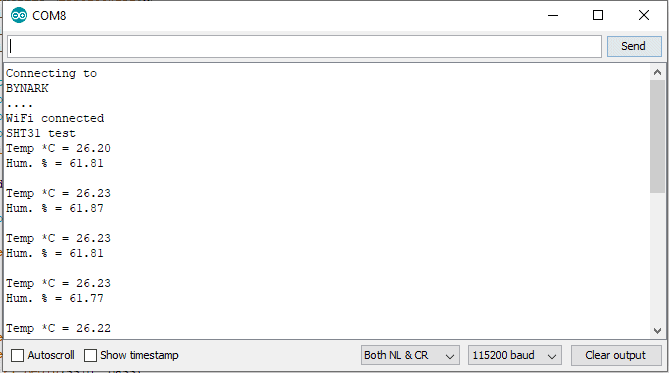
Now you can go to thingspeak private view and check the data online. The data is updated to thingspeak server after the interval of 15 seconds.







1 Comment
Adafruit_I2CDevice.h was not identified as needing to be downloaded.
Sketch > Include Library > Manage Libraries > Adafruit BusIO