


Overview
In this project, we will build a Bitcoin Price Tracker Using ESP32 WiFi Module & OLED Display. The device can be programmed to display the current Bitcoin price in US dollars. The best part of this system is you could set the device to display any cryptocurrency in any local currency. This can only be possible if there is an API available on one of the exchanges.
The Bitcoin Price Tracker is designed using the ESP32 development board, which has built-in WiFi. It connects to your WiFi network and fetches the updated Bitcoin price through the Coindesk API every 15 minutes. Along with the Bitcoin price, the device also displays the percentage change from yesterday’s closing price. It also lights up either a red or green LED depending on whether the price has increased or decreased.

The code is based on Michael Klements project, with some slight modification. Using this guide you can build your own Bitcoin Price Tracker with ESP32 & OLED Display.
Bill of Materials
We need the following components to build this project. You can purchase all these components from Amazon.
| S.N. | Components | Quantity | Purchase Links |
|---|---|---|---|
| 1 | ESP32 WiFi Module | 1 | Amazon | AliExpress |
| 2 | LED 5mm ANy Color | 2 | Amazon | AliExpress |
| 3 | Resistor 560-ohm | 2 | Amazon | AliExpress |
| 4 | 0.96" I2C OLED Display | 1 | Amazon | AliExpress |
| 5 | Jumper Wires | 10 | Amazon | AliExpress |
| 6 | Breadboard | 1 | Amazon | AliExpress |
Hardware Setup & Circuit
The circuit for Bitcoin Price Tracker is very simple. I used fritzing Software to design the schematic.

Connect the SDA & SCL Pin of OLED Display to D21 & D22 of ESP32 Module. Connect the red & green LED to D18 & D19 respectively via 200-ohm resistor. Power the OLED Display using the 3.3V & GND pin of ESP32. The red LED here indicates the price of Bitcoin is going down while the green LED indicates the rise in Bitcoin price.

I used a breadboard to assemble the circuit as per the circuit diagram. You can build your own custom PCB for this project.
Project PCB Gerber File & PCB Ordering Online
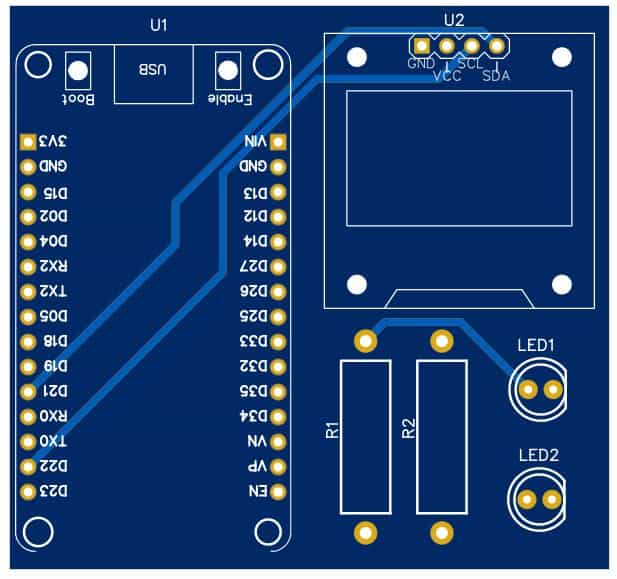
If you don’t want to assemble the circuit on a breadboard and you want PCB for the project, then here is the PCB for you. I used EasyEDA to design the PCB. The PCB Board for Bitcoin Price Tracker looks something like below.

The Gerber File for the PCB is given below. You can simply download the Gerber File and order the PCB from ALLPCB at 1$ only.
You can use this Gerber file to order high quality PCB for this project. To do that visit the ALLPCB official website by clicking here: https://www.allpcb.com/.

You can now upload the Gerber File by choosing the Quote Now option. From these options, you can choose the Material Type, Dimensions, Quantity, Thickness, Solder Mask Color and other required parameters.

After filling all details, select your country and shipping method. Finally you can place the order.
You can assemble the components on the PCB Board.
Source Code/Program
The code/program for the Bitcoin Price Tracker is written on Arduino IDE with all necessary libraries installed on the system. Before moving to the code part, first, we need to add the following libraries to the Arduino library folder.
1. Adafruit SSD1306 Library: https://github.com/adafruit/Adafruit_SSD1306
2. NTP Client Library: https://github.com/arduino-libraries/NTPClient
3. Arduino JSON Library: https://github.com/bblanchon/ArduinoJson
In the below code part, you need to change the WiFi SSID & Password & replace with that of your local network.
|
1 2 |
const char* ssid = "************"; const char* password = "**********"; |
Here is the complete code for this project. Copy it and upload it to your ESP32 Board.
|
1 2 3 4 5 6 7 8 9 10 11 12 13 14 15 16 17 18 19 20 21 22 23 24 25 26 27 28 29 30 31 32 33 34 35 36 37 38 39 40 41 42 43 44 45 46 47 48 49 50 51 52 53 54 55 56 57 58 59 60 61 62 63 64 65 66 67 68 69 70 71 72 73 74 75 76 77 78 79 80 81 82 83 84 85 86 87 88 89 90 91 92 93 94 95 96 97 98 99 100 101 102 103 104 105 106 107 108 109 110 111 112 113 114 115 116 117 118 119 120 121 122 123 124 125 126 127 128 129 130 131 132 133 134 135 136 137 138 139 140 141 142 143 144 145 146 147 148 149 150 151 152 153 154 155 156 157 158 159 160 161 162 163 164 165 166 167 168 169 170 171 172 173 174 175 176 177 178 179 180 181 182 183 184 185 186 187 188 189 190 191 192 193 194 195 196 197 198 199 200 201 202 203 204 205 206 207 208 209 210 211 212 213 214 215 216 217 218 219 220 221 222 223 224 225 226 227 228 229 230 231 232 233 234 235 236 237 238 |
#include <Adafruit_SSD1306.h> //Include the required libraries #include <WiFi.h> #include <Wire.h> #include <HTTPClient.h> #include <NTPClient.h> #include <WiFiUdp.h> #include <ArduinoJson.h> #define SCREEN_WIDTH 128 //Define the OLED display width and height #define SCREEN_HEIGHT 64 #define OLED_RESET -1 // Reset pin # (or -1 if sharing Arduino reset pin) #define SCREEN_ADDRESS 0x3C //I2C address for display #define upLED 18 #define downLED 19 Adafruit_SSD1306 display (SCREEN_WIDTH, SCREEN_HEIGHT, &Wire, OLED_RESET); //Create the display object const char* ssid = "************"; const char* password = "**********"; const int httpsPort = 443; //Bitcoin price API powered by CoinDesk - https://www.coindesk.com/price/bitcoin const String url = "http://api.coindesk.com/v1/bpi/currentprice/BTC.json"; const String historyURL = "http://api.coindesk.com/v1/bpi/historical/close.json"; const String cryptoCode = "BTC"; WiFiClient client; //Create a new WiFi client HTTPClient http; String formattedDate; //Create variables to store the date and time String dayStamp; String timeStamp; const unsigned char bitcoinLogo [] PROGMEM = // 'Bitcoin Logo', 128x64px { 0x00, 0x00, 0x00, 0x00, 0x00, 0x00, 0x00, 0x00, 0x00, 0x00, 0x00, 0x00, 0x00, 0x00, 0x00, 0x00, 0x00, 0x00, 0x00, 0x00, 0x00, 0x00, 0x00, 0x00, 0x00, 0x00, 0x00, 0x00, 0x00, 0x00, 0x00, 0x00, 0x00, 0x00, 0x00, 0x00, 0x00, 0x00, 0x00, 0x00, 0x00, 0x00, 0x00, 0x00, 0x00, 0x00, 0x00, 0x00, 0x00, 0x00, 0x00, 0x00, 0x00, 0x00, 0x00, 0x00, 0x00, 0x00, 0x00, 0x00, 0x00, 0x00, 0x00, 0x00, 0x00, 0x00, 0x00, 0x00, 0x00, 0x00, 0x00, 0xff, 0xf0, 0x00, 0x00, 0x00, 0x00, 0x00, 0x00, 0x00, 0x00, 0x00, 0x00, 0x00, 0x00, 0x00, 0x07, 0xff, 0xfe, 0x00, 0x00, 0x00, 0x00, 0x00, 0x00, 0x00, 0x00, 0x00, 0x00, 0x00, 0x00, 0x00, 0x3f, 0xc0, 0x3f, 0xc0, 0x00, 0x00, 0x00, 0x00, 0x00, 0x00, 0x00, 0x00, 0x00, 0x00, 0x00, 0x00, 0x7c, 0x00, 0x03, 0xe0, 0x00, 0x00, 0x00, 0x00, 0x00, 0x00, 0x00, 0x00, 0x00, 0x00, 0x00, 0x01, 0xf0, 0x00, 0x00, 0xf8, 0x00, 0x00, 0x00, 0x00, 0x00, 0x00, 0x00, 0x00, 0x00, 0x00, 0x00, 0x03, 0xc0, 0x00, 0x00, 0x3e, 0x00, 0x00, 0x00, 0x00, 0x00, 0x00, 0x00, 0x00, 0x00, 0x00, 0x00, 0x0f, 0x00, 0x00, 0x00, 0x0f, 0x00, 0x00, 0x00, 0x00, 0x00, 0x00, 0x00, 0x00, 0x00, 0x00, 0x00, 0x1e, 0x03, 0xe7, 0xc0, 0x07, 0x80, 0x00, 0x00, 0x00, 0x00, 0x00, 0x00, 0x00, 0x00, 0x00, 0x00, 0x38, 0x03, 0xe7, 0xc0, 0x01, 0xc0, 0x00, 0x00, 0x00, 0x00, 0x00, 0x00, 0x00, 0x00, 0x00, 0x00, 0x70, 0x02, 0x24, 0x40, 0x00, 0xe0, 0x00, 0x00, 0x00, 0x00, 0x00, 0x00, 0x00, 0x00, 0x00, 0x00, 0xe0, 0x02, 0x24, 0x40, 0x00, 0x70, 0x00, 0x00, 0x00, 0x00, 0x00, 0x00, 0x00, 0x00, 0x00, 0x01, 0xc0, 0x02, 0x24, 0x40, 0x00, 0x38, 0x00, 0x00, 0x00, 0x00, 0x00, 0x00, 0x00, 0x00, 0x00, 0x01, 0x80, 0x02, 0x24, 0x40, 0x00, 0x1c, 0x00, 0x00, 0x00, 0x00, 0x00, 0x00, 0x00, 0x00, 0x00, 0x03, 0x80, 0x02, 0x3c, 0x40, 0x00, 0x1c, 0x00, 0x00, 0x00, 0x00, 0x00, 0x00, 0x00, 0x00, 0x00, 0x07, 0x03, 0xfe, 0x3c, 0x7c, 0x00, 0x0e, 0x00, 0x00, 0x00, 0x00, 0x00, 0x00, 0x00, 0x00, 0x00, 0x06, 0x03, 0x00, 0x00, 0x1f, 0x00, 0x07, 0x00, 0x00, 0x00, 0x00, 0x00, 0x00, 0x00, 0x00, 0x00, 0x0e, 0x03, 0x00, 0x00, 0x01, 0xc0, 0x07, 0x00, 0x00, 0x00, 0x00, 0x00, 0x00, 0x00, 0x00, 0x00, 0x0c, 0x03, 0x00, 0x00, 0x00, 0xc0, 0x03, 0x80, 0x00, 0x00, 0x00, 0x00, 0x00, 0x00, 0x00, 0x00, 0x1c, 0x03, 0xf0, 0x3f, 0x80, 0x60, 0x03, 0x80, 0x00, 0x00, 0x00, 0x00, 0x00, 0x00, 0x00, 0x00, 0x18, 0x00, 0xf0, 0x3f, 0xe0, 0x20, 0x01, 0x80, 0x00, 0x00, 0x00, 0x00, 0x00, 0x00, 0x00, 0x00, 0x38, 0x00, 0x18, 0x30, 0x70, 0x30, 0x01, 0xc0, 0x00, 0x00, 0x00, 0x00, 0x00, 0x00, 0x00, 0x00, 0x30, 0x00, 0x18, 0x30, 0x10, 0x30, 0x00, 0xc0, 0x00, 0x00, 0x00, 0x00, 0x00, 0x00, 0x00, 0x00, 0x30, 0x00, 0x18, 0x30, 0x10, 0x30, 0x00, 0xc0, 0x00, 0x00, 0x00, 0x00, 0x00, 0x00, 0x00, 0x00, 0x70, 0x00, 0x18, 0x30, 0x10, 0x30, 0x00, 0xe0, 0x00, 0x00, 0x00, 0x00, 0x00, 0x00, 0x00, 0x00, 0x70, 0x00, 0x18, 0x30, 0x30, 0x20, 0x00, 0xe0, 0x00, 0x00, 0x00, 0x00, 0x00, 0x00, 0x00, 0x00, 0x70, 0x00, 0x18, 0x30, 0xe0, 0x60, 0x00, 0x60, 0x00, 0x00, 0x00, 0x00, 0x00, 0x00, 0x00, 0x00, 0x60, 0x00, 0x18, 0x3f, 0xc0, 0xc0, 0x00, 0x60, 0x00, 0x00, 0x00, 0x00, 0x00, 0x00, 0x00, 0x00, 0x60, 0x00, 0x18, 0x00, 0x01, 0xc0, 0x00, 0x60, 0x00, 0x00, 0x00, 0x00, 0x00, 0x00, 0x00, 0x00, 0x60, 0x00, 0x18, 0x00, 0x00, 0xf0, 0x00, 0x60, 0x00, 0x00, 0x00, 0x00, 0x00, 0x00, 0x00, 0x00, 0x60, 0x00, 0x18, 0x00, 0x00, 0x38, 0x00, 0x60, 0x00, 0x00, 0x00, 0x00, 0x00, 0x00, 0x00, 0x00, 0x60, 0x00, 0x18, 0x3f, 0xe0, 0x18, 0x00, 0x60, 0x00, 0x00, 0x00, 0x00, 0x00, 0x00, 0x00, 0x00, 0x60, 0x00, 0x18, 0x30, 0xf8, 0x0c, 0x00, 0x60, 0x00, 0x00, 0x00, 0x00, 0x00, 0x00, 0x00, 0x00, 0x70, 0x00, 0x18, 0x30, 0x1c, 0x0c, 0x00, 0x60, 0x00, 0x00, 0x00, 0x00, 0x00, 0x00, 0x00, 0x00, 0x70, 0x00, 0x18, 0x30, 0x0c, 0x0c, 0x00, 0xe0, 0x00, 0x00, 0x00, 0x00, 0x00, 0x00, 0x00, 0x00, 0x70, 0x00, 0x18, 0x30, 0x04, 0x0c, 0x00, 0xe0, 0x00, 0x00, 0x00, 0x00, 0x00, 0x00, 0x00, 0x00, 0x30, 0x00, 0x18, 0x30, 0x0c, 0x0c, 0x00, 0xc0, 0x00, 0x00, 0x00, 0x00, 0x00, 0x00, 0x00, 0x00, 0x30, 0x00, 0x18, 0x30, 0x0c, 0x0c, 0x00, 0xc0, 0x00, 0x00, 0x00, 0x00, 0x00, 0x00, 0x00, 0x00, 0x38, 0x00, 0x18, 0x30, 0x38, 0x0c, 0x01, 0xc0, 0x00, 0x00, 0x00, 0x00, 0x00, 0x00, 0x00, 0x00, 0x18, 0x01, 0xf0, 0x3f, 0xf0, 0x08, 0x01, 0xc0, 0x00, 0x00, 0x00, 0x00, 0x00, 0x00, 0x00, 0x00, 0x1c, 0x01, 0xe0, 0x1f, 0x00, 0x18, 0x01, 0x80, 0x00, 0x00, 0x00, 0x00, 0x00, 0x00, 0x00, 0x00, 0x1c, 0x01, 0x00, 0x00, 0x00, 0x30, 0x03, 0x80, 0x00, 0x00, 0x00, 0x00, 0x00, 0x00, 0x00, 0x00, 0x0e, 0x03, 0x00, 0x00, 0x00, 0xe0, 0x07, 0x00, 0x00, 0x00, 0x00, 0x00, 0x00, 0x00, 0x00, 0x00, 0x06, 0x03, 0x00, 0x00, 0x0f, 0xc0, 0x07, 0x00, 0x00, 0x00, 0x00, 0x00, 0x00, 0x00, 0x00, 0x00, 0x07, 0x03, 0xfe, 0x3c, 0x7e, 0x00, 0x0e, 0x00, 0x00, 0x00, 0x00, 0x00, 0x00, 0x00, 0x00, 0x00, 0x03, 0x80, 0x02, 0x3c, 0x40, 0x00, 0x0c, 0x00, 0x00, 0x00, 0x00, 0x00, 0x00, 0x00, 0x00, 0x00, 0x01, 0x80, 0x02, 0x24, 0x40, 0x00, 0x1c, 0x00, 0x00, 0x00, 0x00, 0x00, 0x00, 0x00, 0x00, 0x00, 0x01, 0xc0, 0x02, 0x24, 0x40, 0x00, 0x38, 0x00, 0x00, 0x00, 0x00, 0x00, 0x00, 0x00, 0x00, 0x00, 0x00, 0xe0, 0x02, 0x24, 0x40, 0x00, 0x70, 0x00, 0x00, 0x00, 0x00, 0x00, 0x00, 0x00, 0x00, 0x00, 0x00, 0x70, 0x02, 0x24, 0x40, 0x00, 0xe0, 0x00, 0x00, 0x00, 0x00, 0x00, 0x00, 0x00, 0x00, 0x00, 0x00, 0x38, 0x03, 0xe7, 0xc0, 0x01, 0xc0, 0x00, 0x00, 0x00, 0x00, 0x00, 0x00, 0x00, 0x00, 0x00, 0x00, 0x1e, 0x03, 0xe7, 0xc0, 0x07, 0x80, 0x00, 0x00, 0x00, 0x00, 0x00, 0x00, 0x00, 0x00, 0x00, 0x00, 0x0f, 0x00, 0x00, 0x00, 0x0f, 0x00, 0x00, 0x00, 0x00, 0x00, 0x00, 0x00, 0x00, 0x00, 0x00, 0x00, 0x07, 0xc0, 0x00, 0x00, 0x3e, 0x00, 0x00, 0x00, 0x00, 0x00, 0x00, 0x00, 0x00, 0x00, 0x00, 0x00, 0x01, 0xf0, 0x00, 0x00, 0xf8, 0x00, 0x00, 0x00, 0x00, 0x00, 0x00, 0x00, 0x00, 0x00, 0x00, 0x00, 0x00, 0xfc, 0x00, 0x03, 0xf0, 0x00, 0x00, 0x00, 0x00, 0x00, 0x00, 0x00, 0x00, 0x00, 0x00, 0x00, 0x00, 0x3f, 0xc0, 0x3f, 0xc0, 0x00, 0x00, 0x00, 0x00, 0x00, 0x00, 0x00, 0x00, 0x00, 0x00, 0x00, 0x00, 0x07, 0xff, 0xfe, 0x00, 0x00, 0x00, 0x00, 0x00, 0x00, 0x00, 0x00, 0x00, 0x00, 0x00, 0x00, 0x00, 0x00, 0xff, 0xf0, 0x00, 0x00, 0x00, 0x00, 0x00, 0x00, 0x00, 0x00, 0x00, 0x00, 0x00, 0x00, 0x00, 0x00, 0x00, 0x00, 0x00, 0x00, 0x00, 0x00, 0x00, 0x00, 0x00, 0x00, 0x00, 0x00, 0x00, 0x00, 0x00, 0x00, 0x00, 0x00, 0x00, 0x00, 0x00, 0x00, 0x00, 0x00, 0x00 }; void setup() { Serial.begin(115200); //Start the serial monitor pinMode(upLED, OUTPUT); //Define the LED pin outputs pinMode(downLED, OUTPUT); if (!display.begin(SSD1306_SWITCHCAPVCC, SCREEN_ADDRESS)) //Connect to the display { Serial.println(F("SSD1306 allocation failed")); for (;;); // Don't proceed, loop forever } display.clearDisplay(); //Clear the display display.setTextColor(SSD1306_WHITE); //Set the text colour to white display.drawBitmap(0, 0, bitcoinLogo, 128, 64, WHITE); //Display bitmap from array display.display(); delay(2000); display.clearDisplay(); //Clear the display display.setTextSize(1); //Set display parameters display.setTextColor(WHITE); display.println("Connecting to WiFi..."); display.display(); WiFi.begin(ssid, password); Serial.print("Connecting to WiFi..."); while (WiFi.status() != WL_CONNECTED) //Connect to the WiFi network { delay(500); Serial.print("."); } Serial.println(); display.println("Connected to: "); //Display message once connected display.print(ssid); display.display(); delay(1500); display.clearDisplay(); display.display(); } void loop() { Serial.print("Connecting to "); //Display url on Serial monitor for debugging Serial.println(url); http.begin(url); int httpCode = http.GET(); //Get crypto price from API StaticJsonDocument<2000> doc; DeserializationError error = deserializeJson(doc, http.getString()); if (error) //Display error message if unsuccessful { Serial.print(F("deserializeJson Failed")); Serial.println(error.f_str()); delay(2500); return; } Serial.print("HTTP Status Code: "); Serial.println(httpCode); String BTCUSDPrice = doc["bpi"]["USD"]["rate_float"].as<String>(); //Store crypto price and update date in local variables String lastUpdated = doc["time"]["updated"].as<String>(); http.end(); Serial.print("Getting history..."); StaticJsonDocument<2000> historyDoc; http.begin(historyURL); //Get historical crypto price from API int historyHttpCode = http.GET(); DeserializationError historyError = deserializeJson(historyDoc, http.getString()); if (historyError) { //Display error message if unsuccessful Serial.print(F("deserializeJson(History) failed")); Serial.println(historyError.f_str()); delay(2500); return; } Serial.print("History HTTP Status Code: "); Serial.println(historyHttpCode); JsonObject bpi = historyDoc["bpi"].as<JsonObject>(); double yesterdayPrice; for (JsonPair kv : bpi) { yesterdayPrice = kv.value().as<double>(); //Store yesterday's crypto price } Serial.print("BTCUSD Price: "); //Display current price on serial monitor Serial.println(BTCUSDPrice.toDouble()); Serial.print("Yesterday's Price: "); //Display yesterday's price on serial monitor Serial.println(yesterdayPrice); bool isUp = BTCUSDPrice.toDouble() > yesterdayPrice; //Check whether price has increased or decreased double percentChange; String dayChangeString = "24hr Change:"; if (isUp) //If price has increased from yesterday { percentChange = ((BTCUSDPrice.toDouble() - yesterdayPrice) / yesterdayPrice) * 100; digitalWrite(upLED, HIGH); digitalWrite(downLED, LOW); } else //If price has decreased from yesterday { percentChange = ((yesterdayPrice - BTCUSDPrice.toDouble()) / yesterdayPrice) * 100; dayChangeString = dayChangeString + "-"; digitalWrite(downLED, HIGH); digitalWrite(upLED, LOW); } Serial.print("Percent Change: "); //Display the percentage change on the serial monitor Serial.println(percentChange); display.clearDisplay(); //Clear the OLED display display.setTextSize(1); printCenter("BTC/USD", 0, 0); //Display the comparison header display.setTextSize(2); printCenter("$" + BTCUSDPrice, 0, 20); //Display the current price display.setTextSize(1); //Display the change percentage dayChangeString = dayChangeString + percentChange + "%"; printCenter(dayChangeString, 0, 55); display.display(); //Execute the new display http.end(); //End the WiFi connection esp_sleep_enable_timer_wakeup(900000000); //Sleep for 15 minutes } void printCenter(const String buf, int x, int y) //Function to centre the current price in the display width { int16_t x1, y1; uint16_t w, h; display.getTextBounds(buf, x, y, &x1, &y1, &w, &h); //Calculate string width display.setCursor((x - w / 2) + (128 / 2), y); //Set cursor to print string in centre display.print(buf); //Display string } |
Testing the Bitcoin $ Price Tracker
After uploading the code, the ESP32 Module will try connecting to the WiFi Network using the Network credentials provided in the code. Once it gets connected, it will try to fetch the data using the given API & will display parameters on Serial Monitor.

On the other hand, the OLED will boot up with Bitcoin Logo initially.
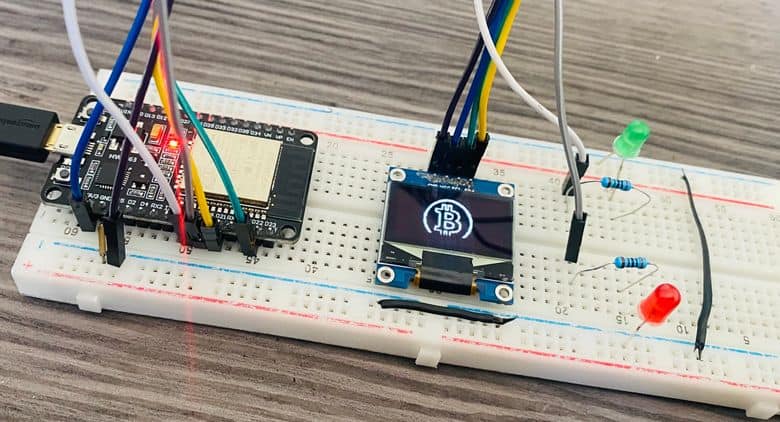
Once the device connects to the WiFi Network it will display the current Bitcoin price along with the change in Bitcoin value since yesterday date. If the bitcoin price is decreasing the Red LED will turn ON.
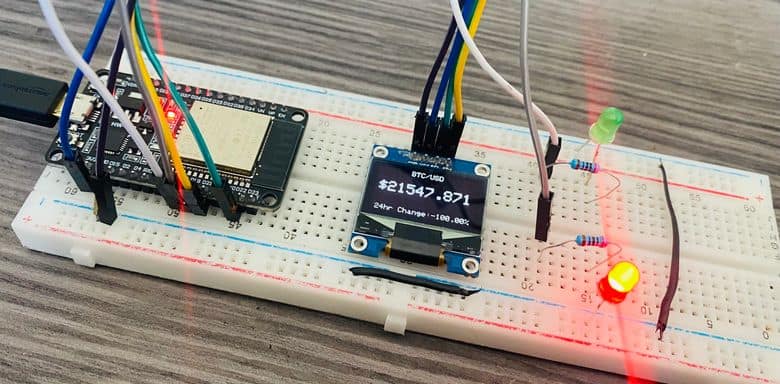
In case, if the Bitcoin price value is increasing the green LED will turn ON.

If you enjoy cryptocurrencies, then take a look at the video below with full guide.
Video Tutorial & Guide







2 Comments
“Hello, how are you?
Thank you very much for your contributions. I want you to know that I have been following your projects closely and I really like them. However, I am currently working on a project myself and it would be great to have your help. I have a 3D-printed Bitcoin sign with LEDs, and I’m trying to connect the ESP32 to an API to fetch the Bitcoin price. The idea is that, based on the price changes, the SMD 5050 LEDs will change color and perform an animation. I have tried various methods, but I’m not good at using those APIs.
I would greatly appreciate your assistance. If I need to upgrade my plan, it’s not a problem. I just need to know if I can count on you.
Thank you very much, and of course, you will receive credits for helping me achieve this.
Have a great day and thank you again.”
does this still work ? cant seem to get the code to work